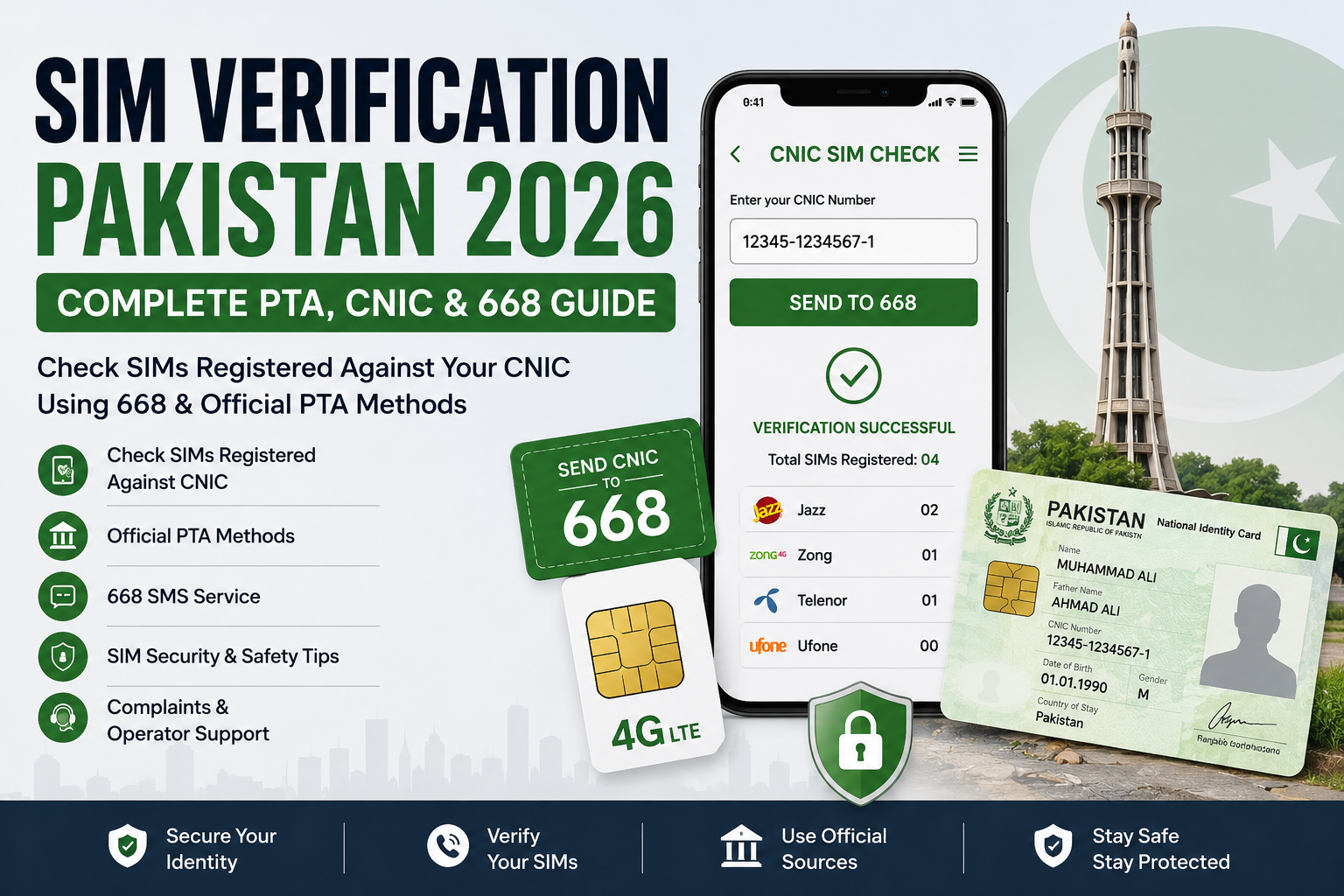
Introduction & Quick Answer
SIM verification in Pakistan is the process of checking and confirming information related to mobile SIM registrations and connections associated with a subscriber’s identity. For Pakistani mobile users, regular SIM verification can help identify unfamiliar registrations and encourage better protection of CNIC and mobile-account information.
The safest approach is to use official PTA resources, authorized mobile network operators, and recognized verification methods rather than unofficial SIM databases or websites claiming to provide private subscriber information.
Table of Contents
Quick Answer: How Can You Verify SIMs Registered Against Your CNIC?
One of the commonly referenced methods for checking SIM registrations associated with your CNIC is the 668 SMS service.
The basic process is:
- Use your own CNIC information.
- Follow the current official instructions for the 668 service.
- Send the required information to 668.
- Review the response.
- If you find an unfamiliar registration, contact the relevant mobile network operator through an official channel.
An official online SIM-information facility may also be available, depending on the current PTA service configuration.
Important: Telecom procedures, short codes, websites, and service requirements can change. Always verify the current procedure through an official PTA or mobile-operator source before relying on an old SMS format, URL, or code.
What Is SIM Verification?
SIM verification refers to checking or confirming information related to a mobile SIM registration and its associated subscriber information through an authorized process.
It can involve several areas, including:
- SIM registration
- Subscriber verification
- CNIC-related registration
- Biometric verification
- SIM-count checking
- Mobile network operator records
- SIM replacement
- SIM activation
- Unauthorized SIM identification
SIM verification should not be confused with simply searching for a mobile number.
A mobile number, SIM card, SIM serial number, IMEI, and CNIC are different identifiers with different purposes.
SIM Verification vs. SIM Owner Details
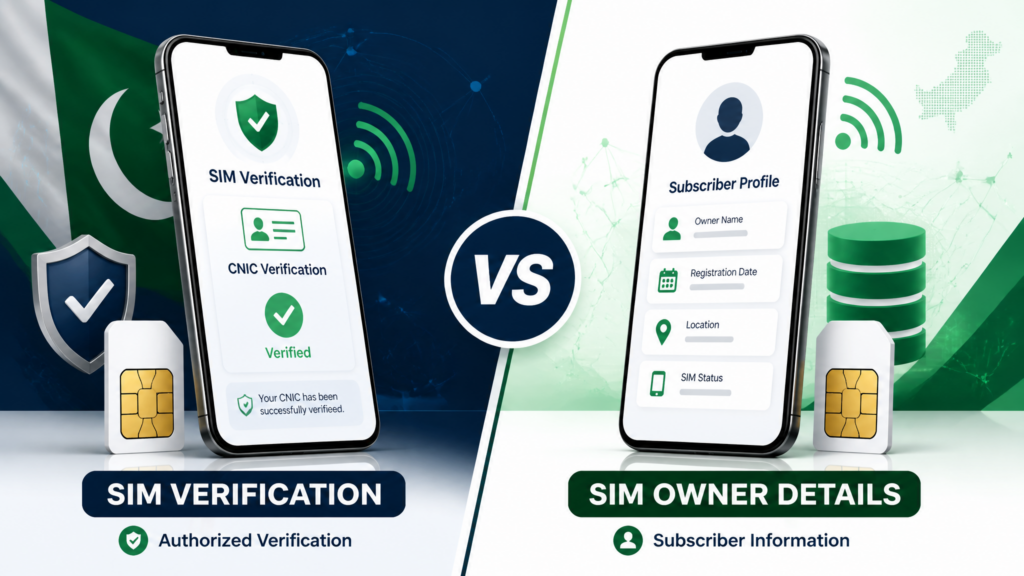
These terms are often used interchangeably online, but they are not necessarily the same.
SIM verification focuses on checking or confirming legitimate SIM-registration information through an authorized process.
SIM owner details generally refers to information associated with the registered subscriber.
Users should not assume that entering a mobile number into an unofficial website gives them legitimate access to another person’s private subscriber information.
Responsible SIM verification should focus on checking your own information through authorized channels.
Why Is SIM Verification Important?

Regular SIM verification can help subscribers maintain awareness of the mobile connections associated with their identity.
For example, a person may have:
- Changed mobile operators
- Replaced an old SIM
- Lost a SIM
- Stopped using an old number
- Forgotten about a previous connection
- Discovered an unfamiliar registration
Checking your registered connections can provide an opportunity to investigate unexpected information through the appropriate official channel.
Personal Security
An unfamiliar SIM registration can create unnecessary privacy and security concerns. Identifying it early allows the subscriber to contact the relevant operator and determine what action is required.
Fraud Awareness
Periodic verification can help users notice unusual registrations and take appropriate action.
Account Management
People who have used multiple networks or replaced SIMs over time can use verification as part of their personal mobile-account management.
Family Awareness
Families can also benefit from learning how to protect CNIC information, recognize suspicious SIM-related requests, and use official verification methods.
Business Management
Businesses that manage multiple mobile connections can maintain records of company-issued SIMs and periodically review their status.
What You Will Learn in This Complete Guide
This guide covers the major aspects of SIM Verification Pakistan, including:
- How SIM registration works
- How to check SIMs associated with your CNIC
- The 668 SMS method
- Online SIM verification
- PTA’s role
- NADRA and biometric verification
- Jazz, Zong, Ufone, Telenor, and SCOM
- Relevant short codes and USSD services
- 667 and 668
- SIM registration and replacement
- Unknown or unauthorized SIM registrations
- SIM blocking
- Common verification problems
- SIM-swap risks
- OTP and CNIC security
- Privacy protection
- Legal and regulatory considerations
- Official complaint procedures
- Common mistakes
- Frequently asked questions
The goal is to provide practical, responsible, and easy-to-understand information without promoting unofficial private-data lookup services.
SIM Verification Is Not a Private Database Search
One of the most important things to understand is that legitimate SIM verification is different from searching an unofficial database for another person’s private information.
Be extremely cautious with websites or individuals claiming that they can provide:
- Complete SIM owner profiles
- Private CNIC information
- Home addresses
- Call records
- Private messages
- Live locations
- Banking information
- OTPs
- Secret telecom databases
Such claims should not automatically be considered legitimate simply because a website uses terms such as PTA, NADRA, SIM Database, or SIM Owner Details.
For your own SIM information, use the appropriate official process.
Before You Verify Your SIMs
Follow these basic safety rules:
Use Your Own Information
Only use your own CNIC and subscriber information when performing a personal verification.
Use Official Sources
Prefer PTA resources, official operator websites, authorized franchises, and recognized customer-support channels.
Protect Your OTP
Never give an OTP to an unexpected caller, website, agent, or person claiming to be performing SIM verification.
Protect Your CNIC
Do not enter your CNIC into random websites simply because they claim to provide SIM information.
Avoid Unofficial SIM Databases
A website claiming to provide complete private subscriber information should not be treated as an official verification service without reliable evidence.
What Should You Do If You Find an Unknown SIM?
If an official verification result shows a SIM registration that you do not recognize, do not immediately assume that a crime has occurred.
First:
Review your old connections → Identify the relevant operator → Contact the operator → Complete the required verification → Follow the official corrective procedure
An unfamiliar registration may have several possible explanations, including an old connection, forgotten number, previous replacement, administrative issue, or genuinely unauthorized registration.
The safest approach is to verify the situation through the relevant official channel.
PTA, NADRA, and Mobile Operators Have Different Roles
Understanding the difference between these organizations makes SIM verification much easier.
| Organization / System | General Role |
|---|---|
| PTA | Telecommunications regulation and oversight |
| NADRA | National identity infrastructure |
| Mobile Operators | Cellular services and subscriber account management |
| Subscriber | Owns/uses the mobile connection and protects personal information |
These roles should not be confused.
For example, a mobile operator manages your cellular service, while PTA has a regulatory role in the telecommunications sector.
SIM Verification and Privacy
SIM-related information can be sensitive, especially when combined with identity information.
Avoid unnecessarily sharing:
- CNIC number
- Mobile number
- SIM serial/ICCID
- IMEI
- OTP
- Account passwords
- Security answers
- Verification screenshots containing personal information
If you need to share a screenshot for technical assistance, hide unnecessary personal information first.
A Simple SIM Verification Formula
You can remember the entire process using this simple sequence:
Check → Review → Verify → Contact → Resolve
Check
Use an official verification method.
Review
Compare the result with your known SIM connections.
Verify
Investigate anything unexpected through the relevant official channel.
Contact
Contact the mobile operator if a specific SIM or account issue exists.
Resolve
Follow the operator’s or appropriate authority’s procedure.
Key Takeaway
SIM verification in Pakistan is primarily about knowing and responsibly managing the mobile connections associated with your own identity.
The 668 method, official online resources, mobile network operators, authorized verification procedures, and appropriate complaint channels can all play a role depending on the situation.
The most important rule is simple:
Use official methods, protect your CNIC and OTP, and never rely on unofficial private SIM databases.
How SIM Registration Works in Pakistan
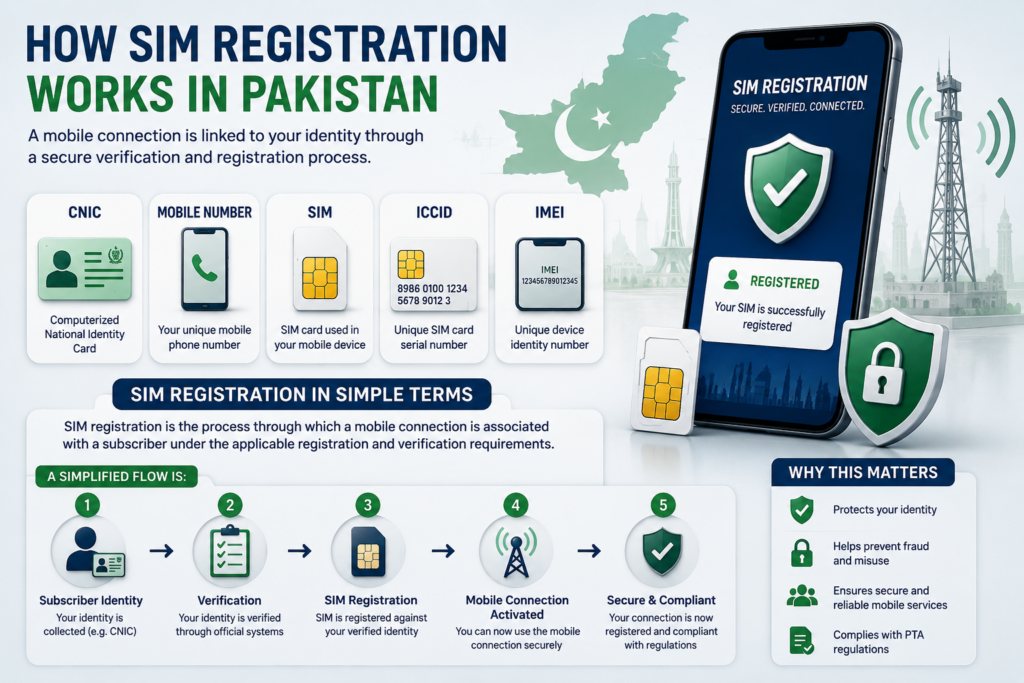
Understanding how SIM registration works makes the rest of the SIM Verification Pakistan process much easier. A mobile connection is not simply identified by its telephone number. Several different identifiers and verification processes can be involved.
The most important distinction is between your CNIC, mobile number, SIM, ICCID, and IMEI.
SIM Registration in Simple Terms
SIM registration is the process through which a mobile connection is associated with a subscriber under the applicable registration and verification requirements.
A simplified flow is:
Subscriber Identity → Verification → SIM Registration → Mobile Operator → Cellular Service
The exact procedure can depend on the type of transaction, operator, and current regulatory requirements.
CNIC and SIM Registration
The CNIC is an identity document, while the SIM provides access to a mobile network.
When a SIM is registered, the subscriber’s identity information is associated with the mobile service through the applicable verification process.
This is why checking SIMs registered against your CNIC is different from simply searching for a mobile number.
Important distinction:
CNIC → Identifies the subscriber
Mobile Number → Identifies the telephone service
SIM/ICCID → Identifies the SIM or subscriber module
IMEI → Identifies the mobile device
These identifiers should not be treated as interchangeable.
What Is a Mobile Number?
A mobile number is the number people use to call or send messages to a subscriber.
For example, changing the physical SIM may not necessarily mean that the subscriber changes their mobile number.
A mobile number is therefore primarily associated with the telecommunications service, while the SIM itself is the physical or digital subscriber module used to access that service.
What Is an ICCID?
The ICCID (Integrated Circuit Card Identifier) is a unique identifier associated with a SIM card/profile.
It is different from:
- Your CNIC
- Your mobile number
- Your device’s IMEI
The ICCID may be relevant when dealing with certain SIM-management or technical situations.
Users should avoid unnecessarily sharing their complete ICCID publicly.
What Is an IMEI?
The IMEI (International Mobile Equipment Identity) identifies a mobile device.
This creates an important distinction:
IMEI = Device
SIM/ICCID = SIM
Mobile Number = Cellular service
CNIC = Subscriber identity
A phone can use different SIMs over its lifetime, while the device itself can retain its IMEI.
Therefore, an IMEI check is not the same thing as a SIM-owner check.
Why This Difference Matters
Many online articles incorrectly mix these terms.
For example, someone may search for:
“Check SIM owner using IMEI.”
But an IMEI identifies the device, not the subscriber’s private profile.
Similarly, knowing a mobile number does not automatically provide legitimate access to private CNIC information.
Understanding these differences helps users avoid misleading SIM databases and inaccurate online claims.
What Happens During SIM Registration?

The exact process can vary depending on the service and current requirements, but the general concept involves:
1. Subscriber Identification
The subscriber provides the required identity information.
2. Verification
The applicable identity/verification process is completed.
3. SIM Registration
The mobile connection is associated with the subscriber according to the applicable requirements.
4. Activation
The operator activates the service when the required conditions have been satisfied.
5. Ongoing Account Management
The subscriber may later need to complete additional procedures for replacement, ownership-related matters, blocking, or other services.
Why Biometric Verification Matters
Biometric verification can be used as part of applicable SIM-related transactions to help verify that the person completing the transaction is the legitimate subscriber.
The purpose is to reduce the risk of SIMs being issued through improper or fraudulent identity use.
PTA National CERT guidance emphasizes proper subscriber verification/authentication and advises consumers to obtain SIMs through authorized cellular franchises.
SIM Registration Is Not the Same as SIM Verification
These terms are related but have different meanings.
SIM Registration
Associating a mobile service with a subscriber through the applicable registration process.
SIM Verification
Checking or confirming relevant information about SIM registrations through an authorized method.
SIM Replacement
Obtaining a replacement SIM for an existing mobile service under the operator’s applicable procedure.
SIM Blocking
Restricting or disabling a mobile connection through the appropriate process.
Keeping these concepts separate makes it easier to understand what action is required in each situation.
The Role of the Mobile Operator
The mobile network operator is responsible for providing the actual cellular service.
Depending on the situation, the operator may handle:
- SIM activation
- SIM replacement
- Subscriber account management
- Network services
- Customer support
- Service complaints
- Applicable SIM-related requests
This is why a subscriber who discovers an unfamiliar SIM registration will often need to contact the relevant operator for the next step.
The Role of PTA
The Pakistan Telecommunication Authority (PTA) has a regulatory role in Pakistan’s telecommunications sector.
Its role is different from that of a mobile operator.
A simple way to remember it:
PTA → Regulation and oversight
Operator → Cellular service and subscriber support
This distinction becomes particularly important when deciding where to report a problem.
The Role of NADRA
NADRA is associated with Pakistan’s national identity infrastructure.
Identity information can be relevant to telecom verification processes, but NADRA is not a cellular network operator.
Therefore:
NADRA does not replace the mobile operator.
If you have a SIM-specific service issue, the relevant mobile network operator remains an important point of contact.
What Happens When You Replace a SIM?
A SIM may need to be replaced if it is:
- Lost
- Damaged
- Malfunctioning
- Being upgraded to a different SIM format
- Being replaced through another eligible service procedure
The exact requirements depend on the operator and current rules.
A replacement should be completed through an authorized operator channel rather than through an unknown agent.
What Happens When You Stop Using a SIM?
Stopping regular use of a SIM does not mean you should simply forget about it.
If you have old mobile connections, periodically review your registered SIMs and determine whether they are still required.
This is particularly useful for people who have:
- Changed networks
- Used temporary numbers
- Replaced SIMs
- Maintained separate personal and business numbers
Keeping track of old connections reduces confusion when reviewing your SIM registrations.
Why Authorized SIM Channels Matter
PTA National CERT guidance recommends purchasing SIMs through authorized cellular franchises and warns users about informal or unauthorized SIM-distribution practices.
When obtaining a new SIM, prefer:
Official operator outlet → Authorized franchise → Required verification → Activation
Avoid accepting a SIM from an unknown person simply because it is cheaper or more convenient.
Protect Your Registration Information
Your SIM-related information should be treated carefully.
Avoid giving your:
- CNIC
- ICCID
- IMEI
- Mobile number
- OTP
- Account credentials
to unknown individuals.
If a person claims to be an operator representative, independently verify the request through the operator’s official customer-support channel.
A Simple Example
Imagine a subscriber has:
- One personal Jazz number
- One business Zong number
- One old number they stopped using
When they check their registered SIM information, they may initially be surprised by the total number of connections.
Instead of assuming that the result means fraud, they should first compare it with their previous connections.
If an additional registration still cannot be explained, the next step is to contact the relevant operator.
This is a much safer approach than searching for the supposed owner’s private details online.
SIM Registration and Security
Proper registration is only one part of mobile security.
Subscribers should also:
- Protect their CNIC
- Protect OTPs
- Avoid suspicious SIM-related links
- Use authorized operators
- Report lost SIMs promptly
- Watch for unexpected loss of mobile service
- Periodically review their registered SIMs
PTA National CERT’s SIM-related security guidance similarly emphasizes subscriber verification, authorized SIM channels, and periodic checking of SIMs issued in a subscriber’s name.
Quick Comparison
| Term | What It Represents |
|---|---|
| CNIC | Subscriber identity/document |
| Mobile Number | Telephone service identifier |
| SIM | Subscriber module used for network access |
| ICCID | SIM/profile identifier |
| IMEI | Mobile device identifier |
| PTA | Telecom regulator |
| Operator | Provides cellular service |
| NADRA | National identity infrastructure |
Key Takeaway
SIM registration connects a subscriber with a mobile service through the applicable verification process. However, CNIC, mobile number, SIM/ICCID, and IMEI are different things and should not be treated as interchangeable.
For safe SIM management:
Use authorized registration channels → protect identity information → periodically review your registered connections → contact the operator when something appears unfamiliar.
How to Check SIMs Registered Against Your CNIC
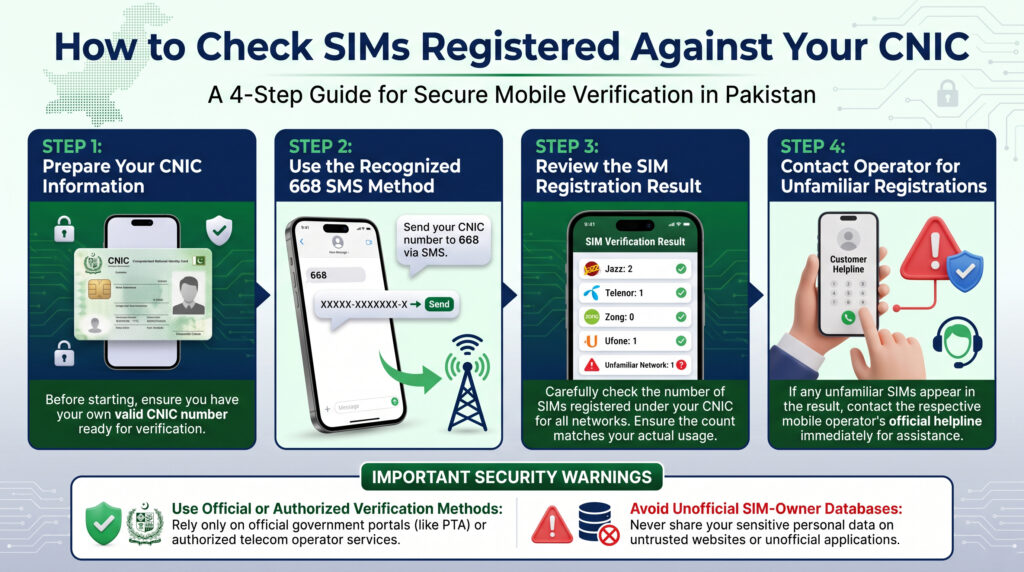
Checking the number of SIM connections registered against your own CNIC is one of the most useful parts of SIM Verification Pakistan. It can help you identify connections you recognize and highlight registrations that may require further investigation.
The most important rule is to use official or authorized verification methods and avoid websites claiming to provide private SIM-owner databases.
668 SIM Verification Method
The 668 SMS service is a commonly referenced method for checking SIM registrations associated with a CNIC.
The basic process is:
- Open the SMS application on your mobile phone.
- Enter your own CNIC information according to the current official instructions.
- Send the required information to 668.
- Wait for the response.
- Review the SIM-registration information provided.
- If something appears unfamiliar, contact the relevant mobile operator through an official channel.
PTA National CERT guidance specifically advises subscribers to periodically check the number of SIMs issued in their name and references sending the CNIC number to 668 for this purpose.
Use Your Own CNIC
The 668 method should be used for legitimate verification of your own identity information.
Do not use another person’s CNIC simply to investigate their private mobile connections.
Your CNIC is sensitive information, so avoid sending it to:
- Unknown numbers
- Unofficial websites
- Random social-media accounts
- Unverified agents
- Websites claiming to provide “complete SIM owner details”
What Does the 668 Result Tell You?
The purpose of the check is to help you understand the SIM registrations associated with your identity.
It should not be treated as a public database containing complete personal profiles.
A legitimate SIM verification process should not be expected to provide unauthorized access to:
- Private addresses
- Call records
- SMS history
- WhatsApp conversations
- Live location
- Banking information
- Passwords
- OTPs
If a website claims that a simple CNIC or mobile-number search can reveal all of these details, treat the claim with caution.
What If the Number of SIMs Is Higher Than Expected?
Suppose you normally remember having two mobile connections, but your verification result indicates a higher number.
Do not immediately assume that fraud has occurred.
First review your previous connections.
You may have:
- Used an old SIM years ago
- Changed mobile operators
- Replaced a SIM
- Stopped using a number without reviewing its status
- Used a separate business or temporary connection
If the additional registration still cannot be explained, contact the relevant mobile operator.
Step-by-Step Action for an Unknown SIM
Step 1 — Review Your Own Records
Think about previous numbers and operators you have used.
Step 2 — Identify the Operator
If the official information indicates the relevant network, determine which operator is involved.
Step 3 — Contact the Operator
Use the operator’s official helpline, website, app, or authorized service center.
Step 4 — Explain the Issue
Tell the operator that the registration is unfamiliar and request the appropriate verification process.
Step 5 — Complete Required Verification
The operator may require identity verification before taking corrective action.
Step 6 — Keep the Reference
If you submit a complaint or request, keep the complaint/reference number for your records.
Online SIM Verification
An official online SIM-information facility may also be available for users who prefer a web-based method.
Because online services and URLs can change, always access the service through the current official PTA resource rather than relying on an old third-party URL.
The general process is:
Open official resource → Follow current instructions → Enter your own information → Complete verification if required → Review result
Do not enter your CNIC into a website simply because it uses government logos or the words “PTA SIM Database.”
668 vs. Online Verification
| Feature | 668 SMS | Official Online Method |
|---|---|---|
| Uses mobile phone | Yes | Not necessarily |
| Uses subscriber information | Yes | May be required |
| SMS-based | Yes | No |
| Web-based | No | Yes |
| Useful for SIM registration checking | Yes | Yes |
| Requires an official source | Yes | Yes |
| Provides private owner profiles | No | No |
The important distinction is that both methods are intended for legitimate verification, not unrestricted access to another person’s private information.
What If 668 Does Not Respond?
A delayed or missing response does not automatically mean that your CNIC has no registered SIMs.
Possible reasons can include:
- Incorrect information
- Temporary service issue
- SMS delivery problem
- Network problem
- Maintenance
- Changes to the service
- Incorrect message format
Before trying random alternatives, verify the current official instructions.
What If You Enter the Wrong CNIC?
If the information is entered incorrectly, the service may not return the expected result.
Before sending your request:
- Check every digit.
- Use your own CNIC.
- Follow the current official format.
- Confirm the destination short code.
- Avoid adding information that the official instructions do not request.
If you are unsure about the current format, check the latest official instructions rather than relying on an old screenshot or social-media post.
Can You Check Someone Else’s SIMs?
SIM verification should be used responsibly.
Do not use another person’s CNIC to investigate their private mobile connections without authorization.
A person’s subscriber information can be sensitive, and legitimate SIM verification should focus on self-verification through authorized channels.
What If You Discover an Unauthorized SIM?
If you believe a registration genuinely does not belong to you:
Do not try to identify or contact the supposed owner yourself.
Instead:
- Contact the relevant operator.
- Explain the unfamiliar registration.
- Complete the operator’s verification process.
- Ask about the applicable blocking, de-registration, or corrective procedure.
- Keep the complaint/reference number.
- If the circumstances indicate suspected fraud, use the appropriate official reporting channel.
PTA National CERT guidance recommends periodically checking SIMs issued in your name and taking action regarding illegally issued SIMs.
Should You Check SIM Registrations Regularly?
Periodic checking can be a useful personal security habit.
It can be particularly useful after:
- Getting a new SIM
- Replacing a SIM
- Losing a SIM
- Changing operators
- Stopping the use of an old number
- Receiving suspicious SIM-related messages
- Noticing unexpected mobile-account activity
The goal is awareness, not constant monitoring.
Should You Save Your Verification Result?
You may keep a private note or screenshot for your own records.
For example:
| Record | Example |
|---|---|
| Date checked | August 2026 |
| Verification method | Official method |
| Result reviewed | Yes |
| Unexpected registration | None |
If you save a screenshot, keep it private and protect any CNIC or subscriber information shown in it.
668 Verification Do’s and Don’ts
Do
- Use your own CNIC.
- Follow current official instructions.
- Use recognized PTA resources.
- Review your result carefully.
- Contact the relevant operator about unfamiliar registrations.
- Keep complaint/reference information.
Don’t
- Use another person’s CNIC without authorization.
- Send your CNIC to random numbers.
- Use unofficial SIM databases.
- Share OTPs.
- Publish your complete verification result.
- Assume an unfamiliar SIM automatically proves criminal activity.
Quick 668 Checklist
Own CNIC? ✓
Correct information? ✓
Current official instructions? ✓
Official 668 method? ✓
Result reviewed? ✓
Unexpected registration? → Contact the relevant operator.
Important Accuracy Note
Short codes and telecom procedures can change over time. Therefore, a high-quality SIM-verification guide should always be reviewed when official procedures change.
This is also why users should prefer current official PTA and operator information over old articles that may contain outdated instructions.
Key Takeaway
The 668 method is useful for checking SIM registrations associated with your own CNIC, but it should be viewed as a verification tool rather than a private-data lookup system.
If the result looks normal, keep your information secure and continue normal SIM-security practices.
If something looks unfamiliar, follow the official process:
Review → Identify the operator → Contact the operator → Verify → Resolve
668 SMS Method in Detail: Step-by-Step Process, Common Errors & Next Steps
The 668 SMS method is one of the most commonly referenced methods for checking SIM registrations associated with a CNIC in Pakistan. PTA National CERT guidance advises subscribers to periodically check the number of SIMs issued in their name and specifically references sending the CNIC number to 668 for this purpose.
Because telecom services can change, users should always verify the current procedure through an official source before using an old SMS format or instruction.
How the 668 SMS Method Works
The basic process can be understood as:
Your CNIC → SMS to 668 → Verification Response → Review SIM Registrations → Take Action if Required
The service is intended to help subscribers check SIM registrations associated with their own identity.
It is not intended to provide unrestricted access to another person’s private subscriber information.
Step-by-Step 668 Verification
Step 1 — Open Your SMS Application
Open the normal messaging application on your mobile phone.
Step 2 — Prepare Your CNIC
Use your own CNIC number.
Carefully check every digit before sending the request.
Step 3 — Follow the Current 668 Instructions
Send the required CNIC information to 668 according to the current official procedure.
Do not rely on an old screenshot if the official instructions have changed.
Step 4 — Wait for the Response
Allow sufficient time for the service to respond.
A delayed response does not automatically mean that the verification has failed.
Step 5 — Review the Result
Compare the information with the mobile connections you know about.
Step 6 — Investigate Anything Unexpected
If the result indicates an unfamiliar registration, identify the relevant operator and contact its official support channel.
What Should You Do After Receiving the Result?
The 668 check is only the first step.
If the Result Looks Correct
If the result is consistent with your known connections, no immediate corrective action may be required.
You can keep a private record of the check if useful.
If the Result Shows More SIMs Than Expected
Review your previous connections first.
Consider:
- Old numbers
- Previous operators
- Replaced SIMs
- Business connections
- Temporary numbers
- Connections you stopped using
If you still cannot explain the additional registration, contact the relevant operator.
If You Identify an Unfamiliar Registration
Do not attempt to investigate the supposed owner yourself.
Instead:
Identify the operator → Contact official support → Complete verification → Follow the applicable corrective process
Common 668 Problems
1. No Response From 668
If you do not receive the expected response, check:
- Whether your CNIC information was entered correctly
- Whether the current SMS format is correct
- Whether your mobile network is functioning
- Whether SMS services are working normally
- Whether there is a temporary service problem
Then verify the current official instructions.
2. Incorrect CNIC Information
A single incorrect digit can prevent the expected response.
Before sending:
- Check all CNIC digits.
- Use your own CNIC.
- Follow the current required format.
- Confirm that you are sending the request to the correct short code.
3. 668 Service Is Temporarily Unavailable
If the service is temporarily unavailable, do not immediately search for an unofficial alternative.
Instead:
- Check the current official PTA information.
- Wait and try again if appropriate.
- Use an official online verification option if currently available.
- Contact the relevant operator if you have a specific SIM problem.
What If Your SIM Count Is Higher Than Expected?
An unexpectedly high number does not automatically prove identity theft.
For example, you may have previously:
- Purchased a SIM and stopped using it.
- Changed operators.
- Replaced a damaged SIM.
- Maintained a second number.
- Used a business connection.
- Forgotten an older connection.
Review your history before treating the result as fraud.
If the registration still cannot be explained, contact the relevant operator for clarification.
What If an Unauthorized SIM Is Confirmed?
If the operator confirms that a SIM registration is genuinely unauthorized, ask about the appropriate procedure for:
- Blocking the connection
- De-registration
- Correcting subscriber records
- Filing a complaint
- Escalating the matter where necessary
Keep any complaint or reference number provided by the operator.
If the circumstances indicate suspected fraud or identity misuse, use the appropriate official reporting channel.
Can 668 Provide Complete SIM Owner Details?
No.
A legitimate SIM-registration check should not be interpreted as a public database containing complete private subscriber profiles.
It should not be used as a method to obtain:
- Private addresses
- Call history
- SMS history
- WhatsApp conversations
- Live location
- Banking information
- Passwords
- OTPs
Any website claiming to provide unrestricted access to such information through a simple SIM or CNIC search should be treated with caution.
668 and Privacy
Your CNIC is sensitive information.
When using a SIM-verification service:
- Use your own CNIC.
- Avoid sharing the result publicly.
- Do not send your CNIC to random numbers.
- Do not share OTPs.
- Do not provide information to unofficial SIM agents.
- Avoid third-party “SIM database” websites.
The safest approach is to minimize the amount of personal information you provide and use official channels whenever possible.
Should You Check SIMs Regularly?
Periodic checking can be a useful security habit.
It can be particularly helpful after:
- Getting a new SIM
- Replacing a SIM
- Losing a SIM
- Changing operators
- Stopping use of an old number
- Receiving suspicious SIM-related messages
- Noticing unexpected mobile-account activity
The purpose is to maintain awareness of your registrations rather than constantly monitor them.
What If Your Phone Suddenly Loses Mobile Service?
If your mobile service suddenly stops without an obvious network outage, do not ignore it.
A sudden loss of calls or SMS can have several explanations, including a technical issue. However, it can also be a warning sign in a potential SIM-swap situation.
Recommended action:
Check basic network issues → Contact your operator → Confirm SIM status → Review important account security notifications
PTA’s SIM-swapping guidance advises users to contact their wireless provider immediately if calls and texts unexpectedly stop.
668 Safety Rules
Do:
- Use your own CNIC.
- Follow current official instructions.
- Verify important information through official sources.
- Contact the relevant operator when necessary.
- Keep complaint references.
- Protect your verification records.
Do Not:
- Use another person’s CNIC without authorization.
- Share OTPs.
- Send CNIC information to unknown numbers.
- Use unofficial SIM databases.
- Publish your complete verification result.
- Assume every unfamiliar SIM is automatically evidence of criminal activity.
668 Quick Reference Table
| Question | Answer |
|---|---|
| What is 668 used for? | Checking SIM registrations associated with a CNIC |
| Whose CNIC should you use? | Your own |
| Is it a complete private database? | No |
| Does it provide private call history? | No |
| Can an unfamiliar registration be investigated? | Yes, through official channels |
| Should random alternative numbers be used? | No |
| Can telecom procedures change? | Yes |
| Should current official instructions be checked? | Yes |
Key Takeaway
The 668 SMS method can be a useful way to check SIM registrations associated with your own CNIC. However, the result should be treated as a verification step, not as a private-data investigation tool.
If everything looks correct, maintain normal SIM-security practices.
If something looks unfamiliar:
Review → Identify the operator → Contact official support → Verify → Resolve
That approach is safer, more responsible, and more useful than relying on unofficial SIM-owner databases.
Online SIM Verification in Pakistan

Online SIM verification provides a convenient way to check SIM-related registration information through a web-based service. However, users should always distinguish between an official verification facility and an unofficial website claiming to provide private SIM-owner information.
The most important rule is simple:
Use the current official PTA resource and never enter your CNIC into an unverified SIM database website.
What Is Online SIM Verification?
Online SIM verification refers to checking SIM-related registration information through an authorized online platform.
It can be useful when you want to:
- Review SIM registrations associated with your identity
- Check information without relying entirely on SMS
- Follow the latest online verification procedure
- Find official information about SIM-related services
The exact information and features available through an online service can change, so users should follow the current instructions displayed by the official platform.
How to Use an Official Online SIM Verification Service
The general process is:
Step 1 — Access the Official Resource
Start from the current official PTA website or another clearly authorized government/operator resource.
Do not rely on an old URL copied from an unknown blog.
Step 2 — Read the Current Instructions
Check what information the service currently requests and what type of verification it provides.
Step 3 — Enter Your Own Information
Only enter information belonging to you.
Do not use another person’s CNIC or mobile information simply to investigate their private records.
Step 4 — Complete Any Required Verification
If the official service asks for a verification step, complete it according to the instructions provided.
Step 5 — Review the Result
Compare the available information with your known SIM connections.
Step 6 — Take Action if Necessary
If something appears unfamiliar, contact the relevant mobile operator through its official channel.
What Can Online Verification Help You Check?
Depending on the current service configuration, an official SIM-information system may help you understand information such as:
- SIM registrations associated with your identity
- Number of registered connections
- Operator-related information where provided
- Relevant registration information available through the service
The exact information displayed should always be confirmed from the current official service.
Do not assume that an old screenshot or article represents today’s interface or available information.
What Online SIM Verification Does Not Provide
Legitimate SIM verification should not be treated as an unrestricted private-data lookup service.
It should not be used to obtain unauthorized access to:
- Private call records
- SMS history
- WhatsApp conversations
- Live location
- Banking information
- Passwords
- OTPs
- Private addresses
- Complete personal profiles
Websites promising all of these from a mobile number or CNIC should be treated with extreme caution.
PTA’s telecom-security regulations classify information such as names, addresses, CNIC numbers, phone numbers and call-data-related information as personal/telecom data requiring appropriate security protections.
Online Verification vs. 668 SMS
Both methods can be useful, but they should not be confused.
| Feature | 668 SMS | Online Verification |
|---|---|---|
| Method | SMS | Web |
| Main purpose | SIM-registration checking | Online SIM-information checking |
| Uses subscriber information | Yes | May be required |
| Requires an official source | Yes | Yes |
| Complete private owner profile | No | No |
| Useful for personal verification | Yes | Yes |
| Procedures can change | Yes | Yes |
The choice between the two depends on the current official services available to subscribers.
Why Use the Official Online Method?
Better Reliability
Official platforms are the appropriate place to obtain current instructions.
Better Privacy
You reduce the risk of handing your CNIC to an unknown third party.
Better Security
You avoid websites that may collect identity information for purposes unrelated to legitimate SIM verification.
Current Information
Official resources are more appropriate for checking whether a procedure, URL, or service has changed.
How to Recognize a Suspicious SIM Verification Website
Be particularly careful if a website claims:
“Enter any mobile number and get complete SIM owner details.”
Other warning signs include:
- Requests for unnecessary CNIC information
- Requests for OTPs
- Claims of access to a “secret SIM database”
- Promises of live location
- Claims of complete call history
- Requests for payment for supposedly official data
- Fake government logos
- Excessive pop-ups
- Unknown downloads
- No identifiable organization
- No clear privacy policy
- Requests to install an unknown application
A professional-looking website is not automatically an official website.
Do Not Install Random SIM-Checking Apps
SIM verification searches can also lead users to suspicious mobile applications.
PTA’s National CERT has previously warned about malicious Android applications, including an app presented as a “Registered SIMs Checker.” Its guidance recommends installing applications only from trusted sources and reviewing application permissions.
Before installing any SIM-related application:
- Check the developer.
- Use an official app store or trusted government source.
- Review permissions.
- Avoid unnecessary SMS, location, microphone, camera, or contact permissions.
- Do not install APK files from unknown websites.
- Keep your phone’s security features enabled.
Protect Your CNIC During Online Verification
Your CNIC is sensitive identity information.
Before entering it online:
Check the Source
Make sure you are using the appropriate official resource.
Check the Website Address
Do not assume that a website is official merely because its design contains government logos.
Avoid Unnecessary Information
Only provide information actually requested by the legitimate service.
Never Share OTPs
An OTP should not be given to an unexpected person claiming to complete your SIM verification.
Avoid Public Computers
Where possible, do not enter sensitive identity information on unknown or shared devices.
What If the Online Result Shows an Unknown SIM?
An unfamiliar result should be treated as a problem requiring verification, not immediate proof of fraud.
Possible explanations include:
- An old connection
- A forgotten number
- A previous SIM replacement
- A business or secondary connection
- An administrative issue
- A genuinely unauthorized registration
Use this process:
Review your records → Identify the operator → Contact the operator → Complete verification → Follow the applicable corrective procedure
Do not attempt to identify the supposed subscriber through an unofficial database.
Can You Remove a SIM Online?
Do not assume that an online SIM-information service allows you to directly deactivate or remove a SIM.
SIM blocking, replacement, de-registration, or other account actions may require the mobile operator’s own procedure and identity verification.
If an unfamiliar connection appears, contact the relevant operator and ask what corrective procedure applies.
Online Verification for Multiple SIM Users
People who use several mobile connections should maintain their own records.
For example:
| Connection | Purpose | Status |
|---|---|---|
| Personal SIM | Personal communication | Active |
| Business SIM | Work | Active |
| Old SIM | Previous number | Review |
| Unknown registration | Not recognized | Contact operator |
Maintaining a simple private record can make unexpected results easier to understand.
Online SIM Verification for Businesses
Businesses that provide mobile connections to employees should maintain accurate records of company-issued SIMs.
A basic record may include:
- Mobile number
- Network operator
- Assigned employee/department
- Assignment date
- Current status
- Replacement history
Sensitive identity information should only be accessible to authorized personnel.
Privacy and Online SIM Verification
The purpose of online verification is self-verification, not unrestricted access to another person’s personal data.
A responsible approach is:
Verify your own information → Identify an issue → Contact the relevant official channel → Resolve the issue
This keeps the process focused on legitimate subscriber protection.
Online Verification Safety Checklist
Before using an online SIM-verification service:
- ☑ Confirm the official source.
- ☑ Use your own information.
- ☑ Read the current instructions.
- ☑ Avoid unofficial SIM databases.
- ☑ Never share OTPs.
- ☑ Do not install unknown SIM-checking applications.
- ☑ Review app permissions before installation.
- ☑ Keep verification results private.
- ☑ Contact the operator if something appears incorrect.
Key Takeaway
Online SIM verification can make checking SIM-related registration information convenient, but the source matters more than the convenience.
Use the current official resource, protect your CNIC and OTP, avoid suspicious websites and applications, and remember that legitimate SIM verification is fundamentally different from accessing another person’s private subscriber information.
PTA SIM Verification: PTA’s Role, SIM Registration & Consumer Protection
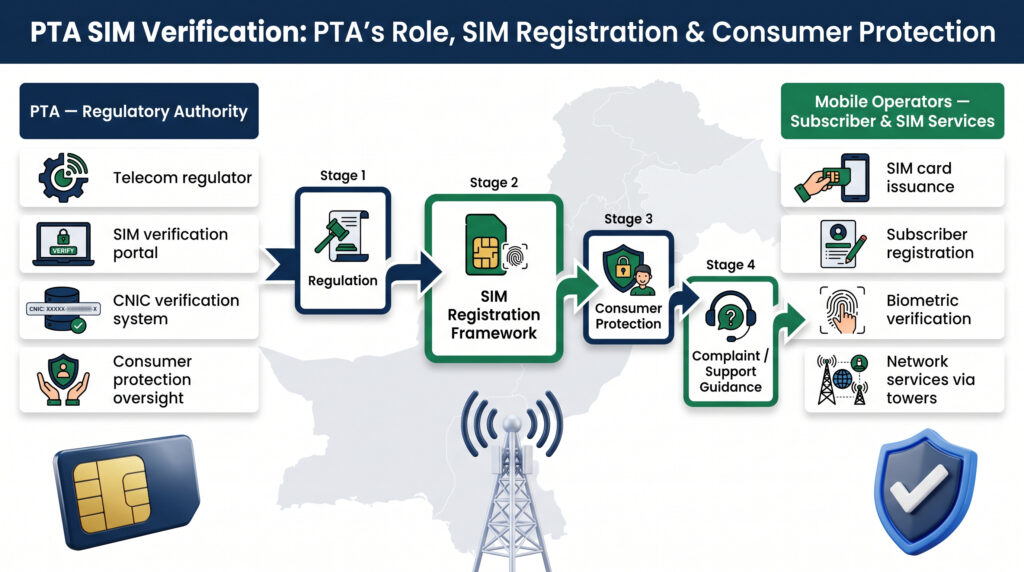
The Pakistan Telecommunication Authority (PTA) plays an important regulatory role in Pakistan’s telecommunications sector. For SIM verification, it is important to understand what PTA does, what mobile network operators do, and where subscribers should go when they encounter a problem.
PTA should not be confused with a mobile network operator. PTA regulates the telecommunications sector, while operators provide cellular services and manage subscriber accounts and SIM-related services.
What Is PTA?
The Pakistan Telecommunication Authority (PTA) is the regulatory authority responsible for Pakistan’s telecommunications sector.
Its responsibilities broadly relate to:
- Telecommunications regulation
- Consumer protection
- Regulatory requirements for telecom services
- Oversight of licensed operators
- Telecom-related complaints
- Cybersecurity and public awareness
- Applicable SIM-registration requirements
This means PTA has a regulatory role, while the actual mobile service is provided by operators such as Jazz, Zong, Ufone, Telenor, and SCOM.
PTA vs. Mobile Network Operator
Understanding this difference is essential when dealing with a SIM problem.
| PTA | Mobile Network Operator |
|---|---|
| Telecommunications regulator | Cellular service provider |
| Regulatory oversight | Mobile network |
| Consumer/regulatory framework | SIM and account management |
| Telecom complaints | Customer support |
| Applicable regulatory requirements | Activation, replacement and service issues |
Example
If your SIM is damaged and you need a replacement, the mobile operator is normally the appropriate first point of contact.
If you have an unresolved telecom complaint, the applicable PTA complaint mechanism may become relevant.
PTA and SIM Verification
PTA’s role in SIM verification is connected to the regulatory framework surrounding subscriber registration and telecom services.
PTA National CERT guidance advises subscribers to periodically check the number of SIMs issued in their name and references the 668 method for checking SIMs associated with a CNIC. It also advises consumers to obtain SIMs through authorized cellular franchises and take action regarding illegally issued SIMs.
This makes SIM verification useful not only as an information check but also as a personal security and awareness practice.
Why Does SIM Registration Matter?
Proper subscriber verification helps establish accountability around mobile connections.
Without appropriate verification, unauthorized SIM issuance could create risks involving:
- Identity misuse
- Fraud
- Unauthorized communications
- Account-security problems
- SIM-swap attempts
- Other telecom-related abuse
PTA National CERT guidance emphasizes proper subscriber verification/authentication and warns about risks associated with illegally issued SIMs.
What Is the 668 Method’s Relationship With PTA?
The 668 service is frequently associated with PTA SIM verification.
PTA National CERT’s published guidance specifically states that subscribers should periodically check the number of SIMs issued in their name and references sending the CNIC number to 668 for this purpose.
The basic concept is:
Own CNIC → 668 → SIM registration information → Review → Take action if necessary
However, users should still verify the current official procedure, because telecom services and instructions can change.
PTA Does Not Provide a Private SIM Database
One of the most important points in SIM verification is understanding what legitimate PTA-related verification does not mean.
PTA verification should not be interpreted as permission to obtain another person’s private information.
Users should not expect a legitimate verification system to provide unrestricted access to:
- Private addresses
- Call history
- SMS contents
- WhatsApp messages
- Live location
- Banking information
- Passwords
- OTPs
A website claiming to provide all of this simply by entering a mobile number should not automatically be considered an official PTA service.
PTA and Consumer Protection
Consumer protection is an important part of the telecommunications regulatory framework.
If a subscriber has a problem with a mobile service, the normal approach is to first communicate with the relevant operator.
For example:
SIM replacement → Operator
Account/service issue → Operator
Network complaint → Operator
Unresolved telecom complaint → PTA complaint mechanism where applicable
This approach prevents users from treating PTA as a replacement for the operator’s customer-service department.
PTA Complaint Management System
PTA provides a Complaint Management System (CMS) through which consumers can submit and track applicable telecom-related complaints.
PTA’s CMS documentation describes a process through which consumers can register complaints and follow their status.
If an operator-level issue remains unresolved, the appropriate PTA complaint process may be considered.
Before escalating, it is useful to keep:
- Operator complaint number
- Date of complaint
- Relevant mobile number
- Description of the issue
- Supporting messages or records
- Any response received from the operator
What If You Find an Unauthorized SIM?
If an official check indicates a SIM that you do not recognize, do not immediately accuse another person of wrongdoing.
First determine whether the registration could be related to:
- An old SIM
- A previous operator
- A replacement
- A secondary number
- A business connection
- An administrative issue
If you still cannot explain it, contact the relevant mobile operator.
A practical process is:
Verify → Identify Operator → Contact Operator → Complete Identity Verification → Request Appropriate Action
If the matter appears to involve identity misuse or fraud, follow the appropriate official reporting process.
PTA and SIM-Swap Awareness
SIM verification is also connected to broader mobile-security awareness.
In a SIM-swap situation, an attacker may attempt to convince a mobile carrier to transfer a victim’s mobile number to another SIM.
PTA National CERT’s SIM-swapping advisory warns users about this risk and advises contacting the mobile carrier immediately if calls and text messages unexpectedly stop.
Possible warning signs include:
- Sudden loss of mobile service
- Calls no longer arriving
- SMS suddenly stopping
- Unexpected account-security notifications
- Unexpected password-reset messages
- Unusual activity involving accounts connected to your mobile number
A sudden service interruption can have many innocent causes, so it should not automatically be interpreted as a SIM swap. However, unexplained changes deserve prompt investigation.
PTA, NADRA and Mobile Operators
These organizations have different roles.
PTA
Telecommunications regulation and oversight
NADRA
National identity infrastructure
Mobile Operators
Cellular network and subscriber services
Subscriber
Uses the mobile connection and protects personal information
A common mistake is to assume that all SIM-related matters are handled by one organization.
In reality, the appropriate contact depends on the specific problem.
How to Stay Safer When Buying a SIM
PTA National CERT guidance recommends obtaining SIMs through authorized cellular franchises and warns consumers about informal or unauthorized SIM-distribution practices.
When purchasing a SIM:
- Use an authorized operator/franchise.
- Complete the required verification process.
- Do not provide your identity information to random agents.
- Keep the relevant documentation or transaction information.
- Periodically check the SIMs registered in your name.
PTA SIM Verification: Common Mistakes
Avoid these mistakes:
Mistake 1 — Assuming PTA Is the Operator
PTA regulates the sector; your operator manages your cellular service.
Mistake 2 — Using an Unofficial SIM Database
A website claiming to provide private owner information is not automatically legitimate.
Mistake 3 — Sharing Your OTP
An OTP should remain confidential.
Mistake 4 — Ignoring an Unknown Registration
An unfamiliar registration should be investigated through the appropriate official channel.
Mistake 5 — Assuming an Unknown SIM Automatically Means Fraud
Verify the situation before making accusations.
Mistake 6 — Using Old Short-Code Instructions
Telecom procedures can change, so verify current instructions.
PTA SIM Verification Safety Checklist
Before performing a SIM check:
- Use your own CNIC.
- Use the current official method.
- Protect your OTP.
- Avoid unofficial databases.
- Do not share sensitive screenshots publicly.
- Contact the relevant operator for SIM-specific issues.
- Keep complaint references.
- Use PTA’s applicable complaint mechanism when escalation is appropriate.
Key Takeaway
PTA’s role in SIM verification is primarily regulatory and consumer-protection related, while mobile operators handle the actual cellular service and subscriber account processes.
For users, the practical approach is:
Check your own registrations → Review the result → Contact the relevant operator if necessary → Escalate through the appropriate PTA mechanism when applicable.
Most importantly, PTA/SIM verification should never be interpreted as a legitimate way to obtain another person’s private telecom information.
NADRA & Biometric SIM Verification in Pakistan
Biometric verification is an important part of understanding how SIM registration works in Pakistan. It helps connect a subscriber’s identity with an applicable SIM-related transaction and adds an additional layer of identity verification.
However, NADRA, PTA, and mobile network operators have different responsibilities. Understanding those differences can help you avoid confusion and protect your personal information.
What Is NADRA?
The National Database and Registration Authority (NADRA) is responsible for Pakistan’s national identity infrastructure.
NADRA is associated with identity-related services and records, while mobile network operators provide cellular services.
Therefore:
NADRA → Identity infrastructure
PTA → Telecommunications regulation
Mobile Operator → Cellular service and subscriber management
NADRA should not be treated as a mobile network operator or as a public source for private SIM-owner information.
What Is Biometric Verification?
Biometric verification uses a physical characteristic, such as a fingerprint, as part of an identity-verification process.
In applicable SIM-related transactions, biometric verification helps establish that the person completing the transaction is the person associated with the identity information being presented.
The exact requirements can vary depending on the type of transaction and current regulations.
Why Is Biometric Verification Important for SIM Registration?
Proper subscriber verification helps reduce the risk of SIMs being issued using someone else’s identity without authorization.
PTA National CERT guidance emphasizes proper subscriber verification/authentication and recommends obtaining SIMs through authorized cellular franchises.
This makes biometric verification an important part of the broader SIM-registration security framework.
When Can Biometric Verification Be Relevant?
Depending on the current rules and the type of transaction, identity verification may be relevant when:
- Obtaining a new SIM
- Replacing a SIM
- Completing certain subscriber-account transactions
- Updating applicable subscriber information
- Completing other operator-authorized SIM procedures
The exact requirements should always be confirmed with the relevant operator or authorized service location.
Where Should You Complete SIM Verification?
Use an authorized mobile network operator or authorized franchise/service location.
PTA National CERT guidance specifically advises consumers to purchase SIMs through authorized cellular franchises and warns about unauthorized SIM-distribution practices.
A safer process is:
Authorized Franchise → Identity Verification → SIM Registration → Activation
Avoid accepting a SIM from an unknown individual simply because the process appears faster or cheaper.
Be Careful With Unsolicited Biometric Requests
One of the most important safety rules is:
Do not provide your fingerprint or identity information to an unknown person simply because they claim it is required for SIM verification.
Be especially cautious if someone approaches you with claims such as:
- Free SIM
- Free mobile package
- Prize or reward
- Survey
- Government benefit
- Welfare registration
- Account verification
- Urgent SIM activation
PTA National CERT awareness material has warned users about situations where biometric information may be requested under misleading pretexts.
How to Verify a Biometric Request
If someone asks you to complete biometric verification, consider the following.
1. Verify the Organization
Determine which company or organization the person represents.
2. Verify the Purpose
Ask why biometric verification is required.
3. Verify the Location
Prefer an authorized operator franchise or service center.
4. Verify the Transaction
Make sure you understand what service you are requesting before completing the process.
5. Keep Documentation
Where applicable, keep the receipt, transaction information, or reference provided by the operator.
CNIC and Biometric Verification
A CNIC and biometric verification serve related but different purposes.
The CNIC provides identity/document information.
Biometric verification can provide an additional mechanism for confirming the person completing an applicable transaction.
Therefore:
CNIC information ≠ Fingerprint
and:
Fingerprint verification ≠ Permission to access someone’s private telecom information
Both should be handled carefully.
Biometric Verification vs. 668
These services have different purposes.
| Method | Main Purpose |
|---|---|
| Biometric Verification | Identity verification during applicable transactions |
| 668 | Checking SIM registrations associated with a CNIC |
| Operator Support | Resolving SIM/account problems |
| PTA Complaint System | Applicable telecom complaint escalation |
A 668 check does not replace biometric verification where biometric verification is required.
Similarly, biometric verification is not a substitute for periodically checking your registered SIMs.
What If Your Fingerprint Verification Fails?
A failed biometric verification does not automatically mean that your CNIC or SIM registration is fraudulent.
Possible reasons can include:
- Fingerprint quality
- Device/scanner issue
- Technical problem
- Verification mismatch
- Temporary system issue
- Other identity-verification circumstances
If verification fails, ask the authorized operator/service center about the applicable next step.
Do not immediately provide your biometric information to another unknown person or unofficial service.
Protect Your Biometric Information
Biometric information is sensitive and should be treated carefully.
Basic safety practices include:
- Use authorized service locations.
- Understand the purpose of the verification.
- Do not allow unknown people to use your biometric information.
- Avoid unofficial SIM-registration agents.
- Do not provide fingerprints for vague or unexplained offers.
- Keep your CNIC and transaction information secure.
What If Someone Offers a “Free SIM”?
A free SIM offer should not automatically be considered legitimate.
Before accepting:
- Verify the operator.
- Confirm the location is authorized.
- Understand the registration process.
- Ask what information is being collected.
- Do not complete biometric verification for an unexplained purpose.
Convenience should never be more important than identity security.
Biometric Verification and SIM Fraud
Biometric verification is designed to strengthen subscriber verification, but users should still maintain basic security awareness.
A secure SIM-management routine includes:
Authorized registration → Identity verification → Keep documents secure → Protect OTPs → Periodically check registrations
This layered approach is stronger than relying on any single verification method.
What If an Unknown SIM Is Found After Verification?
If you discover an unfamiliar SIM registration, biometric verification does not mean you should investigate the supposed owner yourself.
Instead:
Step 1
Review your old mobile connections.
Step 2
Identify the relevant operator.
Step 3
Contact the operator through its official channel.
Step 4
Complete any identity verification requested by the operator.
Step 5
Ask about blocking, de-registration, or corrective action where applicable.
Step 6
Keep the complaint/reference number.
If there are signs of identity misuse or fraud, use the appropriate official reporting mechanism.
NADRA Does Not Mean “SIM Database”
A common misconception is that because CNIC information is connected with SIM registration, users can search NADRA for another person’s complete SIM-owner profile.
That is not an appropriate interpretation of the identity-verification system.
Identity infrastructure and telecom subscriber services are separate functions.
NADRA → Identity
PTA → Telecom regulation
Operator → Mobile service
This distinction is important for both accuracy and privacy.
Common Biometric Verification Mistakes
Mistake 1 — Using an Unauthorized Agent
Always prefer an authorized operator/franchise channel.
Mistake 2 — Giving Fingerprints for a Free Offer
Verify the purpose first.
Mistake 3 — Sharing CNIC Copies Without Understanding Why
Only provide information required for the legitimate transaction.
Mistake 4 — Assuming Failed Verification Means Fraud
Technical or biometric issues can occur.
Mistake 5 — Assuming Biometric Verification Makes You Completely Safe
Continue protecting your CNIC, OTPs, SIM and account information.
Biometric SIM Verification Safety Checklist
Before completing an applicable biometric transaction:
- ☑ Use an authorized operator/franchise.
- ☑ Verify the purpose.
- ☑ Confirm the organization.
- ☑ Protect your CNIC.
- ☑ Do not share OTPs.
- ☑ Avoid unknown agents.
- ☑ Keep transaction records where appropriate.
- ☑ Contact the operator if something appears suspicious.
Key Takeaway
Biometric verification is an important identity-verification mechanism in applicable SIM-related transactions, but it should always be completed through an authorized channel.
Remember the basic relationship:
NADRA → Identity infrastructure
PTA → Telecom regulation
Operator → Cellular service
Biometric verification → Identity verification during applicable transactions
And most importantly, never provide your CNIC, fingerprint, or OTP to an unknown person simply because they claim it is required for SIM verification.
Jazz, Zong, Ufone, Telenor & SCOM SIM Support
After checking your SIM registrations, you may need to contact a specific mobile network operator. This is especially important if you discover an unfamiliar registration, need a SIM replacement, have lost a SIM, or are experiencing an account or service problem.
The important rule is:
Use the official operator’s customer-support channels instead of unofficial agents or SIM databases.
Jazz SIM Support
Jazz provides several official customer-support options.
For existing prepaid customers, Jazz currently lists 111 as its helpline. It also lists 0 111 300 300 for calls from other networks. Jazz additionally provides SIMOSA and other self-service options for customer queries and complaints.
When Should You Contact Jazz?
You may need to contact Jazz if you have:
- An unfamiliar Jazz SIM registration
- A lost or damaged SIM
- A SIM replacement request
- An account problem
- An activation issue
- A network/service complaint
- A SIM-related security concern
If a SIM verification result indicates an unfamiliar Jazz connection, contact Jazz directly and explain the situation.
Zong SIM Support
Zong’s official customer-support page currently lists 310 as its helpline when calling from a Zong number.
Zong also lists (051) 111-222-111 as its UAN. Its official page also provides a 310 SMS service for product-related information and queries.
When Should You Contact Zong?
Contact Zong if you need assistance with:
- An unfamiliar Zong registration
- SIM replacement
- SIM activation
- Account-related issues
- Service complaints
- Network problems
- Other subscriber-related matters
Ufone SIM Support
Ufone’s official customer-service information currently lists 333 for calls from a Ufone number.
Ufone also lists 033-11-333-100 as a customer-support contact number. Its official customer-care pages provide additional support options and service-center information.
When Should You Contact Ufone?
Ufone support may be relevant for:
- Unknown Ufone SIM registrations
- SIM replacement
- SIM activation problems
- Account issues
- Customer complaints
- Service-related problems
Telenor SIM Support
Telenor Pakistan’s published customer-support information has historically listed 345 for Telenor subscribers, while its official material also lists other numbers for calls from landlines and from different locations.
Because operator services and contact arrangements can change, users should verify the current Telenor contact information from the official Telenor website before calling an older number found in an article or social-media post.
When Should You Contact Telenor?
You may need operator support for:
- An unfamiliar Telenor registration
- SIM replacement
- Lost SIM
- Account problems
- Network issues
- SIM activation
- Service complaints
Telenor Pakistan Official Website
SCOM SIM Support
SCOM is operated by the Special Communications Organization (SCO) and is particularly relevant in Azad Jammu & Kashmir and Gilgit-Baltistan.
SCO’s official contact page currently lists 355 as the customer-support helpline when calling from an SCOM number. It also provides additional support channels, service centers, and franchise information.
When Should You Contact SCOM?
Contact SCOM for issues such as:
- Unknown SCOM registration
- SIM/account problems
- SIM replacement
- Service complaints
- Regional network issues
- Other SCOM subscriber matters
Operator Support Quick Reference
| Operator | Officially Listed Support |
|---|---|
| Jazz | 111 from Jazz prepaid; 0 111 300 300 from other networks |
| Zong | 310 from Zong; (051) 111-222-111 UAN |
| Ufone | 333 from Ufone; 033-11-333-100 |
| Telenor | 345 from Telenor; verify current external contact details officially |
| SCOM | 355 from SCOM |
Important: These are customer-support channels, not private SIM-owner lookup services.
What If Your Unknown SIM Is a Jazz SIM?
Use the following process:
SIM verification → Identify Jazz → Contact official Jazz support → Complete required verification → Follow the applicable corrective procedure
Do not attempt to discover the supposed subscriber’s private information through an unofficial website.
What If Your Unknown SIM Is a Zong SIM?
Follow:
Verification result → Identify Zong → Contact Zong → Explain the unfamiliar registration → Complete verification → Follow the operator’s instructions
Keep your complaint/reference number if one is provided.
What If Your Unknown SIM Is a Ufone SIM?
Use the same principle:
Verification → Identify Ufone → Contact official Ufone support → Verify the registration → Request appropriate action
The operator may require identity verification before discussing or changing account information.
What If Your Unknown SIM Is a Telenor SIM?
If the unfamiliar registration appears to be associated with Telenor:
Verify → Contact current official Telenor support → Explain the issue → Complete verification → Follow the applicable procedure
Because customer-support arrangements can change, verify the current contact details before relying on an old number.
What If Your Unknown SIM Is an SCOM SIM?
For SCOM users, the official SCO support channel is the appropriate starting point.
SCO currently lists 355 as its customer-support helpline from an SCOM number.
If the issue cannot be resolved through normal support, keep your complaint information and follow the applicable escalation process.
What Information May the Operator Ask For?
Depending on the issue, the operator may require information necessary to verify your identity or investigate the account.
This could include:
- CNIC information
- Mobile number
- SIM-related information
- Account details
- Complaint details
- Relevant dates
- Previous complaint/reference numbers
Only provide information through an official operator channel.
Never Share an OTP With an Unexpected Caller
A caller may claim:
“We need your OTP to complete SIM verification.”
Do not provide the OTP.
Instead:
End the call → Find the operator’s official contact information yourself → Contact the operator directly → Verify the request
This protects you against social-engineering attempts.
Operator Support vs. PTA Complaint
Another important distinction is knowing when to contact the operator and when regulatory escalation may be appropriate.
Contact the Operator First For:
- SIM replacement
- Lost SIM
- Damaged SIM
- Activation issues
- Account problems
- Network/service issues
- SIM-specific questions
Consider PTA’s Applicable Complaint Mechanism For:
- An unresolved telecom complaint
- A regulatory/service complaint where escalation is appropriate
- Issues that remain unresolved after using the operator’s complaint process
The operator and PTA therefore have different roles in the resolution process.
Why You Should Not Use Random SIM Agents
An unofficial agent may claim:
- “I can remove the SIM.”
- “I can give you the owner’s complete details.”
- “I can verify any CNIC.”
- “I have access to the PTA database.”
- “Send me your OTP.”
Do not rely on such claims.
Use:
Official operator → Authorized franchise → Official complaint mechanism
instead.
Keep Your Complaint Reference
If you report an unfamiliar SIM or another important account issue, keep:
- Complaint/reference number
- Date and time
- Operator name
- Relevant mobile number
- Summary of the problem
- Any official response
This makes follow-up much easier.
Important Difference Between Operator Support and SIM Verification
The verification process can help you identify a potential issue.
The operator can then help you investigate or resolve a specific SIM/account issue.
Think of it as:
Verification = Awareness
Operator Support = Resolution
PTA Complaint Mechanism = Applicable Regulatory Escalation
Key Takeaway
If you discover an unfamiliar SIM registration, do not try to obtain the supposed owner’s private information.
Instead:
Identify the network → Contact the official operator → Verify the registration → Follow the corrective procedure → Escalate through the appropriate official channel if necessary.
This is safer, more accurate, and more responsible than using unofficial SIM databases or private-data services.
667 vs. 668: SIM Short Codes and Important Verification Services in Pakistan
Pakistan’s SIM-verification system includes several short codes and operator services, but 667 and 668 do not serve exactly the same purpose.
This distinction is important because many online articles incorrectly describe every SIM-related short code as a general “SIM owner check.”
According to government-published information, 668 is used to check the number of SIMs registered against a CNIC, while 667 has been used for SIM ownership verification.
What Is 668 Used For?
668 is associated with the SIM Information System.
A subscriber can send their CNIC number to 668 to check the number of SIMs registered against that CNIC. PTA has also recently reminded consumers to verify SIMs registered against their CNIC through its online facility or by sending the CNIC number without dashes to 668.
The basic purpose is:
CNIC → 668 → Registered SIM information → Review
The result can help you determine whether the number of registered connections matches your own records.
What Is 667 Used For?
667 has been associated with SIM ownership verification rather than simply counting all SIMs registered against a CNIC.
Government-published guidance describes sending a blank SMS to 667 for ownership verification, with the response historically providing information related to the person associated with the SIM.
However, because telecom services and procedures can change, users should verify the current 667 procedure with the relevant operator or official source before relying on an older instruction.
This is particularly important because many online guides continue to reproduce historical short-code information.
667 vs. 668 — Simple Difference
| Code | Main Purpose |
|---|---|
| 668 | Check SIMs registered against your CNIC |
| 667 | SIM ownership verification/service-specific verification |
| Operator Support | Account, SIM and service issues |
| PTA Complaint System | Applicable telecom complaint escalation |
The easiest way to remember the difference is:
668 = How many SIMs are registered against my CNIC?
667 = Ownership verification for a particular SIM/service, where currently supported.
Why Is 668 More Important for CNIC SIM Counting?
If your main question is:
“How many SIMs are registered against my CNIC?”
then the relevant service is 668.
PTA’s current consumer guidance specifically recommends checking SIMs registered against your CNIC through cnic.sims.pk or by sending your CNIC number without dashes to 668.
This makes 668 particularly relevant to users who want to perform a periodic personal SIM-registration check.
What If You Want to Verify Your Current SIM?
If the question is:
“Is this particular SIM registered in my name?”
that is different from asking for the total number of SIMs registered against your CNIC.
For a specific SIM, use the applicable operator-supported ownership/verification procedure.
Do not assume that a 668 response will provide every detail associated with an individual mobile number.
Does 668 Give You Every Mobile Number?
The purpose of the 668 system is to provide information about SIM registrations associated with your CNIC, including operator-related information as applicable.
It should not be treated as a public database that gives unrestricted access to complete private subscriber records.
If you need clarification about a particular SIM, contact the relevant operator.
Does 667 Give Complete SIM Owner Details?
No legitimate short-code service should be interpreted as permission to obtain another person’s complete private profile.
SIM ownership verification should be used for an authorized purpose involving your own SIM or account.
Do not use short codes as a method to obtain:
- Another person’s address
- Private call history
- Private messages
- Live location
- Banking information
- Passwords
- OTPs
Other Important SIM and Telecom Codes
Not every telecom short code is a SIM-verification code.
Some codes are designed for:
- Customer support
- Balance checking
- Package information
- Internet resources
- Account services
- Device information
- Other operator-specific functions
Therefore, a high-quality SIM guide should distinguish between SIM verification codes and ordinary operator USSD services.
*#06# — IMEI Check
The code:
*#06#
is commonly used on mobile phones to display the device’s IMEI.
Remember:
IMEI = Device
SIM/ICCID = SIM
Mobile Number = Cellular service
CNIC = Subscriber identity
Therefore, checking an IMEI is not the same thing as checking SIM ownership.
Operator Helplines Are Different From Verification Codes
For example, a customer-support number is designed to connect you with the operator.
It is not necessarily designed to display SIM-registration information.
A simple distinction is:
| Service Type | Purpose |
|---|---|
| 668 | CNIC-associated SIM registration check |
| 667 | SIM ownership verification where currently supported |
| Operator Helpline | Customer/account support |
| USSD Code | Operator-specific service |
| *#06# | Device IMEI |
This prevents users from confusing a package or balance code with a SIM-verification service.
Why Short Codes Change
Telecom operators can modify:
- Short codes
- USSD commands
- Customer-care numbers
- Service procedures
- Charges
- Online portals
- Verification requirements
For this reason, old articles should not be treated as permanent references.
A code that worked several years ago may no longer perform the same function today.
Important Rule for This Article
Whenever you see a SIM short code online, ask:
1. What is the code for?
Is it actually SIM verification?
2. Who operates the code?
Is it PTA, a mobile operator, or another service?
3. Is the information current?
Check the latest official information.
4. Does it require sensitive information?
Never provide unnecessary CNIC or OTP information.
5. Is there a safer official alternative?
If yes, prefer the official method.
What If 667 or 668 Does Not Work?
Do not immediately assume that the service has been permanently discontinued.
Possible reasons include:
- Temporary technical issue
- Incorrect message format
- Network problem
- Service maintenance
- Changes in the verification process
- Operator-specific limitations
The safest approach is:
Check current official instructions → Try the recognized method → Contact the operator/PTA if necessary
668 and Online Verification
PTA’s current consumer guidance provides two relevant ways to check SIMs registered against a CNIC:
Online: cnic.sims.pk
SMS: Send CNIC without dashes to 668.
PTA also advises consumers to ensure that only required and actively used SIMs remain registered against their name.
This makes the online and SMS methods useful alternatives for personal SIM-registration awareness.
Why You Should Keep Only Required SIMs
Having old or unnecessary SIM registrations can make your records harder to manage.
PTA has advised consumers to ensure that only the SIMs they require and actively use remain registered against their name.
If you no longer need a connection, contact the relevant operator and ask about the appropriate procedure rather than simply leaving the registration unattended.
Short-Code Safety Rules
Do:
- Use your own CNIC.
- Verify the current procedure.
- Use official sources.
- Contact your operator when necessary.
- Keep your verification information private.
Do Not:
- Send CNIC information to random numbers.
- Share OTPs.
- Use another person’s CNIC without authorization.
- Trust unofficial “SIM database” claims.
- Assume every short code provides private owner information.
- Publish sensitive verification results online.
Quick Reference
| Question | Recommended Method |
|---|---|
| How many SIMs are registered against my CNIC? | 668 / official online facility |
| Is a particular SIM registered to me? | Applicable operator ownership verification |
| Need SIM replacement? | Mobile operator |
| Lost SIM? | Mobile operator immediately |
| SIM suddenly stopped working? | Mobile operator |
| Need telecom complaint escalation? | PTA complaint mechanism where applicable |
| Need device IMEI? | *#06# |
Key Takeaway
The most important distinction is:
668 → CNIC-based SIM registration checking
667 → SIM ownership verification/service-specific verification where currently supported
Operator → Specific SIM/account problems
PTA → Telecom regulation and applicable complaint escalation
Always verify current short-code instructions before using them, because telecom services can change.
For a personal SIM check, the safest approach remains:
Use the official PTA method → Check your own CNIC → Review the result → Contact the relevant operator if anything is unexpected.
SIM Verification Problems & Solutions
Even when you use an official SIM-verification method, you may encounter technical issues, unexpected results, or confusion about what the result means. The most important thing is to verify the situation before taking action and avoid unofficial SIM databases or unknown agents.
1. 668 SMS Response Is Not Received
If you send the required information to 668 but do not receive the expected response, do not immediately assume that the service has failed permanently.
Check the following:
- Your CNIC number was entered correctly.
- You followed the current official SMS format.
- You sent the request to the correct short code.
- Your mobile network is working normally.
- SMS sending and receiving are working.
- There is no temporary service interruption.
PTA’s current guidance continues to reference the 668 SMS method for checking SIMs registered against a CNIC.
If the problem continues, check the current official PTA instructions or use the official online facility.
2. The Online SIM Verification Service Is Not Opening
An official online service can occasionally be unavailable because of:
- Temporary technical problems
- Maintenance
- Server issues
- Internet connectivity
- Browser problems
- Changes to the online service
Try the following:
- Check your internet connection.
- Refresh the page.
- Try another browser.
- Confirm that you are using the current official website.
- Try again later if the service is temporarily unavailable.
Do not switch to an unknown “SIM database” website simply because the official service is temporarily unavailable.
3. Your SIM Count Is Higher Than Expected
This is one of the most common situations that can cause concern.
For example, you may believe you have two SIMs but discover that more connections are associated with your CNIC.
Before assuming fraud, review:
- Old mobile numbers
- Previous network operators
- Replaced SIMs
- Secondary numbers
- Business SIMs
- Temporary connections
- SIMs that you stopped using
PTA has advised consumers to ensure that only the SIMs they require and actively use remain registered against their name.
If a registration still cannot be explained, contact the relevant operator.
4. You Find an Unknown SIM Registration
If a SIM registration genuinely appears unfamiliar, do not attempt to find the supposed owner’s private information yourself.
Instead:
Step 1 — Review Your Records
Check whether the connection could be an old or forgotten number.
Step 2 — Identify the Network
Determine which operator is associated with the registration, where the available official information allows you to do so.
Step 3 — Contact the Operator
Use the operator’s official helpline, website, app, or authorized service center.
Step 4 — Explain the Problem
Tell the operator that the registration is unfamiliar and ask about the appropriate procedure.
Step 5 — Complete Verification
The operator may require identity verification.
Step 6 — Keep Your Reference Number
Save the complaint or service reference for future follow-up.
5. You Have an Old SIM You No Longer Use
An old SIM should not simply be forgotten.
If you no longer need a connection, contact the relevant operator and ask about the appropriate deactivation or closure procedure.
This can help keep your registered SIM information easier to manage.
A useful personal record can look like this:
| SIM | Operator | Status |
|---|---|---|
| Personal number | Current operator | Active |
| Business number | Current operator | Active |
| Old number | Previous operator | Review |
| Unknown registration | Unknown | Investigate |
6. The Verification Result Is Confusing
If the result is unclear, do not post the complete result publicly asking strangers to identify the information.
Instead:
- Hide your CNIC.
- Hide your full mobile number where possible.
- Avoid sharing SIM serial numbers.
- Contact the relevant operator.
- Ask for clarification through an official channel.
Sensitive information should remain private even when you are trying to solve a technical problem.
7. You Cannot Identify the Number Behind an Unexpected Registration
Some verification systems may provide registration counts or limited operator information rather than exposing every private detail.
If you know that an unexpected registration exists but cannot determine the exact number, do not use an unofficial website claiming to reveal it.
Contact the relevant operator and explain that you have identified an unfamiliar registration associated with your identity.
8. An Operator Says the Registration Is Valid
If the operator confirms that a registration is associated with your identity, but you believe you never requested it, ask what official corrective process is available.
Depending on the circumstances, this may involve:
- Blocking the connection
- De-registration
- Record correction
- A formal complaint
- Further identity verification
Keep all relevant complaint information.
If the matter appears to involve identity misuse or fraud, consider the appropriate official reporting mechanism.
9. You Lost Your SIM
A lost SIM should be reported to the relevant mobile operator as soon as reasonably possible.
Recommended steps:
- Contact the operator.
- Request the applicable blocking procedure.
- Ask about SIM replacement.
- Complete required identity verification.
- Review accounts that rely on the mobile number for verification or recovery.
Do not wait unnecessarily if the lost number is connected to important accounts.
10. Your SIM Suddenly Stops Working
A sudden loss of service can have many causes, including a network or technical problem.
However, if:
- Calls suddenly stop,
- SMS suddenly stop,
- The phone shows no service,
- You did not request a SIM change,
contact your operator promptly.
PTA’s SIM-swapping advisory specifically recommends contacting the mobile carrier immediately when calls and text messages unexpectedly stop.
11. You Start Receiving Unexpected OTPs
If you receive an OTP that you did not request:
Do not share it.
Possible explanations include:
- Someone entered your number incorrectly.
- Someone is attempting to access an account.
- A service is performing an unexpected verification.
- Someone is attempting to reset an account.
If the OTP relates to an important account, open that service through its official application or website and check your security settings.
12. Someone Calls You About “SIM Verification”
A scammer may claim:
“Your SIM will be blocked unless you verify it immediately.”
They may then ask for:
- CNIC information
- OTP
- Account password
- Fingerprint
- SIM information
Do not provide sensitive information simply because the caller sounds convincing.
Instead:
End the call → Find the operator’s official contact details yourself → Contact the operator → Verify the claim
13. A Website Requests Your CNIC and OTP
Be extremely cautious.
A SIM-verification website should not automatically be trusted simply because it uses government terminology.
If an unfamiliar website asks for:
- CNIC
- Mobile number
- OTP
- Password
- Banking information
stop and verify the website independently.
Never provide an OTP to an unknown website or person.
14. A SIM Verification App Requests Many Permissions
Be careful with applications that request access to information unrelated to their claimed purpose.
For example, a simple SIM-information application should make you question why it needs unnecessary access to:
- Contacts
- Microphone
- Camera
- Location
- SMS
- Files
PTA National CERT has previously advised users to install applications only from trusted sources and review application permissions.
15. You Suspect SIM-Swap Fraud
If you suddenly lose cellular service without explanation, especially alongside suspicious account notifications, act quickly.
Recommended sequence:
Contact operator → Confirm SIM status → Secure important accounts → Review security notifications → Report suspected fraud through the appropriate official channel
Do not wait several days if you strongly suspect that your mobile number has been transferred to another SIM.
16. Does a Clean SIM Check Mean You Are Completely Safe?
No.
A clean verification result simply means that the check did not reveal an unexpected registration through the information available at that time.
It does not guarantee protection against:
- Future SIM fraud
- SIM-swap attempts
- Phishing
- Account compromise
- Identity theft
- Future unauthorized registrations
Continue following basic mobile-security practices.
17. How Often Should You Check Your SIM Registrations?
There is no need to check your registrations constantly.
A periodic check can be particularly useful after:
- Getting a new SIM
- Replacing a SIM
- Losing a SIM
- Changing operators
- Stopping an old connection
- Discovering suspicious activity
You can also establish a simple recurring personal reminder to review your registrations periodically.
18. What Information Should You Keep as Evidence?
If you discover a serious problem, keep relevant records privately.
Useful information can include:
- Date of verification
- Verification result
- Operator name
- Complaint number
- SMS notifications
- Relevant account alerts
- Communication with the operator
- Dates of important events
Do not upload sensitive records publicly.
If you need to share a screenshot with support, hide unnecessary identity information first.
19. When Should You Contact PTA?
The mobile operator should normally be your first contact for a specific SIM or account problem.
PTA’s complaint mechanism may become relevant when an applicable telecom complaint remains unresolved or requires regulatory escalation.
A practical sequence is:
Operator → Complaint/reference → Resolution attempt → PTA complaint mechanism where applicable
This is more appropriate than sending every SIM question directly to a regulatory authority.
SIM Verification Troubleshooting Table
| Problem | Recommended Action |
|---|---|
| 668 response not received | Check format, network and current official instructions |
| Online service unavailable | Use official alternative or try later |
| SIM count is higher | Review old connections |
| Unknown SIM | Contact relevant operator |
| Old unused SIM | Ask operator about deactivation |
| Lost SIM | Contact operator immediately |
| Sudden loss of service | Contact operator promptly |
| Unexpected OTP | Never share it |
| Suspicious caller | Disconnect and contact official support |
| Suspicious website | Do not enter sensitive information |
| Suspicious app | Avoid installation/review permissions |
| Unresolved telecom complaint | Consider applicable PTA complaint mechanism |
What You Should Never Do
Never:
- Buy leaked SIM databases.
- Search for another person’s private CNIC information.
- Share an OTP with a caller.
- Give your fingerprint to an unknown agent.
- Enter your CNIC on random websites.
- Install unknown SIM-checking APKs.
- Assume an unfamiliar SIM automatically proves criminal activity.
- Publish complete verification screenshots.
- Rely permanently on outdated short-code information.
Key Takeaway
Most SIM-verification problems can be handled by following a simple process:
Check → Review → Verify → Contact → Document → Resolve
If the problem involves possible fraud or identity misuse, act promptly and use the appropriate official channel.
The objective of SIM verification is not to investigate other people. It is to help you understand and responsibly manage the SIM connections associated with your own identity.
SIM Fraud, SIM Swap, CNIC Privacy, OTP Security & Scam Prevention
SIM verification is not only about checking how many connections are registered against a CNIC. Users should also understand the security risks associated with SIM swapping, identity misuse, phishing, OTP theft, and unauthorized access to mobile accounts.
PTA National CERT has specifically issued guidance about SIM-swapping risks and recommends users take precautions to protect personal information and respond quickly to unexpected loss of mobile service.
What Is SIM Swap Fraud?
A SIM swap occurs when an attacker attempts to have a victim’s mobile number transferred to another SIM under the attacker’s control.
A simplified example is:
Personal Information → Social Engineering → Unauthorized SIM Transfer → Control of Mobile Number → Account Security Risk
If the attacker gains control of the number, they may potentially receive calls and SMS intended for the legitimate subscriber.
PTA’s SIM-swapping advisory explains that attackers may use stolen personal information or social-engineering techniques to manipulate a carrier into transferring a victim’s number.
Why Is SIM Swap Dangerous?
Many online accounts use mobile numbers for:
- Login verification
- Password recovery
- Security alerts
- OTP delivery
- Account recovery
If an attacker gains control of a mobile number, these account-security mechanisms can become a target.
This is why protecting the SIM itself is an important part of protecting your wider digital identity.
Warning Signs of a Possible SIM Swap
One of the most important warning signs is an unexpected loss of mobile service.
Pay attention if:
- Calls suddenly stop working.
- SMS messages suddenly stop arriving.
- Your phone unexpectedly shows no service.
- You did not request a SIM replacement.
- You receive unexpected account-security notifications.
- You receive password-reset messages you did not request.
- Important accounts suddenly behave differently.
A network outage or technical problem can cause similar symptoms, so these signs do not automatically prove SIM-swap fraud.
However, an unexplained and sudden loss of service deserves prompt investigation.
What to Do If Your SIM Suddenly Stops Working
If your mobile service disappears unexpectedly:
Step 1 — Check Basic Network Issues
Restart your phone and check whether the problem affects only your device.
Step 2 — Contact Your Operator
If service does not return and the situation is unexplained, contact your mobile operator immediately.
Step 3 — Confirm SIM Status
Ask whether there has been a SIM replacement, transfer, or other account activity.
Step 4 — Review Important Accounts
Check security notifications from important services connected to your mobile number.
Step 5 — Secure Affected Accounts
If you notice suspicious activity, use the official security process of the affected service.
PTA’s SIM-swapping guidance specifically recommends contacting the carrier immediately when calls or texts unexpectedly stop.
Protect Your CNIC
Your CNIC is an important piece of identity information and should not be shared unnecessarily.
Avoid:
- Uploading complete CNIC images publicly
- Entering CNIC information on random websites
- Sending CNIC copies to unknown agents
- Sharing identity documents through suspicious links
- Giving unnecessary personal information to callers
PTA National CERT guidance also emphasizes protecting personal information because attackers can use publicly available information in social-engineering attempts.
Never Share Your OTP
An OTP should be treated as confidential.
If someone calls and says:
“Your SIM verification requires an OTP.”
do not provide it.
Instead:
End the call → Find the organization’s official contact details yourself → Contact the organization → Verify the request
An official organization should not require you to disclose a confidential OTP to an unexpected caller simply because they claim to be performing a verification.
Unexpected OTP Messages
Receiving an OTP that you did not request does not automatically mean your account has been hacked.
Possible explanations include:
- Someone entered your number incorrectly.
- Someone attempted to log into an account.
- Someone initiated a password reset.
- A service generated a verification request.
The correct response is:
Do not share the OTP → Identify the relevant service → Open it through its official website/app → Review account security
Protect Your Mobile Number
Your phone number is often connected to multiple online services.
Avoid publishing unnecessary combinations of information such as:
Full Name + Phone Number + Address + Identity Information
PTA’s SIM-swap guidance recommends limiting publicly available personal information because attackers may use it for social engineering.
Be Careful With Fake SIM Verification Websites
Search engines and social media can contain websites claiming to offer:
- SIM owner details
- Complete CNIC records
- Private SIM databases
- Live SIM location
- Call history
- Complete subscriber profiles
A website making these claims should not automatically be considered official.
Before entering sensitive information, verify that you are using the correct official source.
Fake PTA or NADRA Branding
Scammers may use:
- Government logos
- PTA references
- NADRA references
- Official-looking colors
- Government-style language
- Fake verification forms
Visual appearance alone does not prove that a website or person is officially authorized.
Always verify the source independently.
SIM Verification Apps
Users should also be cautious with mobile applications claiming to provide SIM-owner information.
PTA National CERT has previously warned about malicious Android applications and advised users to install apps from trusted sources and review application permissions.
Before installing a SIM-related app:
- Check the developer.
- Use a trusted app store.
- Review permissions.
- Avoid unknown APK files.
- Be suspicious of unnecessary access to SMS, contacts, microphone, camera, or location.
- Keep your operating system and security software updated.
Biometric Security
Fingerprint information should only be provided through an appropriate authorized process.
Be cautious if someone asks for biometric verification for:
- Free SIMs
- Surveys
- Prizes
- Unexplained registrations
- Door-to-door offers
- Unverified welfare schemes
PTA National CERT awareness material has highlighted risks associated with people collecting biometric information under misleading explanations.
Use Authorized SIM Channels
When purchasing or replacing a SIM, use an authorized operator or franchise.
A safe approach is:
Official Operator/Franchise → Identity Verification → SIM Registration → Activation
Avoid buying SIMs from unknown individuals or informal sellers simply because they offer convenience.
SIM Verification Is Not a Complete Security System
A clean SIM-registration check does not mean that your digital identity is completely secure.
You should still protect:
- CNIC
- Mobile number
- OTPs
- Passwords
- Recovery information
- Banking credentials
- Email accounts
- Social-media accounts
SIM verification is one layer of security, not a replacement for general cybersecurity.
SIM Fraud Prevention Checklist
Before Getting a SIM
- Use an authorized operator/franchise.
- Complete the required verification.
- Understand the transaction.
- Protect your CNIC.
After Getting a SIM
- Keep your SIM secure.
- Do not share OTPs.
- Monitor unexpected account activity.
- Keep your mobile number protected.
Periodically
- Check SIM registrations associated with your CNIC.
- Review old or unused connections.
- Contact the operator about unfamiliar registrations.
- Review important accounts connected to your mobile number.
What If You Confirm an Unauthorized SIM?
If you have verified that a SIM registration genuinely does not belong to you:
- Contact the relevant mobile operator.
- Explain that the registration is unauthorized or unfamiliar.
- Complete the required identity verification.
- Ask about blocking, de-registration, or record correction.
- Keep your complaint/reference number.
- If identity misuse or fraud is suspected, use the appropriate official reporting channel.
Do not attempt to identify the person yourself through leaked databases.
SIM Fraud and Financial Accounts
Mobile numbers can be connected to banking, wallets, email accounts, and other important services.
If you discover suspicious SIM activity together with:
- Unexpected banking alerts
- Password-reset messages
- Unknown login notifications
- Unexpected account changes
contact the affected financial or digital service through its official support channel.
Do not use contact information supplied by a suspicious caller or message.
Do Not Panic Over an Unknown SIM
An unfamiliar SIM registration should be investigated, but it should not automatically be treated as proof of criminal activity.
There can be legitimate explanations such as:
- Old connections
- Forgotten numbers
- Replacement history
- Administrative issues
- Secondary/business connections
The correct approach is:
Check → Verify → Contact → Document → Resolve
SIM Security Quick Reference
| Risk | Recommended Response |
|---|---|
| Unknown SIM registration | Contact operator |
| Sudden loss of mobile service | Contact operator promptly |
| Unexpected OTP | Never share it |
| Suspicious caller | End call and verify independently |
| Fake SIM website | Do not enter CNIC |
| Unknown SIM app | Avoid installation |
| Unexplained biometric request | Verify authorization |
| Lost SIM | Contact operator |
| Suspicious financial activity | Contact financial provider |
| Suspected identity misuse | Use appropriate official reporting channel |
Key Takeaway
Strong SIM security requires more than a single verification check.
Protect your CNIC, mobile number, OTPs, biometric information, and account credentials, use authorized SIM channels, and respond quickly to unexplained changes in mobile service.
If you suspect SIM-swap fraud or unauthorized SIM activity, the safest sequence is:
Contact the operator → Confirm the SIM status → Secure important accounts → Preserve relevant evidence → Use the appropriate official reporting channel if necessary.
SIM Verification Legal Guide: PTA, Unauthorized SIMs, Complaints, Privacy & Safe Practices
SIM verification also has an important legal and regulatory dimension. Users should understand the difference between checking their own SIM registrations, reporting an unauthorized connection, and attempting to access another person’s private telecom information.
The safest principle is:
Verify your own information through authorized channels and use official procedures when a problem is discovered.
Is SIM Verification Legal?
Checking SIM registrations associated with your own identity through an authorized PTA or operator service is a legitimate subscriber-management activity.
The problem begins when people attempt to obtain or use another person’s private telecom information without authorization.
SIM verification should therefore be understood as a self-verification and account-management process, not as a method for investigating strangers.
What Is an Unauthorized SIM?
An unauthorized SIM is a connection associated with your identity that you do not recognize or did not knowingly request.
However, an unfamiliar registration does not automatically establish criminal activity.
Possible explanations can include:
- An old SIM
- A forgotten number
- A previous mobile operator
- A replacement SIM
- A business or secondary connection
- An administrative issue
- A genuinely unauthorized registration
The first step should always be official verification.
What Should You Do If You Find an Unauthorized SIM?
Follow this sequence:
1. Confirm the Result
Make sure the information came from an official verification method.
2. Review Your History
Think about previous SIMs, operators, replacements, and unused numbers.
3. Identify the Operator
Determine which network is associated with the unfamiliar registration where the available official information allows you to do so.
4. Contact the Operator
Use the operator’s official customer-service channel.
5. Complete Identity Verification
The operator may require you to verify your identity before discussing or changing subscriber information.
6. Request the Appropriate Action
Depending on the circumstances, this may involve blocking, de-registration, record correction, or another applicable procedure.
7. Keep the Complaint Reference
Save any reference or complaint number for future follow-up.
PTA’s Role in SIM-Related Complaints
PTA is the telecommunications regulator, while mobile operators manage the actual subscriber services.
Therefore, the normal approach is:
Operator → Complaint → Attempt Resolution → PTA Complaint Mechanism Where Applicable
PTA’s Complaint Management System provides a mechanism for consumers to submit and track applicable telecom complaints.
This means you should not necessarily contact PTA first for every SIM problem.
For example:
SIM replacement → Operator
Lost SIM → Operator
Account issue → Operator
Unresolved applicable telecom complaint → PTA
What Is PECA?
The Prevention of Electronic Crimes Act (PECA) is part of Pakistan’s legal framework dealing with certain electronic and cyber-related offences.
SIM-related incidents can sometimes overlap with broader issues involving:
- Identity misuse
- Fraud
- Unauthorized access
- Electronic communications
- Cybercrime
However, it is not appropriate to assume that every unfamiliar SIM registration automatically constitutes a specific PECA offence.
The applicable legal position depends on the actual facts, evidence, applicable law, and circumstances of the case.
SIM Fraud and Identity Misuse
If an unauthorized SIM is genuinely registered against your identity and there are indications of deliberate misuse, preserve relevant evidence.
Useful records may include:
- Verification results
- SMS messages
- Operator correspondence
- Complaint/reference numbers
- Relevant account alerts
- Dates and times of important events
Keep this information private and provide it only through appropriate official channels.
Can You Search Someone Else’s CNIC?
You should not use another person’s CNIC simply to investigate their private mobile connections.
Do not attempt to obtain:
- Private SIM registrations
- Complete CNIC profiles
- Home addresses
- Call records
- Private messages
- Live location
- Banking information
through unofficial databases or leaked information.
The appropriate principle is:
Verify your own information, not someone else’s private information.
Are “SIM Owner Database” Websites Legal or Official?
A website claiming to have a “complete SIM owner database” should not automatically be considered an official or lawful source.
Warning signs include claims such as:
- “Search any CNIC”
- “Get complete owner details”
- “Find address by mobile number”
- “Get live location”
- “Get call history”
- “Access secret PTA database”
Do not assume such claims are legitimate simply because the website uses PTA, NADRA, government logos, or official-sounding language.
Privacy Is an Important Part of SIM Verification
SIM-related information can contain or connect to sensitive personal information.
Users should therefore avoid publicly sharing:
- Full CNIC
- Full mobile number
- ICCID
- IMEI
- OTP
- Account credentials
- Biometric information
- Complete verification screenshots
If a screenshot must be shared for legitimate support, hide unnecessary personal information first.
What Evidence Should You Keep?
If you discover a serious SIM-related issue, create a simple private record.
Recommended Information
Date of discovery
Verification method
Operator
Problem identified
Complaint/reference number
Relevant messages
Actions already taken
This can make follow-up easier if the issue requires escalation.
What If the Operator Does Not Resolve the Issue?
If you have already contacted the relevant operator and the applicable complaint remains unresolved, you may consider the appropriate PTA complaint mechanism.
Keep evidence of your previous communication with the operator.
For example:
Operator complaint → Reference number → Follow-up → PTA complaint where applicable
This creates a clearer record than simply submitting a complaint without first documenting the issue.
What If You Suspect Cybercrime?
If the circumstances suggest identity misuse, fraud, unauthorized access, or another cyber-related offence, use the current official government reporting channel appropriate to the circumstances.
Government agencies and reporting structures can change over time, so users should verify the current official channel rather than relying on an old blog post or social-media message.
For serious legal matters, professional legal advice may also be appropriate.
SIM Verification Is Not a Legal Investigation
A SIM check can help you identify an issue.
It does not give you authority to:
- Track another person
- Search private databases
- Obtain private telecom records
- Access another person’s account
- Identify a subscriber through leaked data
If a genuine legal investigation is required, that should be handled through the appropriate authorized authorities and legal processes.
What Are the Benefits of Proper SIM Verification?
Responsible SIM verification can help with:
Identity Awareness
You can understand which SIM registrations are associated with your own identity.
Early Detection
An unexpected registration can be identified earlier.
Better Account Management
Old and unused connections can be reviewed.
Fraud Prevention
Unusual registrations can be investigated through official channels.
Better Documentation
You can maintain a record of your own mobile connections.
Limitations of SIM Verification
SIM verification also has limitations.
It Does Not Guarantee Complete Security
A clean result does not eliminate future fraud risk.
It Does Not Provide Complete Private Information
A legitimate verification service is not a public telecom database.
It Does Not Automatically Prove Fraud
An unfamiliar registration requires investigation.
It Does Not Replace the Operator
The operator remains important for account-specific actions.
Procedures Can Change
Short codes, websites, and complaint processes can be updated.
Common Legal and Privacy Mistakes
Mistake 1 — Searching Someone Else’s CNIC
Avoid unauthorized searches.
Mistake 2 — Buying Leaked SIM Data
Do not rely on leaked or illegally obtained databases.
Mistake 3 — Sharing Your CNIC Publicly
Keep identity information private.
Mistake 4 — Making Immediate Criminal Accusations
Verify the registration first.
Mistake 5 — Ignoring an Unknown Registration
Investigate it through the relevant operator.
Mistake 6 — Assuming Every Online SIM Database Is Official
Verify the source.
Mistake 7 — Relying on Old Legal Information
Laws, agencies, procedures, and reporting channels can change.
Legal Safety Checklist
If you discover an unfamiliar SIM:
- Check the registration through an official method.
- Review your previous connections.
- Contact the relevant operator.
- Document the complaint.
- Request the appropriate corrective action.
- Escalate through the applicable PTA mechanism if necessary.
- Report suspected fraud through the appropriate current official channel.
Do not attempt to investigate the other person’s private information yourself.
Important Legal Disclaimer
This guide provides general educational information about SIM verification, telecom procedures, privacy, and digital safety.
It is not legal advice.
Telecommunications procedures, regulatory requirements, government agencies, complaint systems, and applicable laws can change.
If you are dealing with a serious identity-misuse, fraud, cybercrime, or legal matter, consult the relevant official authority and, where appropriate, a qualified legal professional.
Key Takeaway
The legal and responsible use of SIM verification is straightforward:
Check your own information → Identify an issue → Contact the operator → Document the matter → Use the appropriate official complaint/reporting process.
Do not turn SIM verification into an attempt to access another person’s private information.
The purpose of a responsible SIM-verification system is to help subscribers protect and manage their own identity and mobile connections.
Common SIM Verification Mistakes, Complete Safety Checklist & Final Guide
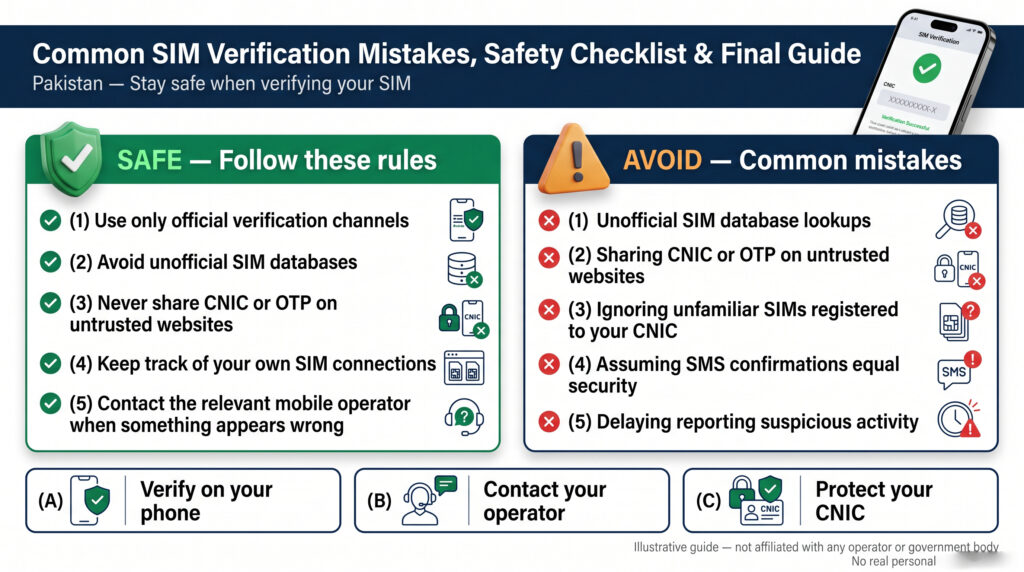
After checking SIM registrations, understanding 668, learning about operator support, and reviewing the security and legal aspects of SIM verification, the final step is knowing how to use all of this information correctly.
Most SIM-related problems can be avoided by following a few simple principles: use official services, protect your identity information, keep track of your own connections, and contact the relevant operator when something appears wrong.
Common SIM Verification Mistakes
1. Using Unofficial SIM Databases
One of the biggest mistakes is entering a CNIC or mobile number into a website claiming to provide complete SIM-owner information.
Avoid websites promising:
- Complete CNIC profiles
- Private addresses
- Call history
- SMS records
- Live location
- Private subscriber information
- Secret telecom databases
A legitimate SIM-verification service should not be treated as a public database of private information.
2. Sharing Your OTP
Never share an OTP with an unexpected caller, agent, website, or social-media account.
If someone claims that an OTP is required for SIM verification:
Stop → End the conversation → Contact the organization through its official channel → Verify independently
3. Giving Your CNIC to Unknown Agents
Your CNIC should only be provided when it is genuinely required for a legitimate transaction or verification process.
Be particularly careful with people offering:
- Free SIMs
- Special packages
- Surveys
- Prizes
- Unexplained registrations
- Unofficial SIM services
Always verify the organization and location first.
4. Assuming Every Unknown SIM Is Fraud
An unfamiliar registration deserves attention, but it does not automatically prove criminal activity.
Before reaching a conclusion, check whether it could be:
- An old SIM
- A previous operator connection
- A replaced SIM
- A secondary number
- A business connection
- An administrative issue
Then contact the relevant operator for clarification.
5. Ignoring Old SIMs
If you have stopped using a number, do not simply forget about it.
Review your old connections periodically and ask the relevant operator about the appropriate procedure if a connection is no longer required.
PTA has advised consumers to ensure that only SIMs they require and actively use remain registered against their name.
6. Using Outdated Short-Code Information
Telecom procedures can change.
A short code, customer-care number, website, or verification process published years ago may no longer work in exactly the same way.
Before relying on an old article:
Check the current official PTA or operator information.
7. Confusing IMEI With SIM Information
Remember:
IMEI = Mobile device
SIM/ICCID = SIM
Mobile number = Cellular service
CNIC = Subscriber identity
Using *#06# can help display the IMEI of a device, but an IMEI check is not the same as checking SIMs registered against a CNIC.
Complete SIM Verification Checklist
Use this checklist whenever you want to review your SIM registrations.
Step 1 — Use an Official Method
For checking SIMs associated with your own CNIC, use the current official 668 or online verification facility.
Step 2 — Review the Result
Compare the result with your own records.
Step 3 — Identify Anything Unexpected
Consider old numbers, previous operators, replacements, and secondary connections.
Step 4 — Contact the Relevant Operator
If something remains unexplained, contact the operator through an official channel.
Step 5 — Complete Verification
Follow the operator’s identity-verification requirements.
Step 6 — Request Corrective Action
If necessary, ask about blocking, de-registration, replacement, or record correction.
Step 7 — Keep Documentation
Save complaint/reference numbers and relevant records.
Step 8 — Escalate When Appropriate
If an applicable telecom complaint remains unresolved, use the appropriate PTA complaint mechanism.
668 Quick Reference
For a basic CNIC-based SIM registration check:
Use the current official 668 procedure.
PTA’s consumer guidance has specifically referenced sending the CNIC number without dashes to 668, as well as using the official online SIM-information facility.
Always verify the latest instructions before using the service.
667 Quick Reference
667 has historically been associated with SIM ownership verification.
However, short-code services and procedures can change, so users should verify the current procedure through the relevant operator or official source before relying on an older 667 instruction.
Do not assume that 667 or any other short code provides unrestricted access to another person’s private information.
What to Do If Your SIM Is Lost
If your SIM is lost:
- Contact your mobile operator promptly.
- Ask about blocking the lost SIM.
- Complete the required identity verification.
- Ask about replacement.
- Review important accounts linked to the number.
- Watch for unexpected security notifications.
The faster you secure a lost number, the lower the risk of someone attempting to misuse it.
What to Do If Your SIM Suddenly Stops Working
A sudden loss of service can be caused by a technical or network issue, but unexplained loss of calls and SMS can also be a warning sign of a potential SIM-swap situation.
PTA National CERT advises users to contact their wireless provider immediately if calls and texts unexpectedly stop.
Use this sequence:
Check network → Contact operator → Confirm SIM status → Review important accounts → Secure affected accounts
What to Do If You Receive an Unexpected OTP
Never share the OTP.
Instead:
Ignore the request → Identify the relevant service → Open the official application/website → Review account activity → Change credentials if necessary
An unexpected OTP does not automatically mean your account has been compromised, but it should not be ignored if it relates to an important account.
What to Do If You Find an Unauthorized SIM
Use this process:
Verify → Review your history → Identify operator → Contact operator → Document complaint → Request corrective action
If there are indications of identity misuse or fraud, use the appropriate current official reporting channel.
Do not attempt to identify the supposed subscriber through leaked databases or unofficial websites.
Protect Your CNIC and Personal Information
Avoid publicly sharing:
- Full CNIC
- Full mobile number
- SIM serial/ICCID
- IMEI
- OTP
- Passwords
- Security answers
- Complete verification screenshots
If you need to provide documentation to an official support channel, share only what is necessary.
Protect Your Biometric Information
Biometric verification should only be completed for a legitimate transaction through an authorized channel.
Before providing biometric information:
- Confirm the organization.
- Confirm the purpose.
- Use an authorized operator/franchise.
- Avoid unknown agents.
- Do not provide fingerprints for unexplained offers.
Official vs. Unofficial SIM Services
| Official/Authorized Approach | Unofficial/Risky Approach |
|---|---|
| PTA resources | Random SIM databases |
| Official operator website | Unknown websites |
| Authorized franchise | Unknown agents |
| Official customer support | Social-media “agents” |
| Recognized complaint mechanism | Leaked databases |
| Current official instructions | Outdated screenshots |
When dealing with identity information, convenience should never be more important than security.
Best SIM Security Routine
A simple routine can help you stay organized:
Periodically
Check the SIM registrations associated with your CNIC.
After Getting a New SIM
Confirm that the registration process was completed through an authorized channel.
After Replacing a SIM
Keep track of the replacement and review your active connections.
After Losing a SIM
Contact the operator immediately.
After Stopping an Old Number
Ask the operator about the appropriate deactivation procedure.
After Suspicious Activity
Review your SIM status and important account-security notifications.
Final SIM Verification Decision Guide
If you are unsure what to do, use this quick guide:
“How many SIMs are registered against my CNIC?”
→ 668 / Official Online Verification
“I found an unfamiliar registration.”
→ Relevant Mobile Operator
“I lost my SIM.”
→ Mobile Operator Immediately
“My SIM suddenly stopped working.”
→ Contact Operator Promptly
“Someone is asking for my OTP.”
→ Do Not Share It
“Someone wants my fingerprint for an unexplained SIM.”
→ Do Not Proceed Until the Request Is Verified
“My telecom complaint remains unresolved.”
→ Applicable PTA Complaint Mechanism
“I want another person’s SIM-owner information.”
→ Do Not Use Unofficial Databases or Unauthorized Searches
Final SIM Verification Safety Checklist
Before considering your SIM-security process complete, make sure you can answer yes to these questions:
- Do I know how to check SIMs registered against my own CNIC?
- Am I using an official verification method?
- Do I know the difference between 667 and 668?
- Do I understand the difference between an IMEI and a SIM?
- Do I know which operator to contact for a SIM problem?
- Do I protect my CNIC?
- Do I keep my OTP private?
- Do I use authorized SIM-registration channels?
- Do I know what to do if I find an unfamiliar SIM?
- Do I know what to do if my SIM suddenly stops working?
- Do I avoid unofficial SIM databases?
- Do I keep important complaint/reference information?
- Do I know when a telecom complaint may need PTA escalation?
If the answer is yes, you have the basic knowledge required to manage your SIM registrations more safely.
Frequently Asked Questions
How can I check SIMs registered against my CNIC in Pakistan?
Use the current official PTA SIM-information facility or the recognized 668 SMS method. PTA consumer guidance has referenced both options for checking SIMs associated with a CNIC.
What is 668 used for?
668 is associated with checking SIM registrations against a CNIC. Always verify the current official procedure before using the service.
What is 667 used for?
667 has historically been associated with SIM ownership verification. Because telecom procedures can change, confirm the current procedure with the relevant operator or official source.
Can I check someone else’s SIM details?
You should not use unauthorized methods to access another person’s private telecom or identity information. SIM verification should primarily be used to check your own registrations.
What should I do if an unknown SIM is registered against my CNIC?
Review your old connections first. If the registration remains unexplained, contact the relevant mobile operator and follow its official verification and corrective procedure.
What if my SIM suddenly stops working?
Contact your mobile operator promptly, especially if the loss of service is unexpected. Sudden loss of calls and SMS can sometimes be a warning sign of SIM-swap activity.
Should I share an OTP with a caller?
No. Never share a confidential OTP with an unexpected caller or agent.
Is an IMEI the same as a SIM number?
No. An IMEI identifies a mobile device, while the SIM/ICCID identifies the SIM or subscriber module.
Is SIM verification enough to protect my identity?
No. It is one part of mobile-security management. You should also protect your CNIC, OTPs, passwords, biometric information, and mobile accounts.
Can an unfamiliar SIM automatically mean fraud?
No. It may be an old connection, replacement, secondary number, business connection, administrative issue, or genuinely unauthorized registration. Verify it before reaching a conclusion.
Final Conclusion
SIM verification is an important part of responsible mobile-account management in Pakistan.
The process becomes much easier when you understand the difference between:
CNIC → Subscriber identity
Mobile number → Cellular service
SIM/ICCID → SIM identifier
IMEI → Mobile device
668 → CNIC-associated SIM registration checking
667 → SIM ownership verification where currently supported
Mobile Operator → SIM and account services
PTA → Telecom regulation and applicable complaint escalation
The safest approach is not to search for private information about other people. Instead, focus on verifying your own registrations, protecting your identity, and resolving problems through authorized channels.
If you discover an unfamiliar SIM, do not panic and do not use an unofficial SIM database. Review your previous connections, identify the relevant operator, contact official support, complete the required verification, and keep a record of the complaint.
Likewise, protect yourself from SIM-swap and identity-related risks by keeping your CNIC, OTPs, biometric information, passwords, and mobile-account details private.
Most importantly, remember this simple formula:
Check → Review → Verify → Contact → Resolve
By following this process and relying on current official information, you can manage your SIM registrations more responsibly while reducing the risks associated with unauthorized SIMs, identity misuse, phishing, and SIM-swap fraud.
This guide is for general educational information only. Telecom procedures, short codes, websites, regulatory requirements, and complaint channels can change. Always verify current details through the relevant official PTA or mobile-operator source.
Leave a Reply