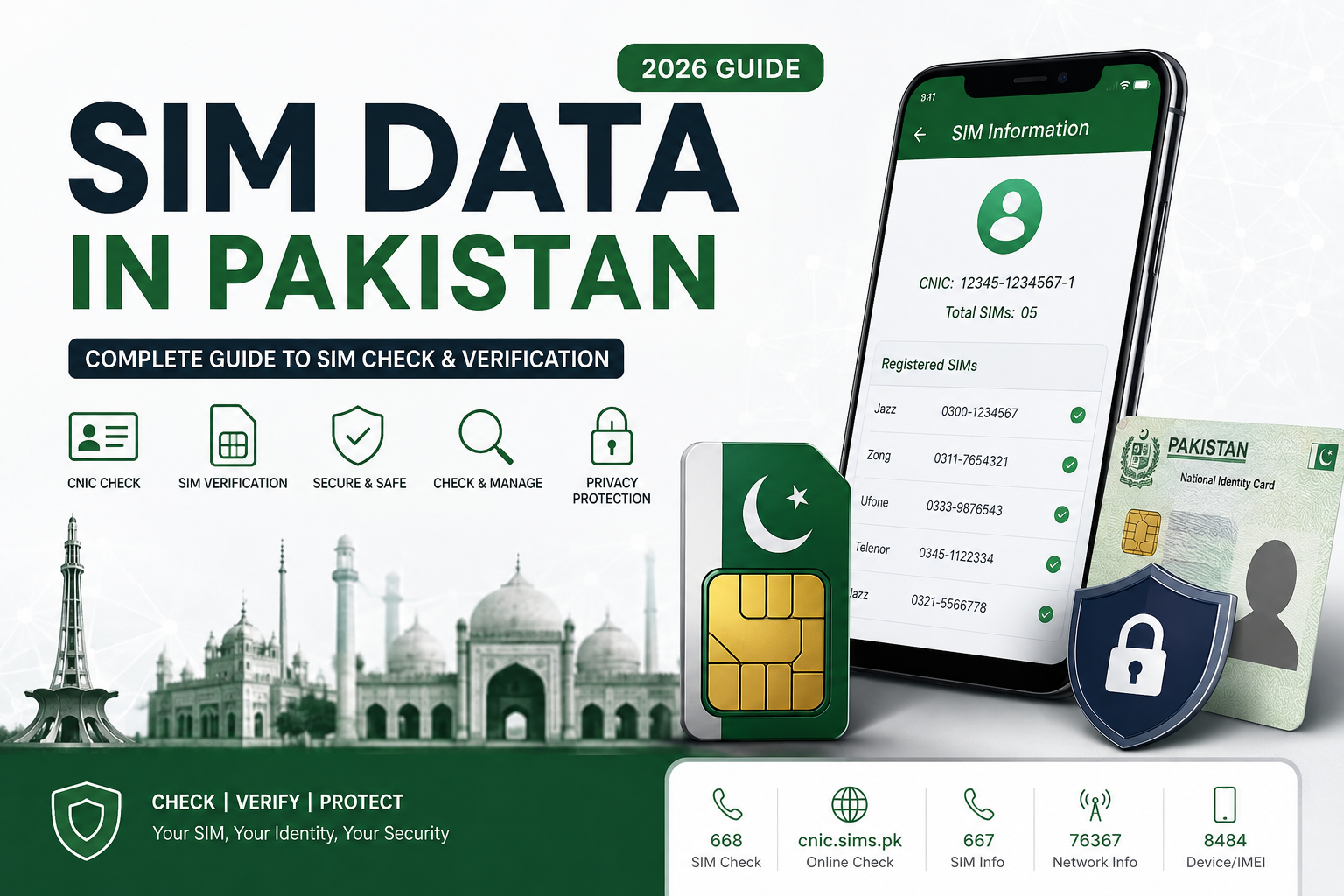
SIM data in Pakistan refers to information associated with mobile SIM registrations, subscriber records, and the connections linked with an identity document. For an individual user, the most important question is usually simple: which SIMs are registered against my CNIC, and how can I verify that information through legitimate channels?
A SIM is not merely a small card inserted into a mobile phone. Its registration connects the mobile service with a subscriber identity, which is why keeping track of your registered connections is an important part of protecting your personal information.
30-Second Quick Answer
If you only need the basic answer, start with the official SIM verification options available for your own CNIC. Pakistan’s telecom verification system provides different methods for checking SIM-related information, while different codes and services have different purposes.
The commonly used options include:
- 668 — CNIC-based SIM information check
- cnic.sims.pk — online SIM verification portal
- 667 — SIM-related verification for a connection in your possession
- 76367 — mobile network identification
These services should not be treated as one universal database. Each has a specific purpose, and the information available through one method may differ from another.
Most importantly, checking your own SIM record is different from trying to obtain another person’s private subscriber information.
What Is SIM Data?
The term SIM data can describe several different categories of information.
It may refer to:
- SIM registration information;
- mobile operator information;
- subscriber records;
- CNIC-linked SIM registrations;
- SIM activation details;
- network information;
- device-related information;
- or other telecom records maintained within authorized systems.
This does not mean that all of this information is publicly searchable.
A person’s private subscriber information is not automatically available simply because a mobile number is known. Legitimate verification systems operate within specific purposes, permissions, and procedures.
Why Is SIM Registration Important?
When a SIM is issued, subscriber identification is an important part of the registration process. This helps telecom operators maintain records of who is associated with a particular mobile connection.
For ordinary users, this creates an important responsibility: know which connections are registered against your own identity.
You may have accumulated several SIMs over the years. Some may be active, some may no longer be used, and others may have been replaced. Without periodically checking your record, it can be difficult to remember every connection associated with your CNIC.
SIM Data Is Not the Same as a Public Database
One of the biggest misunderstandings surrounding SIM data is the idea that there is a public search box where anyone can enter any Pakistani mobile number and obtain a complete subscriber profile.
That assumption is incorrect.
A legitimate SIM verification process is primarily designed to help users manage or verify information they are authorized to access. It should not be confused with unrestricted access to another person’s CNIC, address, family information, call records, or private location data.
This distinction will remain important throughout this guide.
What This Complete Guide Covers
This guide brings together the major aspects of SIM data and SIM verification in Pakistan in one place. It covers official checking methods, registration limits, verification procedures, ownership-related questions, privacy, legal considerations, SIM transfer and disowning, lost connections, security risks, operator-specific issues, special cases, and practical troubleshooting.
It also explains how technologies and systems such as BVS/MBVS, SVMS, DIRBS, MNP, eSIM and IMEI-related services fit into Pakistan’s broader telecom environment.
By the end, you should have a much clearer understanding of what SIM data means, what you can legitimately check, which method is appropriate for a particular situation, and how to keep your own mobile registration record accurate and secure.
Official Ways to Check SIM Data in Pakistan
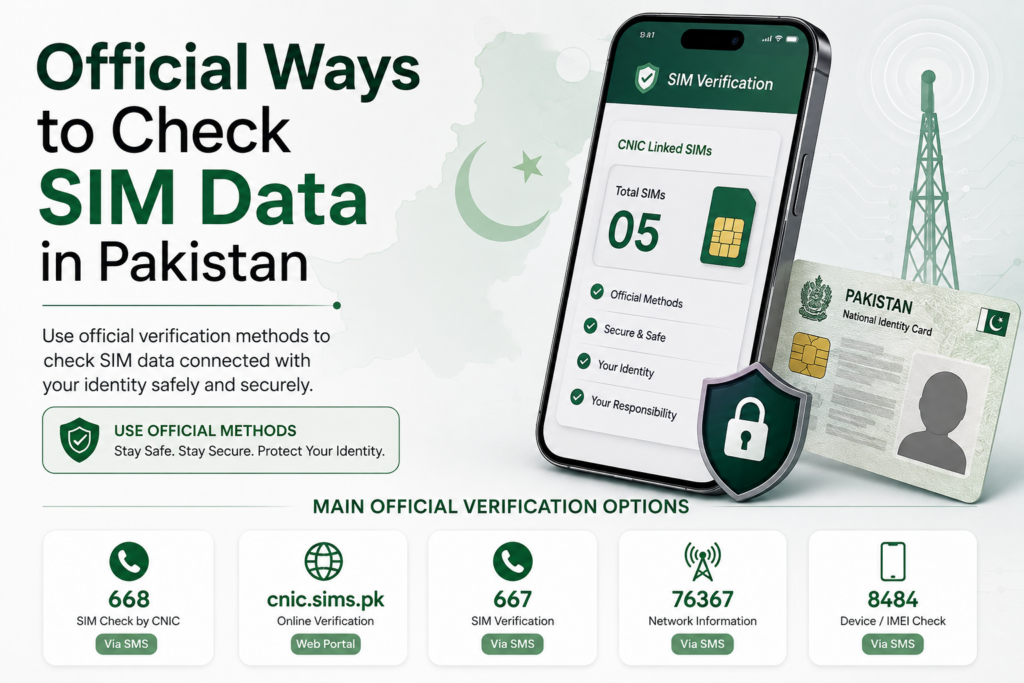
If you want to verify SIM data connected with your own identity, the safest starting point is an official verification method rather than an unofficial database, social-media page, or third-party application. Different services are designed for different purposes, so choosing the correct method is important.
A useful rule is:
First decide what you want to verify, then use the official method designed for that purpose.
For example, checking how many SIMs are associated with your CNIC is different from checking the network of a mobile number or verifying a SIM already in your possession.
The Main Official Verification Options
For personal SIM verification in Pakistan, users commonly encounter several official channels and codes, including:
| Method | Main Purpose |
|---|---|
| 668 | CNIC-based SIM information |
| cnic.sims.pk | Online CNIC-linked SIM verification |
| 667 | Verification related to a SIM in your possession |
| 76367 | Mobile network check |
| Operator support | SIM-specific account and registration issues |
These methods should not be mixed together. Each one serves a different function.
1. 668 — CNIC-Based SIM Check
The 668 method is commonly used when a person wants to check SIM registrations associated with their own CNIC.
This makes it particularly useful for a basic self-audit.
If you have changed numbers several times, used multiple networks, or simply have not reviewed your registrations for a long period, a CNIC-based check can help you understand your current registration situation.
The exact SMS format, response details and applicable charges should always be confirmed through current official instructions because telecom procedures can change.
2. cnic.sims.pk — Online Verification
Users who prefer a browser-based process can use the official cnic.sims.pk portal for CNIC-related SIM verification.
An online portal can be convenient because information can be viewed directly on a screen rather than interpreted from a short SMS response.
Before entering your CNIC, always check that you are using the genuine official website. Avoid entering sensitive identity information into websites that merely copy the appearance or terminology of official telecom services.
3. 667 — SIM-Related Verification
The 667 service has a different purpose from a general CNIC SIM-count check. It can be relevant when you are dealing with a SIM that you actually possess and need registration-related information or verification.
This distinction matters because users sometimes assume that every telecom code performs the same function.
Always follow the current instructions associated with the particular service instead of relying on old screenshots or instructions copied across websites.
4. 76367 — Network Check
If your question is simply which mobile network a number belongs to, a network-check service such as 76367 addresses a different need from CNIC-based SIM verification.
Knowing a number’s network does not automatically provide permission to access the subscriber’s private identity information.
This is an important distinction when researching SIM data.
Official Does Not Mean Everything Is Public
An official verification service should not be interpreted as a public database containing every detail about every subscriber.
Legitimate services may provide specific information for a defined purpose, while sensitive subscriber information remains restricted.
Therefore, if your objective is to check your own SIM registrations, use the appropriate CNIC-based method. If your objective involves a particular SIM, use the relevant operator or SIM-specific service.
The safest approach
Think of the verification process as a simple decision:
Own CNIC → CNIC verification
SIM in your possession → SIM-specific verification
Need network information → network check
Account or registration problem → mobile operator
Using the correct channel reduces confusion, protects your personal information, and keeps the entire SIM verification process focused on legitimate self-checking.
How to Check Your Own SIM Data Through 668

For a quick self-check, the 668 SIM verification method is one of the most commonly used options for reviewing SIM registrations associated with your own CNIC. It is especially useful for people who want to check their mobile registrations without relying on an unfamiliar website or installing a third-party application.
The important point is that 668 should be understood as a self-verification service. It is not a public tool for searching another person’s private subscriber information.
How the 668 Method Works
The basic idea is straightforward: you provide your own CNIC information according to the current official instructions, and the service returns SIM-related information associated with that identity record.
Before sending an SMS, always check the latest instructions from the relevant official authority because SMS formats, charges, response details, and service procedures can change.
Step 1 — Prepare Your CNIC
Keep your own 13-digit CNIC number ready.
If the current instructions require the CNIC without dashes or spaces, enter it exactly in that format. Do not add unnecessary personal information to the message.
Step 2 — Send the Required SMS
Follow the current official procedure for sending your CNIC information to 668.
Do not use a random number provided by an unofficial website simply because it claims to offer a “SIM database” or “owner details” service.
Step 3 — Review the Response
Once you receive the response, carefully review the information provided.
The result can help you understand the SIM registrations associated with your CNIC. Depending on the current service format, information may be presented according to mobile operators or registration categories.
Do not assume that every number you remember using must appear in exactly the same way. Historical SIM usage, replacement connections, and changes in subscriber records can create situations that require further clarification.
What If You See an Unfamiliar Registration?
Do not immediately assume that the result proves identity theft.
First, think about your own mobile history.
Ask yourself:
- Have I ever used this operator?
- Did I previously have another number?
- Did I replace a SIM?
- Did I use a secondary or data connection?
- Could this be an old registration I forgot about?
If you still cannot explain the registration, identify the relevant operator and contact its official customer-service channel.
The goal is to resolve the registration associated with your CNIC, not to investigate the private identity of another person.
How Much Does the 668 Check Cost?
The applicable SMS charge should be confirmed from the latest official information before using the service. Do not rely on an old article that gives a fixed price because telecom charges and service conditions can change.
The online verification route may provide a different user experience and may have different conditions.
668 Is Not a Stranger Lookup Tool
A major misconception is that a person can use 668 to enter someone else’s mobile number and obtain their complete personal profile.
That is not the purpose of the service.
A legitimate CNIC-based verification process is intended for checking information connected with your own identity record. It should not be treated as permission to access another subscriber’s private CNIC, address, family details, call records, or location information.
Keep a Record of Your Check
If you are conducting a regular SIM audit, keep a private note of the date you performed the check and the SIMs you recognize.
If something unexpected appears later, this history can help you identify changes more easily.
The practical rule
Use 668 to check your own SIM registration information, follow the latest official instructions, protect your CNIC, and contact the relevant operator if something does not match your records.
This simple approach makes the 668 method useful as part of a broader personal SIM-data and identity-management routine.
How to Check SIM Data Online Through cnic.sims.pk

The online SIM verification method is useful for people who prefer checking their SIM registration information through a browser rather than using SMS. The official cnic.sims.pk portal is designed for CNIC-based SIM verification, making it another important option for checking the mobile connections associated with your own identity.
The key principle remains the same: use the official portal for your own verification and protect your CNIC information throughout the process.
What Is cnic.sims.pk?
The cnic.sims.pk portal provides an online route for checking SIM-related information associated with your CNIC.
Instead of sending an SMS, you can use a browser-based interface to enter the information requested by the portal and review the available result.
This can be convenient when you want to examine the result on a larger screen or keep a record of your verification.
How to Check Your SIM Data Online
Step 1 — Open the Official Portal
Open the official cnic.sims.pk website directly.
Be careful when searching for the portal through Google or another search engine because third-party websites may use similar terminology.
Before entering your CNIC, check the website address carefully.
Step 2 — Enter Your Own CNIC
Enter your own CNIC information according to the format requested by the portal.
Do not enter another person’s CNIC simply to investigate their mobile registrations.
Your objective should be to verify the SIM data connected with your own identity.
Step 3 — Complete the Required Verification
Follow any verification instructions displayed on the portal.
If the website asks you to complete a security check or another confirmation step, follow the instructions shown by the official system.
Never provide an OTP, password, banking credential, or unrelated sensitive information simply because a third-party page claims that it is required for SIM verification.
Step 4 — Review the Result
Once the verification is completed, carefully examine the information presented.
Compare the result with the mobile connections you currently recognize.
If the information is organized by operator, review each operator separately rather than looking only at the overall total.
What If You Find an Unfamiliar SIM?
An unfamiliar entry should not automatically be interpreted as proof of fraud.
First, consider your previous mobile usage. You may have used an older number, replaced a SIM, maintained a secondary connection, or forgotten a registration from several years ago.
If you still cannot explain the registration, identify the relevant mobile operator and contact its official support channel.
The operator can guide you through the appropriate process for verification, blocking, disowning, or another applicable resolution.
Keep Your CNIC Private
Your CNIC is sensitive personal information.
Avoid entering it into websites that promise:
- unlimited SIM databases;
- another person’s owner details;
- private addresses;
- family information;
- call records;
- or real-time location.
A legitimate online verification process should have a clear purpose.
Also avoid downloading unknown browser extensions, APK files, or applications simply because a website claims they are required to access SIM data.
Online Check vs SMS Check
Both methods can be useful, but the experience is different:
| Feature | 668 SMS | cnic.sims.pk |
|---|---|---|
| Internet required | No | Yes |
| Browser required | No | Yes |
| Quick self-check | Yes | Yes |
| Screen-based review | Limited | More convenient |
| Best for | SMS verification | Online verification |
The exact interface, requirements and available information can change, so always follow the latest instructions shown by the official service.
The main takeaway
The online portal should be treated as a self-checking method, not as a public search engine for private subscriber information.
Use your own CNIC, verify the information carefully, protect your personal data, and contact the relevant operator whenever an unexpected registration requires further investigation.
How 667 SIM Verification Differs From 668

The 667 SIM verification method serves a different purpose from the 668 CNIC-based check. Understanding this difference is important because many people assume that every SIM-related code provides the same type of information.
In reality, telecom verification services can have different functions depending on what you are trying to confirm. One method may help you review SIM registrations associated with your identity, while another may be relevant to a SIM that you already possess.
What Is 667 Used For?
The 667 service is associated with SIM-related verification, particularly when dealing with a SIM in your possession.
This makes it different from a general CNIC-based registration check.
If your question is:
“Which SIM registrations are associated with my CNIC?”
you need a CNIC-focused verification method.
If your question concerns:
“What registration information is associated with the SIM I currently have?”
a SIM-specific verification method such as 667 may be more relevant.
Always follow the latest instructions provided by the relevant official service because procedures can change.
667 vs 668
The easiest way to understand the distinction is through a comparison:
| Feature | 667 | 668 |
|---|---|---|
| Main focus | SIM-specific verification | CNIC-based SIM check |
| Best suited for | SIM in your possession | Your registered SIM record |
| Purpose | Verify relevant SIM information | Review CNIC-linked registrations |
| Public stranger lookup | No | No |
| Personal information required | Follow current instructions | Your own CNIC |
This distinction prevents users from expecting one code to perform every type of SIM check.
When Should You Use 667?
You may encounter situations where a SIM you physically possess needs registration-related verification.
For example, you might be dealing with:
- a recently activated SIM;
- an existing connection;
- a replacement SIM;
- an ownership-related question;
- or another SIM-specific issue.
Rather than searching random websites for an answer, use the appropriate official channel and follow its current procedure.
When Should You Use 668 Instead?
Use a CNIC-based method when your objective is to understand the SIM registrations associated with your own identity record.
This can be useful during a personal SIM audit.
For example, if you have used several networks over the years and want to determine whether your current record matches your understanding, a CNIC-based check is more appropriate than a SIM-specific verification.
Neither Method Is a Stranger Lookup Tool
This is one of the most important privacy principles in SIM verification.
Knowing another person’s mobile number does not automatically give you the right to retrieve their private subscriber information.
Neither 667 nor 668 should be treated as a public database for obtaining another person’s:
- CNIC;
- home address;
- family information;
- call history;
- private messages;
- or real-time location.
The legitimate focus is self-verification and authorized subscriber management.
What If You Are Unsure Which Method to Use?
Start with the question you are actually trying to answer.
Want to review your own CNIC-linked SIMs?
Use the appropriate CNIC-based verification method.
Want to verify a SIM you possess?
Use the relevant SIM-specific method and follow its current instructions.
Want to identify a mobile network?
A network-check service such as 76367 addresses that different purpose.
Have a registration or account problem?
Contact the relevant mobile operator directly.
Final takeaway
The most effective SIM verification process is not about using every available code. It is about choosing the right official method for the specific question you need answered.
Understanding the difference between 667 and 668 can save time, reduce confusion, and help you avoid unofficial services that make exaggerated claims about SIM owner information.
How to Check a Mobile Network Using 76367
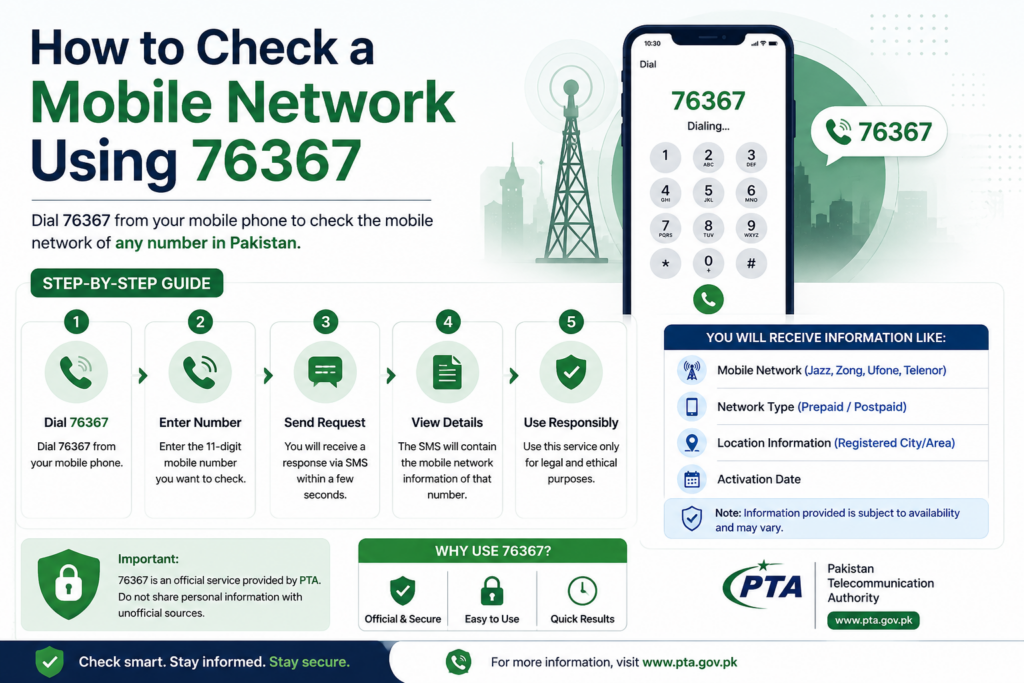
Not every SIM-related question requires a CNIC check. Sometimes you already have a mobile number and simply want to understand which network it is associated with. This is where a network-check service such as 76367 is different from CNIC-based SIM verification.
Understanding this distinction can save you from using the wrong method or expecting information that a particular service is not designed to provide.
What Is 76367 Used For?
The 76367 service is associated with checking the mobile network of a number.
This is a narrower type of verification than checking SIM registrations against your CNIC.
For example, if you have a number and your question is:
“Which mobile network is this number currently associated with?”
a network-check service is more relevant than a CNIC-based SIM check.
Network Check vs SIM Owner Details
These two concepts are often confused.
A network check is about the telecommunications network associated with a number.
SIM owner details, on the other hand, concern subscriber registration and identity-related information.
Knowing the network associated with a mobile number does not automatically provide access to the private identity of the subscriber.
This distinction is especially important when researching SIM information online.
What a Network Check Does Not Automatically Reveal
A network check should not be treated as a public identity lookup.
You should not assume that checking a number can legitimately reveal another person’s:
- CNIC number;
- residential address;
- family information;
- call history;
- private messages;
- bank information;
- or real-time location.
Telecom information exists in different categories, and access to sensitive subscriber information is subject to authorization and applicable rules.
Why Network Information Can Be Useful
Although a network check provides limited information, it can still be practical.
You may want to identify the network when:
- organizing your own contact records;
- checking an unfamiliar number before contacting it;
- troubleshooting a mobile connection;
- comparing operator services;
- or understanding which operator you need to contact about a particular issue.
The information can also help you determine which mobile operator’s official support channel is relevant when dealing with a SIM-related problem.
Do Not Rely on Old Number Prefixes Alone
A common mistake is assuming that a mobile number’s starting digits always tell you its current network.
Number portability can affect this assumption because a subscriber may move a number from one operator to another while retaining the same mobile number.
Therefore, if you specifically need current network information, use an appropriate network-check service rather than relying only on the number’s original prefix.
What Is MNP?
MNP, or Mobile Number Portability, allows eligible subscribers to move their mobile number between participating operators while retaining the number.
This is one reason why number prefixes should not always be treated as definitive evidence of the current operator.
MNP is part of the wider telecom ecosystem and is separate from checking which SIM registrations are associated with your CNIC.
What Should You Do After Identifying the Network?
If you are dealing with a problem involving your own SIM, knowing the network can help you contact the correct operator.
For example, if you need assistance with:
- SIM replacement;
- blocking a lost connection;
- registration questions;
- ownership-related procedures;
- or another account issue,
the relevant mobile operator is generally the appropriate place to begin.
Always use the operator’s current official customer-support channels.
The key distinction
Think of the services this way:
668 → your CNIC-linked SIM registrations
cnic.sims.pk → online CNIC-based verification
667 → SIM-specific verification
76367 → network information
The exact service procedures and available information can change, so confirm current instructions before using any telecom code.
Most importantly, a network check is not a permission slip to investigate another person’s private identity. Use it for its intended purpose and keep your SIM verification focused on legitimate, authorized information.
Understanding SIM Registration and Biometric Verification in Pakistan
SIM registration is the process that connects a mobile connection with the subscriber information required by the telecom system. Because a SIM is linked to an identity record, verification plays an important role when a person activates, replaces, transfers, or manages a mobile connection.
For users checking their own SIM data, understanding this registration process makes the results of official verification methods much easier to interpret.
What Happens During SIM Registration?
When a subscriber obtains a SIM through an authorized process, the operator records the information required for subscriber identification and verification.
The purpose is to establish a connection between the mobile service and the person who is legally registered for that connection.
This is why simply possessing a SIM card does not necessarily answer every ownership-related question. The subscriber record maintained by the operator is an important part of the overall registration process.
What Is Biometric Verification?
Biometric verification uses a person’s biological identity characteristics to confirm that the individual requesting a telecom service matches the identity record being used for the transaction.
In Pakistan’s telecom environment, biometric verification has become an important part of SIM issuance and related subscriber processes.
The objective is to reduce fraudulent registrations and make it harder for someone to obtain a connection using another person’s identity without authorization.
BVS and MBVS
You may encounter the terms BVS and MBVS when researching SIM registration.
BVS generally refers to Biometric Verification System, while MBVS is used for Mobile Biometric Verification System.
These systems relate to biometric identity verification within telecom-related processes.
For an ordinary subscriber, the important point is not the technical architecture but the practical purpose: biometric verification helps establish that the person completing a relevant transaction is properly associated with the identity being used.
Why Biometric Verification Matters
Biometric verification can help reduce problems such as:
- unauthorized SIM registrations;
- fraudulent subscriber identities;
- misuse of another person’s CNIC;
- improperly activated connections;
- and certain forms of identity-related telecom fraud.
However, biometric verification does not mean that a subscriber should stop checking their own SIM registrations.
Regular self-checking remains useful because keeping track of your registered connections is part of responsible identity management.
What If Biometric Verification Fails?
Sometimes a legitimate user may experience difficulty completing biometric verification.
Possible reasons can include:
- identity-record inconsistencies;
- biometric matching difficulties;
- documentation issues;
- technical problems;
- or operator-specific requirements.
If verification fails, do not attempt to bypass the process through unofficial websites or agents.
Instead, contact the relevant operator and follow its current procedure for resolving the issue.
Biometric Verification and SIM Ownership
Biometric verification should not be confused with a public owner-search system.
The fact that SIM registration uses biometric verification does not mean that anyone can enter a mobile number and publicly retrieve the subscriber’s complete identity information.
The purpose of the system is controlled verification and subscriber management.
Keep Your CNIC Information Secure
Your identity document remains sensitive even when biometric verification is part of the registration process.
Do not send photographs of your CNIC, fingerprints, OTPs, or other sensitive information to random individuals claiming they can provide SIM data.
If a transaction requires identity verification, use the operator’s authorized channel.
The practical takeaway
SIM registration, biometric verification, BVS, and MBVS are all connected to the broader process of establishing and maintaining legitimate subscriber records.
For everyday users, the most important habits are simple:
Use authorized registration channels → protect your identity information → verify your own SIM record → resolve problems through the relevant operator.
Understanding these fundamentals will also make later sections about SIM transfers, disowning, biometric problems, fraud prevention, and special registration cases easier to follow.
SIM Registration Limits in Pakistan: 5 Voice + 3 Data
One of the most important things to understand when reviewing your SIM data is the registration limit associated with a CNIC. Pakistan’s telecom framework places a limit on the number of SIM connections that can be registered under one identity, with the commonly referenced maximum divided between voice and data connections.
The practical limit is 8 SIMs in total: 5 voice SIMs and 3 data SIMs.
Understanding the 8-SIM Limit
The limit is easier to understand when separated into its two categories:
| SIM Category | Maximum |
|---|---|
| Voice SIMs | 5 |
| Data SIMs | 3 |
| Total | 8 |
This means that reaching the overall number is not the only consideration. The voice and data categories are also relevant.
For someone managing several mobile connections, keeping track of both categories can prevent confusion when activating another service.
Why Does the SIM Limit Matter?
The registration limit helps maintain control over the number of mobile connections associated with one identity.
From a user’s perspective, it also creates a useful reason to periodically review their SIM registrations.
For example, imagine someone has used several mobile networks over the years. They may remember only the numbers they currently use while forgetting older connections.
If their CNIC-linked registrations are already close to the permitted limit, an attempt to obtain another connection may create an unexpected issue.
A personal SIM audit can help identify unnecessary or unfamiliar registrations before they become a problem.
What If You Have Reached the Limit?
If your registered connections appear to have reached the applicable limit, do not try to bypass the system using unofficial methods.
Instead, review your existing SIMs and determine whether there are connections you no longer need.
If an old or unwanted registration needs to be removed, contact the relevant mobile operator and ask about the current SIM disowning or closure procedure.
The exact process may depend on the circumstances of the connection.
What If an Unknown SIM Is Counted Against You?
An unfamiliar registration deserves attention, particularly if you are certain that you never activated or used the connection.
Start by reviewing your own mobile history.
If you still cannot identify the registration, contact the relevant operator through its official customer-service channel.
Explain that the connection appears to be associated with your CNIC but you do not recognize it.
Keep any complaint or reference number provided during the process.
Does the Limit Mean Every Person Can Use Eight SIMs?
Not necessarily.
The limit represents the permitted registration framework; it does not mean every person needs or should maintain eight connections.
Many users only need one or two active numbers.
Maintaining unnecessary SIM registrations can make personal record management more difficult, so it is sensible to keep only the connections you genuinely need.
Special Categories Need Extra Attention
SIM registration can involve different circumstances, including:
- voice connections;
- data connections;
- minors;
- foreigners or POC holders;
- company or organizational connections;
- deceased subscribers;
- and older or dormant registrations.
These situations may have specific procedures or requirements, so they should not automatically be treated as identical to an ordinary individual SIM activation.
Keep Your Own SIM Count Organized
A simple private record can make the limit easier to manage.
Write down the SIMs you currently recognize and identify which ones you actively use.
Then compare that record with your official CNIC-based verification result.
If something does not match, resolve it through the relevant operator rather than relying on an unofficial database.
The main takeaway
The commonly referenced Pakistani SIM registration limit is:
5 voice + 3 data = 8 SIMs.
Understanding this limit is useful, but the more important habit is maintaining awareness of the connections registered against your own identity.
SIM Disowning in Pakistan: When and How to Remove a Registration
If a SIM is no longer needed, has become unnecessary, or appears against your CNIC without a clear explanation, SIM disowning may become part of the resolution process. Disowning is different from simply removing a SIM card from your phone. The important issue is the subscriber record maintained by the relevant mobile operator.
Understanding this difference can help you keep your SIM data organized and avoid unnecessary registrations remaining associated with your identity.
What Does SIM Disowning Mean?
SIM disowning generally refers to ending your association with a particular SIM registration through the applicable operator procedure.
Simply stopping use of a number does not necessarily mean that you have completed every required subscriber-record action.
If you no longer need a connection, ask the relevant operator about its current process for properly closing or disowning it.
When Might You Need to Disown a SIM?
You may consider the operator’s disowning procedure when:
- you no longer use an old SIM;
- a connection is unnecessary;
- you have replaced an older number;
- an unfamiliar registration appears on your CNIC;
- or you need to resolve a subscriber-record issue.
The correct procedure can depend on the circumstances, so do not assume that every case is handled identically.
Disowning Is Different From Losing a SIM
If your SIM has been lost or stolen, your first priority should be blocking or securing the connection through the relevant operator.
Disowning and blocking are not automatically the same action.
A lost SIM can present a security risk if it remains accessible to another person, particularly when the number is connected to important accounts or authentication services.
For a lost connection, contact the operator promptly and follow its current instructions.
What If an Unknown SIM Is Registered on Your CNIC?
An unfamiliar registration should first be investigated through legitimate channels.
Start by checking your own records and considering whether the number could be an old connection, replacement, secondary SIM, or another registration you have forgotten.
If you still do not recognize it, contact the relevant operator and explain the situation.
Do not attempt to obtain the suspected user’s private information through an unofficial database.
The objective is to resolve the registration associated with your identity, not to investigate another subscriber.
What Documents or Verification May Be Required?
The exact requirements can vary depending on the operator and the type of request.
You may be asked to complete identity verification or provide information necessary to establish that you are the registered subscriber.
Because operator procedures can change, verify the current requirements before visiting a service location.
Do not rely on an old blog post for a specific fee, document list, or processing requirement without checking the latest official information.
Keep Proof of the Request
If you submit a disowning or registration-related request, keep any relevant:
- receipt;
- complaint number;
- reference number;
- SMS confirmation;
- or other official acknowledgement.
This can be useful if you later need to follow up.
Verify Your Record Again
After the operator confirms that the matter has been processed, perform another official SIM verification when appropriate.
The purpose is to confirm that your current subscriber record now matches your expectations.
This creates a simple verification cycle:
Identify → contact operator → resolve → confirm.
Disowning Is Part of Good SIM Management
Managing SIM data is not only about checking how many connections are registered against your CNIC. It is also about keeping that record accurate over time.
When you stop using a connection, lose a SIM, discover an unfamiliar registration, or replace an old number, take the appropriate official action rather than assuming the record will automatically correct itself.
SIM Transfer in Pakistan: Ownership Changes and Important Rules
SIM transfer is different from simply changing the mobile phone in which a SIM is used. A transfer involves the subscriber record and the person to whom the connection is officially associated. Because the SIM registration is connected with identity information, ownership-related changes should always be completed through the appropriate operator process.
Understanding the difference between SIM transfer, SIM replacement, and SIM disowning can prevent many common mistakes.
What Does SIM Transfer Mean?
SIM transfer generally refers to changing the registered subscriber associated with a mobile connection through the applicable official procedure.
This can become relevant when a connection needs to be moved from one eligible subscriber to another.
The exact requirements depend on the operator and the circumstances, so users should confirm the current procedure before beginning the process.
SIM Transfer vs SIM Replacement
These terms are often confused.
SIM replacement normally concerns obtaining a replacement SIM for an existing connection, such as when the original SIM is damaged, lost, or needs to be replaced.
SIM transfer, on the other hand, concerns the subscriber registration associated with the connection.
Replacing a SIM does not automatically mean that the registered ownership has changed.
When Might a Transfer Be Needed?
A transfer may become relevant in situations such as:
- a legitimate change in subscriber responsibility;
- a family-related arrangement;
- a business or organizational requirement;
- or another circumstance where the operator’s rules allow the registration to be changed.
Not every situation qualifies automatically. The operator may require identity verification and other documentation.
The 365-Day Rule
One important rule to understand when researching SIM transfer and disowning is the 365-day restriction associated with a newly activated SIM.
Under the relevant PTA guidance, a newly activated SIM may be subject to a full-year period before certain disowning or transfer actions can be completed.
Because rules and implementation procedures can change, always confirm the current requirement with the relevant operator or official PTA information before making a transfer-related decision.
Do not rely solely on an old social-media post or an outdated article.
Why the 365-Day Rule Matters
The restriction is particularly important for people who have recently activated a connection and then immediately want to change its registration.
A person may assume that because they possess the SIM, they can instantly transfer it to another individual.
That assumption can be incorrect if the applicable restriction has not yet expired.
Checking the activation date and confirming the current operator procedure can therefore save time.
What Information Should You Keep?
Before requesting any subscriber-record change, keep track of:
- the mobile number;
- the relevant operator;
- activation information where available;
- your identity documentation;
- and any reference or receipt provided during the process.
Do not send these details to unofficial agents who claim they can bypass operator requirements.
What If You Cannot Transfer the SIM?
If the connection is not eligible for the requested change, ask the operator what legitimate alternatives are available.
Depending on the circumstances, that could involve continuing the existing registration, waiting until an applicable restriction expires, replacing the connection, or following another approved process.
Never attempt to bypass the telecom registration system through an unofficial database or fraudulent documentation.
Keep the three concepts separate
Transfer → changes the registered subscriber relationship.
Replacement → replaces the physical SIM associated with a connection.
Disowning → ends your association with a SIM registration through the applicable procedure.
Understanding these differences is an important part of managing your SIM data correctly.
The 7-Day New-SIM Waiting Rule in Pakistan
When researching SIM registration in Pakistan, users may come across another important timing requirement: the 7-day waiting rule associated with a newly issued SIM. Understanding this rule is useful because people sometimes expect a newly obtained connection to be immediately available for every type of subsequent action.
The exact procedure can depend on the transaction and the operator, so the current official requirements should always be confirmed before taking action.
What Is the 7-Day Rule?
The 7-day rule refers to a waiting period associated with certain actions involving a newly issued SIM.
The practical lesson is simple: if you have just obtained a new SIM, do not automatically assume that every ownership-related or subscriber-management action can be completed immediately.
Some telecom procedures have timing restrictions designed to prevent rapid changes immediately after activation.
Why Does a Waiting Period Matter?
A waiting period can provide additional control around newly activated connections.
Without understanding applicable timing requirements, a subscriber might visit an operator location expecting an immediate transfer, disowning action, or another change and discover that the request cannot yet be processed.
Checking the relevant date before visiting an operator can therefore save time.
How Should You Track the Waiting Period?
If you have recently activated a SIM and expect to perform another subscriber-related action later, keep a private record of:
- activation date;
- mobile number;
- operator;
- transaction details;
- and any receipt or confirmation provided.
This makes it easier to determine whether the applicable waiting period has passed.
Do Not Confuse 7 Days With 365 Days
The 7-day rule and the 365-day rule are separate concepts and should not be treated as interchangeable.
The 7-day requirement relates to a shorter waiting period associated with a newly issued connection, while the 365-day rule concerns a much longer restriction associated with certain disowning or transfer situations.
Because these rules address different circumstances, always check which requirement applies to the specific transaction you are trying to complete.
What If Your Request Is Rejected?
If an operator tells you that a newly issued SIM is not yet eligible for the action you requested, ask the representative to explain the applicable current requirement.
Do not attempt to bypass a waiting period through:
- unofficial agents;
- fake documentation;
- altered subscriber information;
- unofficial databases;
- or unauthorized applications.
If the restriction is legitimate, waiting until the applicable period has passed is safer than attempting to circumvent it.
Why Current Information Matters
Telecom procedures can be updated, and different transactions may have different requirements.
For this reason, an article, social-media post, video, or screenshot published months or years ago should not automatically be treated as the current rule.
Before making an important SIM transfer, disowning, replacement, or registration decision, confirm the current requirement with the relevant operator or official PTA information.
A simple way to remember it
New SIM → note the activation date → check the applicable waiting requirement → confirm with the operator → proceed through the official process.
The 7-day rule is therefore best understood as part of the wider SIM-management framework rather than as a universal waiting period for every telecom service.
If your situation involves both a recently activated SIM and a later ownership-related action, check the applicable rule carefully instead of assuming that one timing requirement applies to every transaction.
SIM Disowning Fees and What You Should Know Before Visiting an Operator
When you no longer need a SIM or discover a registration that you do not recognize, the next step is usually to understand the operator’s current process for resolving that registration. One important part of this process is the SIM disowning fee.
The fee is only one part of the process. You should also understand when disowning is appropriate, what verification may be required, and why you should use an authorized operator channel.
What Is a SIM Disowning Fee?
A SIM disowning fee is the applicable charge associated with processing a request to end your registered association with a particular SIM, where the operator’s current procedure requires such a charge.
The exact amount and applicable conditions can change, so do not rely on an old article or social-media post for the current fee.
Before visiting an operator franchise or service centre, confirm the latest information through the operator’s official customer-support channel.
When Might You Need SIM Disowning?
Disowning may become relevant when:
- you no longer use an old SIM;
- a connection is unnecessary;
- an unfamiliar registration appears on your CNIC;
- you have changed your mobile arrangements;
- or you need to correct your subscriber record.
However, disowning is not automatically the correct solution for every SIM-related problem.
For example, if a SIM has been lost or stolen, your immediate priority should be securing or blocking the connection through the operator.
Do Not Confuse Disowning With Blocking
These actions address different situations.
Blocking is generally concerned with preventing a SIM or connection from being used, particularly in situations such as loss or theft.
Disowning concerns your subscriber association with a registration.
If you are unsure which action applies, explain your situation to the operator and ask for the appropriate current procedure.
What Should You Take With You?
Requirements can vary depending on the operator and the nature of the request.
You may need to complete identity verification and provide information necessary to establish your subscriber status.
Before visiting, check the operator’s current requirements so that you do not make an unnecessary trip.
Avoid giving your CNIC documents to unofficial agents who promise to process the request faster or bypass normal verification.
What If the SIM Is Unknown?
If an unfamiliar SIM appears during your CNIC self-check, do not immediately assume that someone has committed fraud.
First, compare the result with your own mobile history.
If you genuinely cannot identify the connection, contact the relevant operator and explain that the registration is associated with your CNIC but is not recognized by you.
Ask the operator what official process applies.
Keep the complaint or reference number if one is provided.
Confirm the Result Afterward
After the operator confirms that the request has been completed, consider performing another official SIM verification when appropriate.
This gives you a simple record-management cycle:
Check → identify → contact operator → resolve → check again.
If the registration remains after the stated resolution period, use the reference information from your original complaint when following up.
Why Official Channels Matter
SIM registration involves personal identity information. Using an authorized operator channel helps reduce the risk of exposing your CNIC or other sensitive information to an unnecessary third party.
Be especially cautious of anyone who claims they can remove a SIM from your CNIC through a private database, unofficial application, or secret telecom system.
A legitimate process should not require you to bypass the operator’s identity and registration procedures.
Final takeaway
The most important point about SIM disowning fees is not simply the amount charged. It is understanding whether disowning is actually the correct action, confirming the current fee and requirements, and completing the process through the relevant operator.
Because fees and procedures may change, always verify the latest information before taking action.
What to Do About an Unknown SIM Registered on Your CNIC
Finding a SIM registration that you do not recognize can be concerning, but the right response is to verify first and resolve the registration through official channels. An unfamiliar entry does not automatically prove that someone has committed fraud. It may relate to an old connection, a replacement, a forgotten number, or another legitimate explanation.
The important thing is not to ignore the issue.
Step 1: Confirm the Result
Before taking action, repeat your own SIM verification using the appropriate official method.
Check that you entered your CNIC correctly and understood the information displayed.
If the same unfamiliar registration continues to appear, move to the next step.
Step 2: Compare It With Your SIM History
Think about every mobile connection you have used.
Ask yourself:
- Have I ever used this operator?
- Did I previously have another number?
- Did I replace a SIM recently?
- Did I have a secondary or data connection?
- Could the registration be connected with an older SIM?
People frequently forget connections they stopped using months or years ago.
Step 3: Identify the Relevant Operator
If you still cannot explain the registration, determine which operator is associated with it.
This is important because the operator maintaining the subscriber relationship is generally the appropriate place to begin resolving a registration problem.
Use the operator’s official customer-service channel or an authorized service location.
Step 4: Explain the Problem Clearly
Tell the operator that the SIM registration appears to be associated with your CNIC but you do not recognize the connection.
You do not need to investigate or identify the person currently using the number yourself.
The issue is the registration connected with your identity.
Ask what official procedure applies to verify, block, disown, or otherwise resolve the connection.
Step 5: Keep Your Complaint Reference
If the operator creates a complaint or service request, keep the reference number.
Also retain relevant:
- receipts;
- SMS confirmations;
- emails;
- screenshots;
- and other official correspondence.
These records can make follow-up much easier if the issue is not resolved immediately.
Step 6: Verify Again After Resolution
Once the operator confirms that the matter has been addressed, perform another official SIM check when appropriate.
Compare the new result with your previous record.
This provides a useful confirmation that the subscriber information has been updated.
What You Should Not Do
Do not try to solve an unknown registration by purchasing access to a private database.
Avoid websites, social-media accounts, applications, or individuals claiming they can reveal the identity, address, family information, or other private details of the person using the number.
You also should not publish the suspected number or your own CNIC publicly while asking strangers for help.
Doing so can create additional privacy and security risks.
What If You Believe Your Identity Was Misused?
If there are genuine indications of identity misuse, fraud, harassment, or unauthorized telecom activity, preserve the relevant evidence and use the appropriate official complaint channels.
Depending on the nature of the problem, this may involve the mobile operator, PTA, or the relevant cybercrime reporting authority.
The safest approach is to report the specific issue rather than attempting to investigate the suspected individual yourself.
Your Unknown-SIM Action Plan
Remember the process:
Check → compare → identify operator → contact operator → document complaint → resolve → verify again.
This approach keeps the focus on protecting your own identity and maintaining an accurate SIM registration record.
An unfamiliar SIM should be taken seriously, but it should also be handled calmly and through legitimate channels.
Lost or Stolen SIM: Blocking, Replacement, and Reactivation
Losing a SIM card is not just an inconvenience. A mobile number may be connected to banking services, digital wallets, email accounts, social-media profiles, and other important services. If a SIM is lost or stolen, acting quickly can reduce the risk of unauthorized use.
The safest approach is to contact the relevant mobile operator through an official channel and explain that the SIM is missing.
What Should You Do First?
If your SIM has been lost or stolen, contact your operator as soon as possible.
Depending on the operator’s current procedure, you may be able to request that the connection be blocked or temporarily secured.
Do not wait several days simply because you think nobody will find the SIM.
The number itself may be important even if the physical SIM card is not.
Why Blocking Matters
A mobile number can receive:
- OTPs;
- account verification messages;
- password-reset codes;
- banking notifications;
- wallet notifications;
- and other sensitive communications.
If another person gains access to your lost SIM, they may attempt to use the number for unauthorized activity.
Blocking the connection helps reduce this risk while you arrange the next step.
SIM Blocking vs Replacement
These are separate actions.
Blocking is intended to prevent continued use of the missing connection.
Replacement involves obtaining another SIM associated with the relevant mobile number, subject to the operator’s current verification requirements.
If you want to keep the same number, ask the operator about its current replacement process.
What About Reactivation?
If a connection has been blocked, the procedure for restoring service depends on the reason for the block and the operator’s current rules.
Do not assume that every blocked SIM can be reactivated through the same process.
The operator may require identity verification before restoring or replacing the connection.
Secure Accounts Connected to the Number
After losing a SIM, think beyond the SIM itself.
If the number is connected to important accounts, review their security settings.
Pay particular attention to:
- banking applications;
- mobile wallets;
- email accounts;
- social-media accounts;
- payment services;
- and authentication systems.
If you suspect that someone may have accessed the number, contact the relevant service provider immediately.
What If the Phone Was Also Lost?
If the SIM and phone were lost together, the situation requires additional attention.
Use another trusted device to secure important accounts where possible.
You may need to:
- change passwords;
- review active sessions;
- contact your bank;
- secure your wallet;
- block the device through appropriate channels;
- and contact your mobile operator.
If the phone itself is lost or stolen, keep the device’s IMEI information available if you have previously recorded it.
Do Not Give Your OTP to Anyone
A lost SIM situation can also create opportunities for scams.
Someone may contact you claiming to be an operator representative and ask for an OTP or verification code.
Do not share authentication codes with unknown people.
If you receive an unexpected request, independently contact the operator through its official channel.
Keep Evidence
If your SIM was stolen or you believe it may have been misused, keep relevant information such as:
- the date you noticed the loss;
- operator complaint details;
- replacement receipt;
- suspicious messages;
- and relevant account alerts.
This documentation can be useful if further action becomes necessary.
Quick emergency checklist
Lost SIM → contact operator → block connection → secure linked accounts → request replacement if needed → monitor important accounts.
Taking action quickly is much safer than assuming a lost SIM is harmless.
Your mobile number can be an important part of your digital identity, so protecting the connection should be treated as part of your overall personal security routine.
SIM-Swap Fraud: How It Works and How to Protect Yourself
A SIM swap is a type of account-security risk in which a mobile number is moved from one SIM card to another. The legitimate subscriber may suddenly lose mobile service while another SIM becomes associated with the number.
Because mobile numbers are often connected to banking, wallets, email accounts, and OTP-based authentication, SIM-swap fraud can have consequences beyond the mobile connection itself.
What Happens During a SIM Swap?
In a legitimate SIM replacement, the subscriber requests a new SIM through the operator’s authorized process.
The security problem occurs when someone fraudulently obtains control of the number or attempts to manipulate the replacement process.
A successful attack can result in the genuine user losing access to the mobile connection while the attacker receives calls and messages intended for that number.
Warning Signs to Watch For
One important warning sign is an unexpected and sudden loss of mobile service.
Pay attention if:
- your phone unexpectedly loses network service;
- calls and SMS stop working without an obvious reason;
- you receive an unexpected SIM replacement notification;
- an account suddenly reports a change in mobile access;
- or you receive security alerts that you did not initiate.
A temporary network problem does not automatically mean SIM-swap fraud. However, an unexplained loss of service should not simply be ignored.
Why OTPs Matter
Many online services use SMS-based OTPs as one layer of account verification.
If an attacker gains control of your mobile number, they may attempt to receive OTP messages intended for you.
This is why your mobile number should be treated as part of your digital-security infrastructure.
Never forward an OTP to another person, even if they claim to be from a bank, mobile operator, wallet provider, or technical-support team.
Protect Your Banking and Wallet Accounts
Your mobile number may be linked to:
- bank accounts;
- mobile wallets;
- payment applications;
- investment platforms;
- email accounts;
- and other important services.
If you suspect that your number has been compromised, contact the relevant financial institution immediately through its official channel.
Ask about securing the account and follow its current fraud-response procedure.
Use Strong Account Security
Where supported, consider using stronger authentication methods instead of relying exclusively on SMS codes.
Keep passwords unique and avoid reusing the same password across important accounts.
Review account-recovery settings periodically and make sure your recovery information is current.
Be Careful With Personal Information
Fraudsters may try to collect personal information before attempting a SIM-related attack.
Do not casually provide:
- CNIC photographs;
- OTPs;
- passwords;
- banking details;
- security answers;
- or other authentication information.
Be particularly cautious when someone creates a sense of urgency and asks you to confirm sensitive information immediately.
What to Do If You Suspect a SIM Swap
Act quickly.
First, contact your mobile operator through an official channel and report the unexpected loss of service or suspected SIM replacement.
Second, secure important financial and online accounts linked to the number.
Third, change compromised passwords and review recent account activity.
Fourth, preserve suspicious messages, notifications, transaction records, and complaint references.
If financial loss or cybercrime is involved, use the appropriate official reporting channel rather than attempting to investigate the suspected person yourself.
SIM-swap protection checklist
Unexpected service loss → contact operator → secure bank/wallet accounts → protect email → change compromised credentials → preserve evidence → report through official channels.
A SIM-swap attack demonstrates why SIM data management is not simply about counting registered connections. Your mobile number can be an important gateway to other parts of your digital identity, making basic SIM security an essential part of personal cybersecurity.
OTP Security and Protecting Your Bank & Mobile Wallet Accounts
Your mobile number can be connected to important financial and online services, which makes OTP security an essential part of SIM protection. An OTP may look like a simple temporary code, but sharing it with the wrong person can give an attacker an opportunity to interfere with an account.
For this reason, SIM security should extend beyond the physical SIM card itself.
What Is an OTP?
An OTP (One-Time Password) is a temporary verification code used by a service to confirm that a person is attempting to access or authorize an account.
OTPs can be delivered through:
- SMS;
- an authentication application;
- email;
- or another approved verification method.
The exact method depends on the service.
An OTP is intended for your own authentication process. It should never be treated as a code that customer-support representatives, friends, agents, or strangers need you to forward to them.
Never Share Your OTP
One of the simplest security rules is also one of the most important:
Never share an OTP with another person.
This includes someone who claims to be:
- a mobile operator representative;
- a bank employee;
- a wallet-support agent;
- a government representative;
- or a technical-support specialist.
If someone asks you to read an OTP aloud, forward it, or send a screenshot containing the code, stop and independently contact the relevant organization through its official channel.
Protect Your Bank Accounts
Your mobile number may be connected to your bank account for transaction notifications, authentication, recovery, or other services.
If your SIM suddenly stops working without an obvious explanation, pay attention to your financial accounts as well.
Check for:
- unexpected transaction alerts;
- password-reset messages;
- account-security notifications;
- unfamiliar login attempts;
- or changes you did not request.
If anything looks suspicious, contact your bank immediately through its official support channel.
Protect Mobile Wallets
Mobile wallets can also depend heavily on the mobile number associated with the account.
If your number is compromised, do not wait for an unauthorized transaction before taking action.
Contact your wallet provider through its official support process and explain the situation.
Never give an unknown caller your wallet PIN, OTP, password, or other authentication information.
Secure Your Email Account
Email is often the recovery point for other accounts.
If an attacker gains access to your mobile number and then compromises your email account, the consequences can become much broader.
Use a strong, unique password for your email and enable stronger authentication options where available.
Review recovery information periodically and remove outdated phone numbers or email addresses.
Be Careful With Screenshots
A screenshot can contain more information than you realize.
Before sharing a screenshot publicly or with someone who does not need the information, check whether it contains:
- OTPs;
- CNIC numbers;
- phone numbers;
- account numbers;
- transaction details;
- QR codes;
- or personal addresses.
When seeking technical help, hide sensitive information before sharing an image.
What If You Accidentally Share an OTP?
If you have accidentally disclosed an OTP, act quickly.
Contact the relevant service provider through its official channel and explain what happened.
If the OTP was connected with a bank or wallet, ask the institution about securing the account and review recent activity.
If your mobile service is also behaving unexpectedly, contact your mobile operator.
A Simple Security Routine
You can reduce risk with a few basic habits:
Protect your SIM → protect your OTPs → secure your email → monitor bank and wallet accounts → respond quickly to unexpected activity.
SIM data management is therefore closely connected to broader digital security.
Keeping your CNIC-linked registrations organized is useful, but protecting the authentication information associated with your mobile number is equally important.
Fresh SIM Database and Pak SIM Data: Educational & Self-Check Resources
The terms Fresh SIM Database and Pak SIM Data are widely searched by people looking for information about SIM registration, mobile networks, subscriber verification, and CNIC-linked SIM records in Pakistan. For users who want to understand this topic, educational websites built around these subjects can be useful because they bring different SIM-related concepts, checking methods, explanations, and safety guidance together in one place.
A good SIM-information resource should focus on education, awareness, and responsible self-checking. It should help readers understand how SIM registration works, what official verification methods are available, and what steps they can take when they need to review their own mobile records.
Fresh SIM Database as an Educational Resource
A Fresh SIM Database website can be useful when it explains SIM-related terminology and guides users toward responsible verification.
Educational content around Fresh SIM Database may cover topics such as:
- SIM registration;
- CNIC-based verification;
- SIM owner information;
- network identification;
- SIM security;
- registration limits;
- operator procedures;
- and practical self-checking guidance.
For readers, the value comes from having these subjects explained in simple language rather than having to search through unrelated sources.
When using any online resource, however, readers should still distinguish between educational information and an official telecom transaction. If an actual registration change, SIM replacement, blocking request, or ownership procedure is required, the relevant operator or official authority remains the appropriate channel.
Pak SIM Data and Telecom Education
Pak SIM Data is another important search term within Pakistan’s SIM-information space.
A useful Pak SIM Data resource can educate readers about how SIM information is organized, how CNIC-linked registrations work, how different verification methods differ, and how users can perform legitimate checks on their own records.
For example, someone searching for Pak SIM Data may actually be looking for answers to several different questions:
- How can I check my own SIM registrations?
- How many SIMs are associated with my CNIC?
- Which network does a number belong to?
- What should I do about an unfamiliar registration?
- How can I protect my CNIC information?
- What should I know before using a SIM-related service?
A well-structured educational resource can answer these questions without making the reader navigate through dozens of unrelated pages.
Self-Check Should Remain the Priority
Whether a person arrives through a Fresh SIM Database search or a Pak SIM Data search, the safest educational approach is to bring the user back to their own verification needs.
If you want to review SIMs associated with your CNIC, use the appropriate official verification method.
If you need assistance with a specific connection, contact the relevant mobile operator.
If you need information about telecom regulations, consult current official guidance.
This creates a simple path:
Learn → verify your own record → understand the result → take the appropriate official action.
Educational Information vs Official Records
It is also important to understand that an educational website and a telecom authority serve different purposes.
An educational website can explain:
- terminology;
- procedures;
- common questions;
- security considerations;
- and practical steps.
An operator or relevant authority handles actual subscriber-record transactions.
Keeping this distinction clear helps readers use online information responsibly while still benefiting from detailed educational resources.
A Better Way to Use SIM Information Online
When researching SIM data, readers should focus on accuracy, privacy, and practical usefulness.
A good resource should help you understand the system rather than encourage unnecessary collection or sharing of personal information.
Never provide an OTP, password, or sensitive identity information simply because a website claims that doing so will unlock additional information.
The main takeaway
Fresh SIM Database and Pak SIM Data can be valuable search topics for people trying to learn about Pakistan’s telecom and SIM-verification ecosystem. The most useful approach is to treat these resources as educational guides, use them to understand the available options, and rely on appropriate official channels whenever you need to verify or manage your own subscriber record.
SIM Tracker in Pakistan: Understanding Mobile Tracking and Self-Check Options
SIM Tracker is a commonly searched topic in Pakistan for people who want to understand mobile-number tracking, network information, device security, and available self-check options. A well-structured SIM Tracker resource can be useful because it brings these different topics together and explains them in simple, practical language.
The important thing is to understand what type of information you are trying to find and which method is appropriate for that purpose.
What Is a SIM Tracker?
A SIM Tracker generally refers to information or tools related to identifying, monitoring, or understanding a mobile connection.
Depending on the purpose, users may be interested in:
- mobile network information;
- SIM registration;
- device location;
- lost-phone recovery;
- mobile-number information;
- SIM security;
- or general telecom guidance.
These are different areas, so a useful SIM Tracker guide should explain each one separately rather than treating every tracking question as the same.
SIM Tracking and Mobile Networks
Mobile networks maintain technical information that allows telecom services to operate.
When a mobile device connects to a network, the network can process information required to provide communication services.
For an ordinary user, however, the practical question is usually much simpler:
How can I check information related to my own SIM or device?
For this purpose, users should begin with legitimate self-checking methods and the appropriate operator or official service.
SIM Tracker for Your Own Device
If you are trying to locate your own lost phone, the situation is different from trying to identify another person’s location.
Modern smartphones can provide device-recovery and location features through the account and security systems associated with the device.
These features may help users:
- locate their own device;
- secure the device;
- lock the screen;
- display a recovery message;
- or protect personal information.
It is useful to enable these security features before a phone is lost.
SIM Information and Device Information Are Different
A SIM and a mobile device are related, but they are not the same thing.
A SIM is associated with the mobile subscriber connection, while the phone itself has its own device identifier.
One important identifier is the IMEI (International Mobile Equipment Identity).
Understanding this difference helps when dealing with lost phones, stolen devices, SIM replacement, and telecom verification.
What Is IMEI?
IMEI is a unique identifier associated with a mobile device.
It is not the same as:
- your CNIC;
- your mobile number;
- or your SIM registration.
If you own a smartphone, keeping your IMEI recorded privately can be useful if the device is lost or stolen.
You should avoid unnecessarily publishing your IMEI because it is device-related information that should be handled carefully.
8484 and Device-Related Checking
Pakistan’s telecom ecosystem also includes 8484, which is associated with IMEI/device-related information and verification.
If you are checking a device rather than trying to understand your CNIC-linked SIM registrations, an IMEI-focused method is more appropriate than a general CNIC SIM check.
Always confirm the current instructions and applicable procedure before using a telecom code.
SIM Tracker and Self-Check
The most useful approach is to identify your exact requirement first.
Want to check your own SIM registrations?
Use the appropriate CNIC-based verification method.
Want to identify a mobile network?
Use the relevant network-check service.
Want to manage your own lost phone?
Use the device’s official recovery and security features.
Want to check device-related information?
Use the appropriate IMEI/device verification method.
This makes SIM Tracker information easier to understand and prevents different telecom services from being confused with one another.
Why Educational SIM Tracker Guides Are Useful
A good SIM Tracker resource can educate users about the difference between SIM information, network information, device identifiers, registration records, and authorized tracking features.
It can also help users understand which information they can legitimately check themselves and when they should contact a mobile operator or relevant authority.
The goal is not simply to find information about a mobile number. The goal is to understand your own mobile connections and devices and manage them responsibly.
Final takeaway
SIM Tracker is a broad topic that connects mobile-number information, SIM registration, network identification, device security, IMEI verification, and self-checking.
The best approach is to identify what you actually need, select the appropriate method, protect your personal information, and use authorized channels for important subscriber or device-related actions.
SIM Database Apps, APKs, and Safe Mobile Verification
Mobile users searching for SIM information may come across Android applications, APK files, websites, and online tools that promise quick access to SIM-related information. These resources can be useful when they provide clear educational guidance, but users should always understand what an application is asking for before installing it or granting permissions.
The safest approach is to use trusted resources for self-checking, education, and legitimate SIM management.
SIM Information Apps
A SIM-related application may provide educational material, network information, device tools, or guidance about SIM registration.
Before installing an app, check:
- the developer or publisher;
- the app’s stated purpose;
- requested permissions;
- update history;
- privacy information;
- and whether the application is available through a trusted distribution channel.
An app requesting access that is unrelated to its stated purpose deserves additional scrutiny.
What Are APK Files?
An APK is the installation package used by Android applications.
Android users may sometimes find APK files outside the official app marketplace. An APK is not automatically unsafe simply because it is an APK, but downloading applications from unknown sources can increase security risks.
Before installing an APK, understand where it came from and why it is being offered.
Never install an unknown application simply because a website claims that it will reveal additional SIM information.
Protect Your CNIC Information
Some SIM-related services may ask users for personal information.
Before entering your CNIC into an application or website, ask:
Why does this service need my CNIC?
If the answer is unclear, do not provide it.
Your CNIC should be handled carefully because it is a sensitive identity document.
Avoid sending CNIC photographs, OTPs, passwords, or authentication codes to individuals through messaging applications simply because they promise to perform a SIM check for you.
Watch Application Permissions
When installing an app, review the permissions it requests.
A SIM-information application may reasonably need certain device-related permissions depending on its purpose, but unnecessary access to unrelated information should make you cautious.
Pay attention to requests involving:
- contacts;
- SMS;
- call logs;
- microphone;
- camera;
- location;
- files;
- and other personal information.
The appropriate permissions depend on the application’s actual function.
Malware and Data-Harvesting Risks
One reason to be careful with unknown APKs is that malicious applications can attempt to collect information from a device.
Potential risks can include:
- personal-data collection;
- unwanted advertisements;
- account compromise;
- malicious downloads;
- unauthorized access to messages;
- or other security problems.
This does not mean that every third-party SIM application is malicious. It means that users should evaluate the source and permissions before installation.
Use Trusted Resources for Self-Checking
If your objective is simply to check SIMs associated with your own CNIC, there may be no reason to install an unknown application at all.
Use the appropriate official verification method or trusted educational resource to understand the process.
For operator-specific issues such as replacement, blocking, transfer, or registration problems, contact the relevant mobile operator.
Keep Your Phone Updated
Basic device security also matters.
Keep your operating system and applications updated whenever appropriate. Use a device lock, protect important accounts, and avoid installing software from sources you do not trust.
If an application behaves unusually after installation, review its permissions and consider removing it.
A Safe App-Checking Checklist
Before installing a SIM-related app, ask:
- Who published it?
- What exactly does it do?
- Why does it need the requested permissions?
- Where did I obtain it?
- Does it require unnecessary personal information?
- Can I accomplish the same self-check through an official method?
These questions take only a few minutes but can prevent unnecessary exposure of your personal information.
Final takeaway
SIM databases, educational applications, and mobile tools can help users understand telecom information, but security should always come before convenience.
For self-checking, use legitimate methods. For SIM management, use authorized operator channels. And before installing any SIM-related application or APK, verify its source, purpose, permissions, and privacy practices.
Truecaller, SIM Information, and the Difference Between Caller ID and Subscriber Records
Truecaller and similar caller-identification services are often mentioned when people search for SIM data or SIM owner details. These services can be useful for identifying callers, but it is important to understand what caller-ID information means and how it differs from official telecom subscriber records.
What Is Truecaller?
Truecaller is primarily known as a caller-identification and spam-detection service.
Depending on the available information and the service’s features, it may help users recognize an incoming number or identify potentially unwanted calls.
This is different from checking the official SIM registration associated with a CNIC.
A caller-ID result should therefore not automatically be treated as proof of legal SIM ownership.
Caller ID vs Official SIM Registration
These are two different types of information.
Caller identification helps users understand who a number may be associated with based on the information available to the service.
Official SIM registration concerns the subscriber record maintained through the authorized telecom system.
For example, a caller-ID application may display a name associated with a number, but that does not necessarily establish that the displayed name is the legally registered subscriber.
This distinction is especially important when a user is trying to resolve an ownership or registration issue.
Why Can Names Differ?
A mobile number may be saved under different names by different people, and caller-identification services can obtain information through their own systems and user-provided data.
As a result, the name displayed by a caller-ID service may not match the official subscriber record.
This does not automatically mean that either source is incorrect. They are simply answering different questions.
When Is Truecaller Useful?
Caller-identification services can be helpful when you want to:
- recognize an unknown caller;
- identify potential spam;
- organize your contacts;
- understand whether a number is commonly associated with a particular name;
- or reduce unwanted calls.
These functions are different from checking how many SIMs are registered against your own CNIC.
When Should You Use Official SIM Verification?
If your question is:
“Which SIMs are registered against my CNIC?”
use the appropriate official CNIC-based verification method.
If your question is:
“Who might be calling me?”
a caller-identification service may provide useful context.
If your question concerns:
“Which network does this number use?”
a network-check method is more appropriate.
Understanding the question first helps you select the right source.
Can Truecaller Replace an Official SIM Check?
No single caller-ID service should be treated as a replacement for an official subscriber-record verification process.
If you are checking your own SIM registrations, rely on the appropriate official method.
If you are trying to resolve a registration problem, contact the relevant mobile operator.
Caller-ID information can be supplementary information, but it should not be confused with the telecom registration record.
Protect Your Privacy
Before using any caller-identification application, review its current privacy information and permissions.
Be careful about granting unnecessary access to:
- contacts;
- call information;
- messages;
- location;
- or other personal data.
You should understand what information an application requests and how that information is handled.
A Simple Comparison
| Tool / Method | Main Purpose |
|---|---|
| Truecaller | Caller identification and spam awareness |
| 668 | CNIC-based SIM verification |
| cnic.sims.pk | Online CNIC SIM check |
| 667 | SIM-related verification |
| 76367 | Network information |
| Operator support | SIM account and registration issues |
The methods complement different needs rather than performing exactly the same job.
Final takeaway
Truecaller can be useful for caller identification, while official SIM verification methods are designed for authorized subscriber and registration checks.
If you are performing a personal SIM audit, use the official verification route. If you simply want additional context about an incoming call, a caller-ID service may be useful.
Keeping these two purposes separate makes SIM information easier to understand and helps you make better decisions about which service to use.
NADRA, PTA and Their Roles in Pakistan’s SIM Registration System
Understanding SIM data becomes much easier when you know which organization is responsible for which part of the process. Two names that frequently appear in discussions about CNICs and SIM registration are NADRA and PTA. Although their roles are connected, they are not the same.
NADRA’s Role
NADRA is Pakistan’s identity-registration authority. Its role is centered around national identity records and identity-document services.
When SIM registration involves identity verification, NADRA’s identity infrastructure becomes relevant because the subscriber’s identity needs to be established against an official identity record.
For an ordinary user, the important distinction is:
NADRA → identity records and identity-document matters
If your problem concerns a CNIC, identity information, renewal, or another NADRA-related matter, the appropriate NADRA service is the correct starting point.
PTA’s Role
PTA, the Pakistan Telecommunication Authority, has a different responsibility.
PTA regulates Pakistan’s telecommunications sector and is involved in telecom-related policies, rules, consumer complaints, and regulatory matters.
For SIM users, PTA can therefore become relevant when the issue concerns:
- SIM registration rules;
- telecom regulations;
- operator-related complaints;
- SIM-related advisories;
- or broader telecommunications policy.
A simple way to remember the difference is:
NADRA → identity side
PTA → telecommunications regulatory side
Why Both Organizations Matter
SIM registration sits at the intersection of identity and telecommunications.
A subscriber needs an identity record, while the mobile operator provides the telecommunications service under the applicable regulatory framework.
This is why users may encounter both NADRA and PTA when researching SIM registration or CNIC-related telecom questions.
What About Mobile Operators?
The mobile operator also has an important role.
If you have a problem with a specific SIM, the operator is often the first practical point of contact.
For example, operator support may be relevant for:
- SIM replacement;
- blocking a lost SIM;
- subscriber-record issues;
- SIM transfer;
- disowning;
- biometric problems;
- and account-related questions.
So the three roles should not be confused:
| Organization | General Role |
|---|---|
| NADRA | National identity records and CNIC services |
| PTA | Telecom regulation and consumer-related telecom matters |
| Mobile Operator | Your specific SIM and mobile account |
When Should You Contact NADRA?
If your problem is primarily related to your identity document, such as an expired CNIC or another identity-record issue, NADRA is the relevant authority.
For current procedures, requirements, fees, and identity-document services, always consult NADRA’s official information rather than relying on outdated third-party instructions.
When Should You Contact PTA?
PTA becomes particularly relevant when your issue involves telecom regulation or a complaint involving a mobile operator that requires regulatory attention.
Keep records of previous operator complaints when escalating a matter.
Useful information can include:
- complaint/reference number;
- date of complaint;
- operator name;
- mobile number involved;
- and relevant supporting evidence.
Why This Distinction Helps With SIM Self-Checks
When checking your own SIM data, you do not necessarily need to contact every organization.
Start with the appropriate verification method.
If the result identifies a problem with a particular SIM, contact the relevant operator.
If the matter concerns identity documentation, NADRA may be relevant.
If the issue becomes a telecom regulatory complaint, PTA may be the appropriate escalation channel.
Final takeaway
NADRA, PTA, and mobile operators have different but connected responsibilities within Pakistan’s SIM and identity ecosystem.
Knowing which organization handles which issue can save time and prevent users from sharing sensitive information with the wrong person or service.
For personal SIM management, the practical path is simple:
Check your own record → identify the issue → contact the appropriate organization → keep your complaint/reference details → verify the result.
SVMS, DIRBS and MNP: Understanding Pakistan’s Telecom Systems
Pakistan’s telecom environment includes several technical systems and terms that users may encounter when researching SIM data, mobile registration, and device-related services. Three important terms are SVMS, DIRBS, and MNP.
These systems have different purposes. Understanding the difference helps prevent confusion when checking SIM information or dealing with a mobile device.
What Is SVMS?
SVMS refers to a system associated with the management and verification of mobile subscriber information within the telecom environment.
For an ordinary user, the most important point is that subscriber-management systems support the broader process through which mobile connections are registered, verified, and managed.
This should not be confused with a public database that allows anyone to access another person’s private subscriber information.
What Is DIRBS?
DIRBS stands for Device Identification, Registration and Blocking System.
Its focus is primarily on mobile devices, rather than simply determining which SIMs are registered against a CNIC.
DIRBS is therefore relevant when you are researching:
- mobile-device registration;
- IMEI-related matters;
- compliant and non-compliant devices;
- imported phones;
- and device blocking or registration issues.
This is an important distinction:
SIM registration → subscriber/SIM side
DIRBS → device side
Why Is DIRBS Important?
A mobile phone and a SIM are two different components of the telecom ecosystem.
The SIM identifies the mobile subscription, while the device has its own IMEI.
When users buy a phone, especially an imported device, they may encounter questions about whether the device is properly registered for use on Pakistani mobile networks.
That is where device-focused systems such as DIRBS become relevant.
What Is MNP?
MNP stands for Mobile Number Portability.
It allows eligible subscribers to move their mobile number from one operator to another while retaining the same number.
This is important when interpreting mobile-number information.
A number’s starting digits may have originally been associated with one operator, but the subscriber can potentially move the number to another network through number portability.
Therefore, relying only on a number prefix may not always tell you the subscriber’s current network.
SIM Data vs Device Data
These concepts can be separated into three broad areas:
| System / Concept | Main Focus |
|---|---|
| SIM registration | Subscriber and SIM association |
| DIRBS | Mobile-device/IMEI registration |
| MNP | Moving a mobile number between operators |
This distinction is particularly useful when troubleshooting a mobile problem.
For example, if your issue is an unfamiliar SIM registered against your CNIC, you need a subscriber-focused solution.
If your imported phone has a device-registration issue, the relevant question is different.
If you want to retain your number while changing operators, MNP becomes relevant.
Why Users Should Know These Terms
Telecom terminology can make simple problems seem complicated.
A person may search for “SIM data” when their actual problem is an IMEI issue. Another person may search for a network based on a number prefix when the number has already been ported.
Knowing what each system does helps you choose the correct route.
Keep Your Own Records Organized
If you own multiple mobile devices and SIMs, maintain a private record of:
- mobile numbers;
- operators;
- device models;
- IMEI numbers;
- and important registration information.
Do not publish these details publicly.
Keeping them organized can make it easier to resolve problems involving lost devices, SIM replacement, network changes, or device registration.
Final takeaway
SVMS, DIRBS, and MNP are not the same system.
SVMS relates to subscriber-management and verification processes, DIRBS focuses on mobile-device identification and registration, while MNP concerns retaining a mobile number when changing operators.
Understanding these differences gives you a clearer picture of Pakistan’s telecom ecosystem and helps you select the right verification or support channel for your specific problem.
eSIM, IMEI and Mobile Device Information in Pakistan
Modern mobile services are no longer limited to traditional physical SIM cards. eSIM technology allows compatible devices to use a digital SIM profile, while the device itself continues to have an IMEI that identifies the hardware.
Understanding these differences is useful when researching SIM data, changing devices, checking registration information, or dealing with a lost phone.
What Is an eSIM?
An eSIM, or embedded SIM, is a digital SIM profile built into a compatible device.
Unlike a traditional SIM card, an eSIM does not require a removable plastic card to provide the subscriber connection.
Depending on the operator and device, users may be able to activate or manage an eSIM through an operator-supported process.
The important point is that moving to eSIM does not mean that the subscriber identity system disappears. The mobile service still operates within the applicable registration and verification framework.
eSIM vs Physical SIM
The main difference is the way the SIM profile is delivered.
| Feature | Physical SIM | eSIM |
|---|---|---|
| Physical card | Yes | No |
| Compatible device required | No special eSIM support | Yes |
| Subscriber registration | Required | Required |
| Mobile number | Can be assigned | Can be assigned |
| Operator involvement | Yes | Yes |
The exact activation process depends on the mobile operator and the device.
What Is IMEI?
The IMEI (International Mobile Equipment Identity) identifies a mobile device.
It is separate from your:
- CNIC;
- mobile number;
- SIM;
- and subscriber registration.
This distinction is important because a person may have a perfectly valid SIM but encounter a problem with the device using that SIM.
Why IMEI Matters
IMEI information can become relevant when dealing with:
- imported phones;
- lost or stolen devices;
- device registration;
- network compatibility;
- and device-related telecom services.
If you own a phone, keeping a private record of its IMEI can be useful for future reference.
Do not unnecessarily publish your IMEI online.
8484 and Device Verification
8484 is associated with device/IMEI-related checking in Pakistan.
If your question concerns the status or identity of a mobile device, a device-focused verification method is more appropriate than using a CNIC-based SIM check.
Always confirm the current instructions and service requirements before using a telecom code because procedures can be updated.
What Is DIRBS?
DIRBS stands for Device Identification, Registration and Blocking System.
Its purpose is related to identifying and managing mobile devices within Pakistan’s telecom environment.
This is different from checking the SIMs registered against your CNIC.
Think of it this way:
SIM question → subscriber/SIM verification
Phone question → IMEI/device verification
Keeping these two categories separate makes troubleshooting much easier.
Lost or Stolen Phone
If your phone is lost or stolen, record the IMEI if you have it available.
You should also:
- Contact your mobile operator about the SIM.
- Secure important accounts connected to the number.
- Use the device’s official recovery/security features where available.
- Keep records of relevant device information.
- Follow the applicable official procedure for the lost device.
If the phone contained banking or wallet applications, review those accounts immediately.
eSIM Security
An eSIM should be treated with the same level of care as a physical SIM.
Protect:
- your account credentials;
- verification codes;
- operator communications;
- device access;
- and recovery information.
Never share an OTP or activation credential with someone who contacts you unexpectedly.
Final takeaway
eSIM, SIM, IMEI and DIRBS address different parts of the mobile ecosystem.
An eSIM is a digital SIM profile, the SIM represents the subscriber connection, IMEI identifies the device, and DIRBS relates to device registration and management.
Understanding these differences helps you choose the correct self-check or official support route instead of searching for unrelated SIM information.
Special SIM Registration Cases in Pakistan
Not every SIM registration situation is identical. Most users deal with ordinary individual registrations, but Pakistan’s telecom environment also includes foreigners, POC holders, companies, minors, overseas Pakistanis, expired CNICs, deceased subscribers, and dormant or recycled SIMs.
Understanding these special cases is important because the normal self-check process may not answer every question by itself.
Foreigners and POC Holders
Foreign nationals and people holding a Pakistan Origin Card (POC) may have different documentation and eligibility requirements from ordinary CNIC holders.
If you fall into this category, do not assume that procedures designed specifically for CNIC holders automatically apply to you.
Use the relevant operator or official authority to confirm:
- acceptable identity documents;
- SIM eligibility;
- registration requirements;
- validity periods;
- and applicable limits.
Company and Organizational SIMs
Businesses may maintain mobile connections for employees, departments, devices, or operational purposes.
A company-managed connection should not automatically be treated like an individual’s personal SIM.
If a business SIM needs to be transferred, replaced, blocked, or otherwise managed, the organization should follow the operator’s current business-registration procedure.
Keep organizational subscriber records separate from personal SIM records where appropriate.
Minor SIM Registrations
SIM registration involving minors can involve additional requirements or restrictions.
Parents and guardians should not assume that an ordinary adult registration procedure applies in every case.
Before obtaining or managing a SIM for a minor, confirm the current eligibility and documentation requirements with the relevant operator.
Overseas Pakistanis
Overseas Pakistanis may have SIM-related questions when returning to Pakistan, maintaining an existing number, using roaming services, or managing identity documentation from abroad.
If your CNIC has expired or your documentation has changed while you are overseas, confirm the current requirements before attempting a registration-related transaction.
Do not rely on an unofficial intermediary simply because you are outside Pakistan.
Expired CNIC
An expired CNIC can create problems for services that depend on valid identity information.
If your CNIC has expired, check the current renewal requirements with NADRA and determine whether your telecom issue is connected with the identity-document status.
Do not provide your CNIC information to unofficial services promising to “update” your telecom record remotely.
Deceased Person’s SIMs
SIMs registered to a deceased person require particular care.
Family members should not simply continue using a deceased person’s SIM indefinitely without understanding the applicable operator procedure.
Where a family member needs to close, transfer, or otherwise manage such a connection, contact the relevant operator and ask about the current documentation and process.
This may involve identity and relationship documentation depending on the circumstances.
Dormant and Recycled SIMs
A number that has not been used for a long period may eventually become subject to the operator’s applicable dormant or recycling policies.
This is one reason why people should not assume that an old number will remain under their control forever.
If you have stopped using a SIM, keep your important accounts updated and remove obsolete numbers from account-recovery settings where appropriate.
Biometric Problems
A legitimate subscriber may occasionally experience difficulty with biometric verification.
Possible issues can include identity-record mismatches, biometric matching difficulties, technical problems, or documentation concerns.
If verification fails, use the operator’s authorized resolution process rather than attempting to bypass the system.
Special Cases Need Current Verification
The important principle across all these situations is:
Special circumstances should be checked individually.
A rule that applies to an ordinary CNIC-based SIM registration may not automatically apply to a company connection, foreign national, POC holder, minor, deceased subscriber, or overseas Pakistani.
Before taking action, confirm the current requirements with the relevant operator or authority.
Quick reference
| Situation | Recommended starting point |
|---|---|
| Foreign national | Operator + applicable identity requirements |
| POC holder | Operator + current POC requirements |
| Company SIM | Operator’s business support |
| Minor | Operator + current minor-registration rules |
| Overseas Pakistani | Operator + identity documentation |
| Expired CNIC | NADRA + relevant operator |
| Deceased subscriber | Relevant operator + required documentation |
| Biometric issue | Authorized operator support |
The goal is always the same: maintain an accurate subscriber record while using the correct procedure for your specific circumstances.
Final SIM Data Self-Check Checklist
You now have the complete framework for understanding SIM Data in Pakistan, from official verification methods to SIM registration, privacy, security, device information, and special cases.
The most important principle is simple: use SIM information responsibly and focus on checking and managing your own records.
Your Personal SIM Audit
Use this checklist regularly:
- Check the SIMs registered against your own CNIC through an appropriate official method.
- Compare the result with the SIMs you actually use.
- Investigate any registration you genuinely do not recognize.
- Contact the relevant mobile operator when a registration needs clarification.
- Disown unnecessary connections through the applicable official procedure.
- Block a lost or stolen SIM immediately.
- Keep your important banking and wallet accounts secure.
- Never share OTPs, passwords, or sensitive identity information.
- Keep your CNIC information private.
- Record important device information such as your IMEI privately.
- Use appropriate official channels for telecom complaints or cybercrime reporting.
Choose the Right Method
Remember the difference between the major services discussed in this guide:
668 → CNIC-based SIM verification
cnic.sims.pk → online CNIC SIM checking
667 → SIM-related verification
76367 → network information
8484 → device/IMEI-related checking
These services have different purposes, so always select the method that matches your actual question.
Keep Your Information Updated
Your SIM record can change over time as you activate, replace, transfer, disown, or stop using connections.
That is why a monthly SIM audit is a useful personal-security habit.
You do not need to investigate other people’s private information. Simply keep your own subscriber record accurate, secure your mobile accounts, and use legitimate channels whenever something needs to be corrected.
Final Takeaway
SIM Data is much broader than simply finding information about a mobile number. It includes SIM registration, CNIC-linked connections, network information, device identifiers, security, verification procedures, and responsible subscriber management.
Whether you reached this guide through a Fresh SIM Database, Pak SIM Data, or SIM Tracker search, the most valuable outcome is better understanding and safer self-checking.
Use official verification methods, protect your CNIC and OTPs, keep your SIM registrations organized, and contact the relevant operator or authority whenever an issue requires formal action.
Your SIM record is part of your digital identity. Check it, understand it, and protect it.