
Introduction
In today’s digital world, a mobile SIM card is much more than a tool for making calls or sending text messages. It plays a vital role in online banking, government services, two-factor authentication, digital wallets, e-commerce, and communication with family, businesses, and public institutions. Because mobile numbers are closely linked to a person’s identity, Pakistan has established a regulated SIM registration system designed to ensure that every active SIM card can be associated with its legitimate owner.
SIM Registration Pakistan refers to the official process of activating a mobile SIM card through identity verification and biometric authentication in accordance with the regulations issued by the Pakistan Telecommunication Authority (PTA). This process helps create a safer telecommunications environment by reducing anonymous mobile usage and strengthening public confidence in digital communication services.
Whether you are purchasing your first SIM card, replacing a lost connection, changing your mobile network, or verifying that your existing number is properly registered, understanding the registration process is essential. Following the correct procedure not only helps you comply with national regulations but also protects your personal information and reduces the risk of identity misuse.
This comprehensive guide explains every important aspect of SIM Registration Pakistan in 2026. You will learn how the registration system works, why biometric verification is required, which documents are needed, how each mobile operator handles registration, and what security practices you should follow to keep your mobile identity protected.
The information provided in this guide is intended for educational purposes and is based on publicly available guidance from official Pakistani telecommunications authorities and licensed mobile network operators. Regulations may change over time, so users should always confirm important requirements through official channels before completing any registration process.
Table of Contents
- What is SIM Registration Pakistan?
- Why SIM Registration is Important
- Understanding the PTA Registration System
- Biometric Verification Explained
- Documents Required for Registration
- Who Can Register a SIM?
- Step-by-Step SIM Registration Process
- Jazz SIM Registration
- Zong SIM Registration
- Telenor SIM Registration
- Ufone SIM Registration
- How to Verify Your Registered SIMs
- Common Registration Problems
- SIM Registration Rules and Limits
- Security and Fraud Prevention
- Frequently Asked Questions
- Official Resources
- Conclusion
Editorial & EEAT Notice
Last Updated: 2026
This article has been prepared using publicly available information from official telecommunications authorities and licensed mobile network operators in Pakistan. Its purpose is to educate readers about lawful SIM registration practices and encourage the use of authorised registration channels only.
The content does not promote unofficial databases, unauthorised verification services, or methods that bypass applicable regulations. Readers should always rely on official information provided by the Pakistan Telecommunication Authority (PTA), licensed telecom operators, and other relevant government authorities when making decisions related to SIM registration.
Our editorial team periodically reviews this guide to reflect significant regulatory changes, improve accuracy, and maintain relevance for readers seeking reliable information.
What is SIM Registration Pakistan?
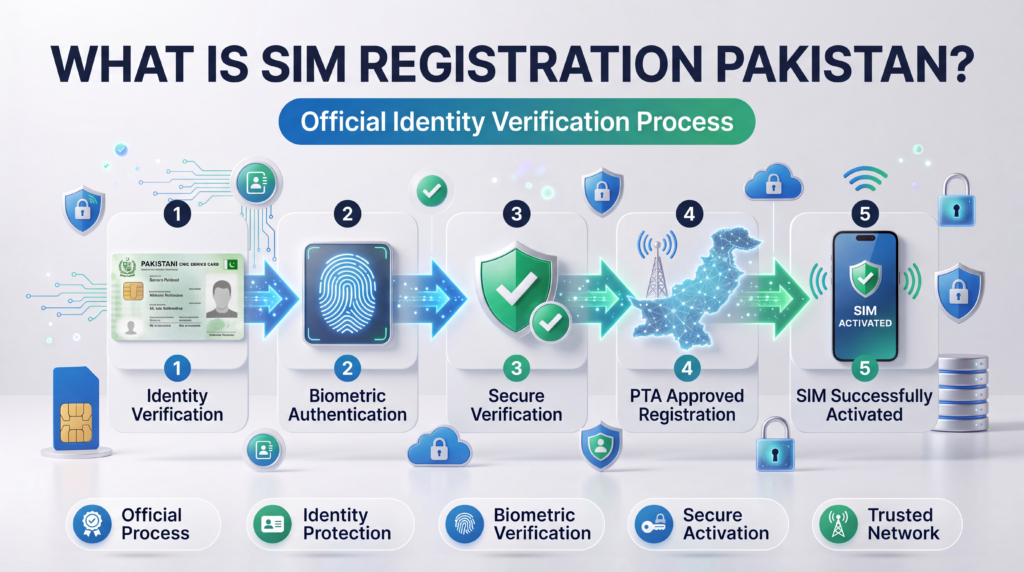
SIM Registration Pakistan is the official process through which a mobile subscriber obtains and activates a SIM card using verified identity information. Before a newly purchased SIM can become operational, the applicant’s identity must be confirmed through prescribed verification procedures. This registration process helps ensure that every active mobile connection is linked to its genuine user.
The registration system is an important part of Pakistan’s telecommunications framework because mobile numbers are widely used for communication, financial transactions, government services, emergency contact, online authentication, and business operations. Linking each SIM card with a verified individual improves accountability while supporting a more secure digital ecosystem.
Unlike earlier years when identity verification procedures were less advanced, modern SIM registration relies heavily on biometric verification. During registration, the applicant’s biometric information is matched with official identity records to confirm ownership before activation can proceed. This additional verification layer significantly reduces the possibility of fraudulent registrations using another person’s identity.
It is important to understand that purchasing a SIM card does not automatically activate the connection. Registration must be completed according to the procedures established by the relevant authorities and the licensed mobile network operator. Only after successful verification can the SIM become eligible for activation.
Every licensed telecom operator in Pakistan follows the same regulatory framework while providing its own customer service channels and franchise network. Although small operational differences may exist between operators, the core registration principles remain consistent across the industry.
Proper SIM registration benefits both consumers and service providers by improving identity verification, reducing fraudulent activities, strengthening national telecommunications security, and increasing trust in mobile services.
Why SIM Registration is Important
Many users think SIM registration is simply a legal requirement, but its importance extends far beyond regulatory compliance. A properly registered SIM card plays a significant role in protecting both individuals and the wider telecommunications ecosystem.
1. Protects Your Digital Identity
Mobile numbers are now connected with many digital services, including banking applications, online shopping accounts, email verification, and two-factor authentication. Registering your SIM correctly helps ensure that these services remain linked to your own verified identity.
2. Reduces Identity Misuse
Identity misuse can occur when mobile numbers are activated using incorrect or unauthorised information. Official registration procedures help reduce this risk by requiring identity verification before activation.
3. Improves Public Safety
Accurate subscriber records support lawful investigations conducted under applicable legal procedures and contribute to a more secure telecommunications environment.
4. Protects Your Mobile Number
A correctly registered SIM gives you greater control over your mobile connection. If your phone or SIM card is lost, the registered ownership information can help you work with your operator to replace the SIM and restore service.
5. Supports Secure Financial Services
Many digital payment platforms, banking applications, and financial services rely on mobile numbers for account verification and one-time passwords (OTPs). Proper SIM registration helps maintain the integrity of these authentication processes.
6. Reduces Telecom Fraud
Fraudulent activities often rely on anonymous or improperly registered mobile connections. Identity verification requirements make it more difficult for unauthorised users to activate SIM cards under false identities.
7. Enhances Customer Support
When your SIM is officially registered under your own identity, telecom operators can more efficiently assist with services such as SIM replacement, number recovery, package management, and account verification.
Key Benefits of Proper SIM Registration
- Ensures compliance with applicable telecom regulations.
- Strengthens protection of your mobile identity.
- Supports secure online authentication.
- Helps prevent identity misuse.
- Improves access to customer support services.
- Reduces the risk of fraudulent SIM usage.
- Enables smoother SIM replacement if your connection is lost or damaged.
- Contributes to a safer telecommunications environment.
What You’ll Learn in the Next Part
In Part 2, we’ll cover:
- Understanding the PTA SIM Registration System
- How Biometric Verification Works
- Documents Required for SIM Registration
- Who Can Register a SIM in Pakistan
- Eligibility Requirements
- Common Reasons Registration Requests Are Delayed or Rejected
Understanding the PTA SIM Registration System
The mobile telecommunications sector in Pakistan operates within a structured regulatory framework that aims to provide secure, reliable, and accountable communication services. One of the key components of this framework is the SIM registration system, which ensures that every active mobile connection is associated with a verified subscriber.
The Pakistan Telecommunication Authority (PTA) is responsible for regulating telecom services in the country. As part of its regulatory responsibilities, PTA establishes policies and standards that licensed mobile network operators must follow when issuing and activating SIM cards.
The objective of this system is not only to maintain accurate subscriber records but also to promote responsible mobile usage, strengthen digital security, and support a safer telecommunications environment.
It is important to understand that PTA does not directly sell or register SIM cards for consumers. Instead, registration is carried out through licensed telecom operators, while PTA provides the regulatory framework that governs the entire process.
Every authorised mobile operator—including Jazz, Zong, Telenor Pakistan, and Ufone—must follow these regulatory requirements before activating a customer’s SIM card.
How the SIM Registration System Works
Although each telecom company has its own customer service procedures, the overall registration workflow is broadly similar across all licensed operators.
A simplified registration process generally follows these stages:
Step 1 – Purchase a SIM Card
The customer visits an authorised franchise, customer service centre, or approved retailer to obtain a new SIM card.
Step 2 – Identity Verification
The customer presents the required identification documents, usually a valid Computerised National Identity Card (CNIC) or another officially accepted document where applicable.
Step 3 – Biometric Authentication
The applicant completes biometric verification using a fingerprint scanner available at the authorised registration point.
Step 4 – Verification Process
The biometric information is verified through the authorised identity verification process before approval.
Step 5 – SIM Activation
Once verification is successfully completed and all regulatory requirements have been met, the telecom operator proceeds with SIM activation.
Why PTA Requires SIM Registration
SIM registration serves several important purposes within Pakistan’s telecommunications ecosystem.
1. Subscriber Identification
Every active SIM card should belong to a verified subscriber. This improves accountability while helping maintain accurate subscriber records.
2. Protection Against Identity Misuse
Identity verification helps reduce the possibility of SIM cards being activated using another person’s personal information without authorisation.
3. Secure Digital Services
Many digital services rely on mobile numbers for verification, including:
- Internet banking
- Mobile wallets
- Government portals
- Online shopping
- Social media authentication
- Two-factor authentication (2FA)
Accurate subscriber registration helps strengthen the reliability of these services.
4. Improved Customer Protection
Proper registration enables mobile operators to provide services such as:
- SIM replacement
- Ownership verification
- Account recovery
- Number restoration
- Customer support
5. Regulatory Compliance
Licensed telecom operators are required to follow national telecommunications regulations regarding subscriber registration before activating a SIM card.
Understanding Biometric Verification
One of the most important parts of SIM Registration Pakistan is biometric verification.
Biometric verification confirms that the individual requesting the SIM is the legitimate owner of the identity documents presented during registration.
Instead of relying solely on paper documents, the system verifies the applicant using fingerprint authentication.
This additional verification layer significantly improves the reliability of subscriber registration while helping prevent unauthorised SIM activation.
Why Fingerprint Verification is Used
Fingerprints are unique to each individual, making biometric verification one of the most effective methods of confirming identity.
Compared with traditional document-only verification, biometric authentication provides several advantages:
- Higher accuracy
- Stronger identity protection
- Reduced fraud risk
- Improved registration integrity
- Faster verification process
- Better customer confidence
When Biometric Verification is Required
Biometric verification is commonly required in situations such as:
- Purchasing a new SIM card
- Registering an additional SIM
- Replacing a lost or damaged SIM
- Changing SIM ownership (where applicable)
- Completing certain customer verification procedures
Specific requirements may vary depending on the telecom operator and applicable regulations.
What Happens During Biometric Verification?
Although the exact procedure may differ slightly between operators, the general process is straightforward.
A customer visiting an authorised registration centre is typically asked to:
- Present a valid CNIC.
- Provide the required registration information.
- Place a finger on the biometric scanner.
- Wait while the identity verification is completed.
- Receive confirmation if the verification is successful.
If all requirements are met, the registration process can continue.
Common Reasons Biometric Verification May Fail
Occasionally, biometric verification may not succeed on the first attempt.
Some possible reasons include:
Poor Finger Placement
Incorrect finger positioning can prevent the scanner from capturing a clear fingerprint.
Dirty Scanner Surface
Dust, moisture, or residue on the scanner may affect image quality.
Dry or Damaged Skin
Very dry skin, cuts, or worn fingerprints may reduce scanning accuracy.
Temporary Technical Issues
Network interruptions or equipment problems can delay verification.
Identity Record Mismatch
If the biometric information does not match the official identity records, verification may not be completed successfully.
Tips for Successful Biometric Verification
To improve the likelihood of a successful verification:
- Ensure your hands are clean.
- Remove excessive moisture before scanning.
- Follow the operator’s instructions carefully.
- Apply gentle pressure to the scanner.
- Allow multiple attempts if requested.
- Visit an authorised franchise or customer service centre.
Documents Required for SIM Registration
Before beginning the registration process, applicants should ensure they have the necessary documentation.
The exact requirements may vary depending on individual circumstances, but the most commonly requested documents include:
Valid CNIC
A valid Computerised National Identity Card is generally required for Pakistani citizens.
Original Identification
Authorised registration centres typically require the original identity document rather than photocopies.
Existing Mobile Number (If Applicable)
Customers replacing an existing SIM or requesting specific account-related services may be asked to provide their current mobile number.
Additional Supporting Information
Depending on the service requested, the telecom operator may ask for further information to complete verification.
Who Can Register a SIM in Pakistan?
SIM registration is generally available to individuals who meet the eligibility requirements established by licensed telecom operators and applicable regulations.
Applicants are usually expected to:
- Present valid identification.
- Complete biometric verification.
- Visit an authorised registration location.
- Meet any operator-specific requirements.
Registration policies may differ for special categories of users, such as overseas Pakistanis or foreign nationals. In such cases, applicants should consult their chosen mobile operator for the latest guidance.
Eligibility Checklist
Before visiting a registration centre, confirm that you:
- Have a valid original CNIC or other accepted identification.
- Can complete biometric verification.
- Are visiting an authorised franchise or customer service centre.
- Have all required information available.
- Meet the operator’s registration requirements.
Common Reasons SIM Registration May Be Delayed
Although many registrations are completed quickly, delays can occur in certain situations.
Some common reasons include:
- Missing documentation
- Biometric verification issues
- Temporary network interruptions
- Incorrect customer information
- Technical system maintenance
- Operator verification requirements
Ensuring that all required documents are available before visiting a registration centre can help minimise delays.
Expert Advice
Before purchasing a new SIM card, always verify that the seller is an authorised franchise or retailer. Avoid buying pre-activated SIM cards or allowing anyone else to complete biometric verification on your behalf. Registering your SIM using official procedures helps protect your identity and ensures your mobile connection remains compliant with applicable regulations.
How to Register a New SIM in Pakistan
Registering a new SIM card in Pakistan is a straightforward process when you follow the official procedure established by licensed mobile network operators. Every new connection must be activated through identity verification and biometric authentication before it can be used for calls, text messages, or mobile internet services.
To avoid unnecessary delays, always visit an authorised franchise or customer service centre of your preferred mobile operator. Purchasing a SIM card from unofficial sources or individuals can expose you to unnecessary risks and may result in registration problems.
Following the correct registration process ensures that your mobile number is securely linked to your identity and complies with applicable telecom regulations.
Step 1: Choose a Mobile Network Operator
Pakistan has four major mobile network operators that provide prepaid and postpaid SIM services:
- Jazz
- Zong
- Telenor Pakistan
- Ufone
Before selecting a network, consider factors such as network coverage in your area, call packages, internet bundles, customer support, and service availability. Choosing a provider that best matches your communication needs can improve your overall experience.
Step 2: Visit an Authorised Franchise
After selecting your preferred operator, visit an official franchise, customer service centre, or authorised retailer.
Authorised outlets are equipped with the necessary systems to complete identity verification, biometric authentication, and SIM activation according to regulatory requirements.
Avoid purchasing pre-activated SIM cards or allowing anyone to register a SIM on your behalf.
Step 3: Present Your Original CNIC
You will be asked to provide your original Computerised National Identity Card (CNIC) for identity verification.
The representative will review your information and begin the registration process using the operator’s authorised registration system.
Photocopies alone are generally not sufficient for completing registration. Carry your original identification document whenever possible.
Step 4: Complete Biometric Verification
Once your identity details have been entered into the system, you will be asked to complete biometric verification.
A fingerprint scanner captures your fingerprint, which is then securely verified through the authorised identity verification process.
Biometric verification is one of the most important stages of SIM registration because it confirms that the applicant is the legitimate owner of the identity being used.
Successful verification allows the registration process to continue.
Step 5: Confirm Registration Details
Before the representative submits your registration request, carefully review all of your information.
Check the following details:
- Your full name
- CNIC number
- Mobile operator
- SIM type
- Contact information (if applicable)
Correcting any mistakes before submission can help prevent activation delays later.
Step 6: Receive Your New SIM Card
After successful verification, the authorised representative will issue your SIM card.
Depending on the operator’s procedures, the SIM may be activated immediately or within the standard processing period.
You should keep the SIM packaging safely until the activation process has been completed successfully.
Step 7: Wait for Activation
Activation times can vary depending on operational requirements.
Many registrations are completed within a relatively short period, although processing times may differ between operators and individual cases.
Avoid removing the SIM repeatedly or attempting multiple unnecessary activation requests while the process is still underway.
How to Replace a Lost or Damaged SIM
If your registered SIM card has been lost, stolen, or physically damaged, you can usually request a replacement from your mobile operator.
The replacement process generally involves:
- Visiting an authorised franchise.
- Presenting your original CNIC.
- Completing biometric verification.
- Confirming ownership of the mobile number.
- Receiving a replacement SIM.
Replacing a SIM through official channels helps protect your mobile number from unauthorised access.
Registering an Additional SIM
Many users maintain separate mobile numbers for personal and professional use.
If you wish to register another SIM, the registration process is generally similar to obtaining your first connection.
You will normally be required to:
- Present valid identification.
- Complete biometric verification.
- Meet the applicable registration requirements.
- Comply with any limits established under relevant regulations.
If you are unsure about the number of SIMs already associated with your identity, reviewing your registered connections through official verification methods can help you manage your mobile accounts more effectively.
How Long Does SIM Registration Take?
The time required to complete SIM registration can vary depending on several factors, including operator workload, biometric verification, and system availability.
In many cases, the registration process at the franchise itself takes only a short time. However, activation may take longer depending on operational procedures.
Delays can occasionally occur due to:
- Temporary technical maintenance.
- Network congestion.
- Identity verification issues.
- Incorrect registration information.
- Additional verification requirements.
If your SIM remains inactive for longer than expected, contact your mobile operator through its official customer support channels.
Common SIM Registration Problems
Although most registrations are completed without difficulty, users occasionally experience issues during the process.
Understanding these common problems can help you resolve them more efficiently.
Biometric Verification Failure
One of the most common issues occurs when fingerprint verification cannot be completed successfully.
Possible reasons include:
- Dry or damaged fingerprints.
- Improper finger placement.
- Temporary scanner malfunction.
- Technical verification delays.
If the first attempt is unsuccessful, follow the representative’s instructions and try again.
Incorrect Personal Information
Errors in your personal details may delay registration or require correction before activation.
Always verify your:
- Name
- CNIC number
- Date of birth (where applicable)
- Mobile operator selection
before completing the registration process.
Technical System Delays
Occasionally, operator systems may experience temporary maintenance or network interruptions.
In these situations, your registration request may require additional processing time before activation is completed.
Visiting an Unauthorised Seller
Purchasing SIM cards from unofficial sources increases the risk of registration problems.
Authorised franchises have access to approved registration systems and trained representatives who can complete the process correctly.
Using Expired Identification
Identity documents should be valid and acceptable under the applicable registration requirements.
If your identification cannot be verified, the registration process may not proceed until valid documentation is available.
Tips for a Smooth Registration Experience
Following a few simple precautions can make the registration process faster and more convenient.
- Carry your original CNIC.
- Visit an authorised franchise during working hours.
- Ensure your fingerprint is clean before biometric verification.
- Carefully review all information before submission.
- Keep your SIM packaging until activation is complete.
- Save the customer support number of your mobile operator.
- Never allow another person to complete biometric verification on your behalf.
- Avoid sharing copies of your identification with unauthorised individuals.
Taking these simple steps helps reduce delays while improving the security of your mobile connection.
Why Official Registration Matters
Official SIM registration protects both the subscriber and the telecommunications system.
A properly registered SIM offers several advantages, including improved customer support, easier SIM replacement, stronger identity protection, and better access to digital services that rely on mobile verification.
Using unofficial registration methods or attempting to bypass verification procedures may expose users to unnecessary risks and future complications.
For this reason, every subscriber should complete registration only through authorised telecom operators and follow all official verification requirements before activating a new mobile connection.
Jazz SIM Registration Process
Jazz is one of Pakistan’s largest mobile network operators, offering prepaid and postpaid services across the country. New customers can register a Jazz SIM by visiting an authorised Jazz franchise or customer service centre and completing the required identity and biometric verification process.
The registration process is designed to verify the subscriber’s identity before a new mobile connection is activated.
Steps to Register a Jazz SIM
- Visit an authorised Jazz franchise or customer service centre.
- Select the prepaid or postpaid SIM package that best suits your needs.
- Present your original CNIC for identity verification.
- Complete biometric fingerprint verification.
- Review the registration information entered by the representative.
- Receive your new Jazz SIM.
- Wait for the activation process to be completed.
If you require assistance during registration, Jazz customer support can provide guidance through its official service channels.
Zong SIM Registration Process
Zong provides nationwide mobile communication services, including voice, SMS, and high-speed mobile internet. Registering a Zong SIM follows the same regulatory requirements established for all licensed telecom operators in Pakistan.
Customers should always obtain their SIM cards from authorised Zong franchises or customer service centres.
Steps to Register a Zong SIM
- Visit an authorised Zong outlet.
- Choose the desired prepaid or postpaid package.
- Provide your original CNIC.
- Complete biometric fingerprint verification.
- Verify that all personal information is accurate.
- Receive the SIM card.
- Wait for the activation confirmation.
Keeping your registration information accurate helps minimise future customer service issues.
Telenor Pakistan SIM Registration Process
Telenor Pakistan offers mobile communication services to customers throughout the country. New SIM registration requires identity verification and biometric authentication before activation.
The process is completed at authorised Telenor customer service centres and franchises.
Steps to Register a Telenor SIM
- Visit an authorised Telenor franchise.
- Select the preferred mobile package.
- Present your original CNIC.
- Complete biometric verification.
- Confirm the registration details.
- Collect your SIM card.
- Allow the operator to complete activation.
Customers should avoid purchasing SIM cards from unauthorised sellers, as only approved outlets can complete official registration procedures.
Ufone SIM Registration Process
Ufone also follows Pakistan’s official subscriber verification requirements before activating a new mobile connection.
Customers can register a Ufone SIM through authorised customer service centres and franchise locations across the country.
Steps to Register a Ufone SIM
- Visit an authorised Ufone franchise.
- Choose your preferred SIM package.
- Provide your original CNIC.
- Complete biometric fingerprint verification.
- Verify your registration details.
- Receive the SIM card.
- Wait until activation has been completed.
Following the official registration procedure helps ensure that your mobile connection is correctly associated with your identity.
Comparison of Pakistan’s Mobile Network Operators
| Mobile Operator | SIM Registration | Biometric Verification | Customer Service Centres | Prepaid Available | Postpaid Available |
|---|---|---|---|---|---|
| Jazz | Required | Yes | Yes | Yes | Yes |
| Zong | Required | Yes | Yes | Yes | Yes |
| Telenor Pakistan | Required | Yes | Yes | Yes | Yes |
| Ufone | Required | Yes | Yes | Yes | Yes |
Although each operator offers different service packages and network coverage, the subscriber registration process follows the same regulatory principles established for licensed telecom operators in Pakistan.
How to Check Whether Your SIM Has Been Registered Successfully
After completing the registration process, many users want to confirm that their SIM has been activated correctly.
There are several official ways to verify the registration status of your mobile connection.
Confirm SIM Activation
Once your SIM becomes active, you should be able to:
- Make outgoing calls.
- Receive incoming calls.
- Send SMS messages.
- Access mobile internet services if a data package is active.
If these services are functioning normally, your activation process has likely been completed successfully.
Verify Subscriber Information
It is also a good practice to ensure that the SIM is registered under your own identity.
Maintaining accurate subscriber information helps prevent future ownership disputes and simplifies customer support if you ever need a replacement SIM or account assistance.
Contact Customer Support
If your SIM has not been activated within the expected timeframe, contact your mobile operator through its official customer support channels.
Provide the requested registration details so the representative can review your activation status.
Avoid attempting repeated registrations while your original request is still being processed.
Common Activation Delays
Although many SIM cards are activated promptly, some registrations may require additional processing.
Possible reasons include:
- Temporary technical maintenance.
- Network congestion.
- Additional identity verification.
- Registration information requiring correction.
- Operator system updates.
Most temporary delays are resolved once the verification process has been completed.
Best Practices After Activating Your SIM
After your SIM becomes active, there are several important steps you should take to protect your mobile number and maintain account security.
Save Important Numbers
Store the official customer support number of your mobile operator so you can quickly report any future issues.
Keep Your SIM Packaging
The original SIM packaging may contain useful information, such as the SIM serial number, which can assist with future customer service requests.
Protect Your Personal Information
Avoid sharing sensitive personal information with unknown individuals claiming to offer registration or verification services.
Always use official communication channels provided by your mobile operator.
Monitor Your Mobile Account
Regularly review your account activity and mobile services.
If you notice unexpected behaviour, such as unauthorised package subscriptions or unusual account activity, contact your operator immediately.
Report Lost SIM Cards Promptly
If your phone or SIM card is lost, report it to your mobile operator as soon as possible.
Prompt reporting reduces the risk of unauthorised use and helps protect services linked to your mobile number, including banking and two-factor authentication.
Understanding Subscriber Responsibilities
Registering a SIM card is not only about activating a mobile connection—it also comes with certain responsibilities.
Every subscriber should:
- Use only officially registered SIM cards.
- Keep personal registration information accurate.
- Avoid allowing others to use a SIM registered in their name without understanding the associated responsibilities.
- Report suspicious activity involving their mobile number.
- Follow the applicable terms and conditions of their mobile operator.
Responsible SIM ownership contributes to a safer and more secure telecommunications environment for everyone.
SIM Registration Rules in Pakistan
SIM registration is governed by the regulatory framework established for Pakistan’s telecommunications sector. Every licensed mobile network operator must follow these requirements before activating a new SIM card for a subscriber.
As a customer, understanding these rules can help you complete the registration process correctly while avoiding unnecessary delays or future complications.
Register Every SIM Using Your Own Identity
One of the most important principles of SIM registration is that every mobile connection should be registered using the identity of the person who will actually use the SIM.
Using another person’s CNIC to obtain a mobile connection can create ownership disputes and make it difficult to recover or replace the SIM if it is lost or damaged.
For this reason, always ensure that your SIM is registered under your own identity.
Complete Biometric Verification Yourself
Biometric verification confirms the identity of the subscriber requesting the SIM.
Never ask another individual to complete fingerprint verification on your behalf.
Similarly, never agree to complete biometric verification for a SIM that will be used by someone else.
Completing biometric verification personally helps protect your identity and ensures that your mobile number remains correctly associated with you.
Purchase SIM Cards Only from Authorised Sources
Always obtain SIM cards from authorised franchises, customer service centres, or approved retailers of licensed mobile operators.
Buying SIM cards from unofficial sellers increases the risk of receiving an improperly registered or inactive connection.
Authorised outlets also provide assistance if you experience any issues during registration or activation.
Keep Your Registration Information Accurate
Before leaving the franchise, carefully review all information entered during registration.
Pay special attention to:
- Full name
- CNIC number
- Mobile operator
- Selected package
- Contact information (where applicable)
Correct information reduces the likelihood of activation delays and simplifies future customer support requests.
Protect Your SIM After Activation
Once your SIM has been activated, it becomes an important part of your digital identity.
Many online services rely on your mobile number for verification, including:
- Internet banking
- Digital wallets
- Government portals
- Online shopping accounts
- Social media security
- Two-factor authentication
Protecting your SIM helps protect access to these services as well.
Common Mistakes to Avoid During SIM Registration
Many registration issues occur because customers unknowingly make avoidable mistakes.
Understanding these common errors can save time and reduce the chances of registration problems.
Purchasing SIM Cards from Unauthorised Sellers
Some people purchase SIM cards from roadside vendors or unofficial shops without verifying whether they are authorised.
This may create unnecessary complications if registration has not been completed correctly.
Always use official operator outlets whenever possible.
Forgetting the Original CNIC
Many franchises require the original identity document during registration.
Arriving without the required identification may delay the registration process.
Before leaving home, confirm that you have your original CNIC available.
Ignoring Registration Details
Customers sometimes leave the franchise without checking the information entered during registration.
Even a small typing error may cause inconvenience later.
Always review your details before confirming the registration.
Sharing Personal Documents Carelessly
Your CNIC contains important personal information.
Avoid sharing copies of your identity documents with unknown individuals or unauthorised businesses.
Provide your documents only when required by authorised representatives during legitimate registration procedures.
Delaying SIM Replacement
If your SIM card is lost or stolen, report it immediately.
Waiting too long may increase the possibility of unauthorised access to services connected with your mobile number.
Prompt reporting helps protect your identity and allows your operator to assist with SIM replacement.
SIM Registration and Mobile Security
Registering your SIM correctly is only the first step.
Maintaining good security practices afterwards is equally important.
A registered mobile number often becomes the primary recovery method for email accounts, banking applications, messaging services, and social media platforms.
If someone gains unauthorised access to your SIM, they may also attempt to access these connected accounts.
Following basic security practices significantly reduces this risk.
Enable Additional Account Protection
Whenever possible, enable extra security features on services linked to your mobile number.
These may include:
- Strong account passwords
- Two-factor authentication
- Recovery email addresses
- Login alerts
- Device verification
Using multiple security layers makes your accounts more resistant to unauthorised access.
Never Share Verification Codes
Banks, telecom operators, and online platforms frequently send one-time passwords (OTPs) or verification codes to your registered mobile number.
Never share these codes with anyone, even if they claim to represent customer support.
Legitimate organisations will not ask you to disclose confidential verification codes over the phone or through text messages.
Be Careful with Suspicious Calls
Fraudsters sometimes pretend to be representatives of mobile companies or government organisations.
They may ask for:
- CNIC details
- Verification codes
- Banking information
- Mobile account credentials
If you receive an unexpected call requesting sensitive information, end the conversation and contact your mobile operator using its official customer support number.
Protect Your Smartphone
A secure SIM is most effective when it is paired with a secure mobile device.
Simple measures include:
- Using a strong screen lock
- Keeping your operating system updated
- Installing applications only from trusted sources
- Avoiding unknown links received through SMS or messaging apps
- Locking your phone immediately if it is lost
SIM Fraud Prevention Tips
Mobile-related fraud continues to evolve as criminals develop new techniques to deceive users.
Fortunately, many scams can be avoided by following a few practical precautions.
Verify Every Request
If someone contacts you claiming to represent a telecom operator, verify their identity through official customer support before providing any information.
Ignore Unsolicited Offers
Be cautious of messages promising free packages, cash rewards, or account upgrades in exchange for personal information.
Official promotions are normally announced through verified communication channels.
Review Your Registered SIMs Regularly
Periodically checking the mobile numbers associated with your CNIC is a good security practice.
Regular reviews help you identify any unexpected or unauthorised connections that may require further investigation.
Keep Contact Information Updated
Ensure that your mobile operator has accurate contact information whenever changes are required.
Updated records make it easier to recover your account if you lose your phone or need a replacement SIM.
Report Suspicious Activity Immediately
If you notice unusual behaviour involving your mobile account, such as unexpected service interruptions or messages relating to unknown registration requests, contact your operator without delay.
Early reporting can help minimise potential problems and protect your mobile identity.
Frequently Asked Questions
Is SIM registration mandatory in Pakistan?
Yes. New SIM cards are activated only after the required identity and biometric verification procedures have been completed through authorised telecom operators.
Can I register a SIM online?
Registration requirements may vary depending on the operator and applicable regulations. For the latest procedures, customers should follow the guidance provided through official telecom operator channels.
Can someone else register a SIM using my CNIC?
No one should register a SIM using your identity without your knowledge and participation. Biometric verification is intended to confirm the identity of the subscriber requesting the connection.
What should I do if my biometric verification fails?
Speak with the authorised representative at the registration centre. They can guide you through additional attempts or advise you on the next appropriate steps if verification cannot be completed.
What happens if my SIM is lost?
Contact your mobile operator immediately to request suspension of the connection and begin the official SIM replacement process after completing the necessary identity verification.
How can I check the SIMs registered under my CNIC?
You can use the official methods provided by the Pakistan Telecommunication Authority (PTA) to review the mobile connections associated with your identity. We have explained the complete process in our CNIC SIM Check Pakistan (2026) guide.
Conclusion
Registering a SIM card through the official process is an important step in protecting your identity, securing your mobile services, and complying with Pakistan’s telecommunications regulations. By visiting authorised franchises, completing biometric verification yourself, and keeping your registration information accurate, you can reduce the risk of fraud and enjoy uninterrupted access to essential communication and digital services.
As technology continues to evolve, your mobile number will remain a key part of your digital identity. Taking a few extra precautions today—such as safeguarding your SIM, monitoring your registered connections, and using only official registration channels—can help protect your personal information for years to come.
Whether you are purchasing your first SIM, replacing a damaged connection, or verifying your registration details, always rely on official guidance from licensed telecom operators and relevant authorities. A properly registered SIM not only supports a secure mobile experience but also contributes to a safer and more trustworthy telecommunications environment across Pakistan.